This lab will revisit setting up CUE in Baltimore for eventual integration with Unity Connection via VPIM. It will be very similar to CUCME-CUE Lab 8.
Unity Connection Lab 7.1 – Baltimore CUE Tasks
1. Configure the Baltimore CUCME router to interface with CUE, using IP address 10.1.12.3/24.
2. Use extension 1999 as the voicemail pilot.
3, Use 8000 and 8001 for MWI.
4. Create voicemail users and mailboxes via the CUE CLI.
5. Mailboxes should be limited in size to accommodate up to 50 users on a AIM-CUE.
6. Make sure that messages can be forward via either dial by name or by extension.
7. Provision the system for GUI access.
Unity Connection Lab 7.2 – Baltimore CUE Verification
Since the tasks here are almost identical to CUCME-CUE Lab 8, please refer to that previous post for help on answers. Note, the Baltimore dial plan for Arliss Michaels and Cal Ripken is slightly different, refer to Unity Connection-CUCME Scenario Background.
Unity Connection Lab 7.3 – Baltimore CUE Wrap-up
The original intention for this lab was to stage Baltimore and then integrate with Unity Connection via VPIM. However, after some thought, I am not sure this is applicable for the CCIE Voice Lab. During the CCIE Voice Techtorial and Cisco Live 2009, the present suggested that the CCIE Voice lab would not have a DNS server. Based on some initial research for VPIM integration, DNS is a requirement. Therefore, one could infer that VPIM would not be tested in the Voice Lab.
That said, I will spend some time pretesting VPIM integration between Baltimore CUE and Unity Connection. If this testing consumes too much time and integration with DNS, I may abort and move on to some other items.
Showing posts with label Connection-CUCME Labs. Show all posts
Showing posts with label Connection-CUCME Labs. Show all posts
Monday, August 31, 2009

Thursday, August 20, 2009
Unity Connection-CUCME Lab 6 – Unity Connection & Los Angeles CUCME Integration
Unity Connection-CUCME Lab 6 is basically a duplication of Unity Connection-CUCME Lab 4 – Unity Connection & CUCME New York Integration. However, due to the limited number of ports in the Unity Connection demo license, we need to make some modifications to what was done in Unity Connection-CUCME Lab 5 – Unity Connection & CUCME Baltimore Integration.
Lab 6.1 – Unity Connection & Los Angeles CUCME Integration Tasks
1. Remove all voicemail configuration parameters in the Baltimore CUCME router.
2. Remove all telephony integration settings for Baltimore in Unity Connection, including the users.
3. Configure the Los Angeles CUCME router to interface with Unity Connection via a SIP Trunk.
4. Use extension 2999 as the voicemail pilot.
5. Create voicemail users and mailboxes for LA users for testing purposes. However, make the users E.164 their primary voicemail box number and their 4-digit extension
6. Use PIN 135246 for each user and ensure that it never expires.
7. Users should be forced to enroll the first time they access Unity Connection.
8. Ensure that users receive their proper greeting when they dial from their Cisco IP Phone.
Lab 6.2 – Unity Connection & Los Angeles CUCME Integration Verification
1. The first two tasks involve removing the integration between Unity Connection and Baltimore. On Unity Connection, first remove the users (Arliss Michaels & Cal Ripken), then the phone system, port group, and ports.
On the Baltimore CUCME router, the commands to remove the configuration for Unity Connection is as follows:
baltimore(config)#no dial-peer voice 2999 voip
baltimore(config)#telephony-service
baltimore(config-telephony)#no voicemail 2999
baltimore(config-telephony)#ephone-dn 1
baltimore(config-ephone-dn)#no call-forward busy 2999
baltimore(config-ephone-dn)#no call-forward noan 2999 timeout 4
baltimore(config-ephone-dn)#ephone-dn 2
baltimore(config-ephone-dn)#no call-forward busy 2999
baltimore(config-ephone-dn)#no call-forward noan 2999 timeout 4
baltimore(config-ephone-dn)#no ephone-dn 5 dual-line
baltimore(config)#no ephone-dn 6
baltimore(config)#no ephone 3
2. Configuring the Los Angeles CUCME router is nearly identical to the configuration parameters added in Lab 4. To review, refer to Unity Connection-CUCME Lab 4.
3. Because the lab instructions states to configure the user extension using their E.164 address, we have to make some tweaks. First, a screen shot of Jerry Maquire’s Basic User information. Note that Jerry is associated with the LA-CUCME phone system

Next, we need to define Jerry Maquire’s four-digit extension as an alternate extension.
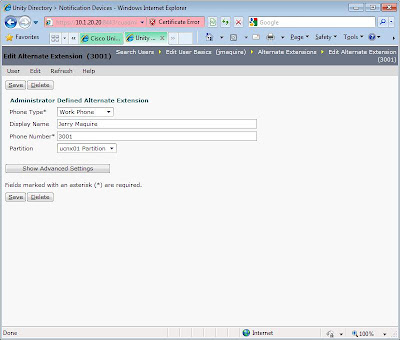

4. Simple enough, right? Jerry and Kobe should be able access Unity Connection. Unfortunately, this was not the case.
I first tested the phone system integrations after adding LA, and Unity Connection indicated everything was functional. However, when I pushed the voicemail key on the phone, I received a busy response. Dialing 2999 directly also returned the same result.
I then proceeded to walk through various troubleshooting procedures, such as placing calls across the “WAN” to other location, ping tests, and various debug voice commands; everything was telling me calls and IP routing was functioning correctly.
Stumped, I begin exploring additional debugs one by one. Debug ccsip revealed the problem, buried in lines of output. I added the LA CUCME router to Unity Connection using the voice vlan subnet IP address 10.1.32.1. As I combed through the debug output, a 172.16.1.5 address caught my attention. It appears that Unity Connection was sending response to the LAN WAN link IP, which is the last hop IP leaving LA to NY. Changing the Server address in Unity Connection for LA from 10.1.32.1 to 172.16.1.5 corrected the problem.
Lab 6.3 – Unity Connection & Los Angeles CUCME Integration Wrap-up
Lab 6.1 – Unity Connection & Los Angeles CUCME Integration Tasks
1. Remove all voicemail configuration parameters in the Baltimore CUCME router.
2. Remove all telephony integration settings for Baltimore in Unity Connection, including the users.
3. Configure the Los Angeles CUCME router to interface with Unity Connection via a SIP Trunk.
4. Use extension 2999 as the voicemail pilot.
5. Create voicemail users and mailboxes for LA users for testing purposes. However, make the users E.164 their primary voicemail box number and their 4-digit extension
6. Use PIN 135246 for each user and ensure that it never expires.
7. Users should be forced to enroll the first time they access Unity Connection.
8. Ensure that users receive their proper greeting when they dial from their Cisco IP Phone.
Lab 6.2 – Unity Connection & Los Angeles CUCME Integration Verification
1. The first two tasks involve removing the integration between Unity Connection and Baltimore. On Unity Connection, first remove the users (Arliss Michaels & Cal Ripken), then the phone system, port group, and ports.
On the Baltimore CUCME router, the commands to remove the configuration for Unity Connection is as follows:
baltimore(config)#no dial-peer voice 2999 voip
baltimore(config)#telephony-service
baltimore(config-telephony)#no voicemail 2999
baltimore(config-telephony)#ephone-dn 1
baltimore(config-ephone-dn)#no call-forward busy 2999
baltimore(config-ephone-dn)#no call-forward noan 2999 timeout 4
baltimore(config-ephone-dn)#ephone-dn 2
baltimore(config-ephone-dn)#no call-forward busy 2999
baltimore(config-ephone-dn)#no call-forward noan 2999 timeout 4
baltimore(config-ephone-dn)#no ephone-dn 5 dual-line
baltimore(config)#no ephone-dn 6
baltimore(config)#no ephone 3
2. Configuring the Los Angeles CUCME router is nearly identical to the configuration parameters added in Lab 4. To review, refer to Unity Connection-CUCME Lab 4.
3. Because the lab instructions states to configure the user extension using their E.164 address, we have to make some tweaks. First, a screen shot of Jerry Maquire’s Basic User information. Note that Jerry is associated with the LA-CUCME phone system

Next, we need to define Jerry Maquire’s four-digit extension as an alternate extension.

Finally, we need to uncheck the “Inherit User’s Extension” and add Jerry’s four-digit extension under his MWI settings. Repeat the above for Kobe Bryant.

4. Simple enough, right? Jerry and Kobe should be able access Unity Connection. Unfortunately, this was not the case.
I first tested the phone system integrations after adding LA, and Unity Connection indicated everything was functional. However, when I pushed the voicemail key on the phone, I received a busy response. Dialing 2999 directly also returned the same result.
I then proceeded to walk through various troubleshooting procedures, such as placing calls across the “WAN” to other location, ping tests, and various debug voice commands; everything was telling me calls and IP routing was functioning correctly.
Stumped, I begin exploring additional debugs one by one. Debug ccsip revealed the problem, buried in lines of output. I added the LA CUCME router to Unity Connection using the voice vlan subnet IP address 10.1.32.1. As I combed through the debug output, a 172.16.1.5 address caught my attention. It appears that Unity Connection was sending response to the LAN WAN link IP, which is the last hop IP leaving LA to NY. Changing the Server address in Unity Connection for LA from 10.1.32.1 to 172.16.1.5 corrected the problem.
Lab 6.3 – Unity Connection & Los Angeles CUCME Integration Wrap-up
Interestingly, my configuration in Lab 4 did not produce this problem because I added the NY CUCME router to Unity Connection using its 10.1.20.1 address, which is on the same subnet as Unity Connection. Another valuable lesson is using a different, easily recognizable IP Addressing scheme for the WAN (172.16.1.x), rather than borrowing a subnet from the same 10-space used for the VLANS. I wonder how easily I would have spotted Unity Connection seeking LA’s WAN interface I had chosen a 10 address space for the WAN.
Tuesday, August 11, 2009
Unity Connection-CUCME Lab 5 – Unity Connection & CUCME Baltimore Integration
Now that the New York CUCME has been integrated with Unity Connection, we will now provision basic voice mail connectivity for the CUCME users in Baltimore.
Lab 5.1 – Unity Connection & Baltimore CUCME Integration Tasks
1. Configure the Baltimore CUCME router to interface with Unity Connection via SCCP.
2. Use extension 2999 as the voicemail pilot.
3. Create voicemail users and mailboxes for Baltimore users for testing purposes.
4. Use PIN 135246 for each user and ensure that it never expires.
5. Users should be forced to enroll the first time they access Unity Connection.
6. Ensure that users receive their proper greeting when they dial from their Cisco IP Phone.
Lab 5.2 – Unity Connection & Baltimore CUCME Integration Verification
1. The first step for this lab is to configure the Baltimore CUCME router to integrate with Unity Connection. The first document to review is the Cisco Unified Communications Manager Express SCCP Integration Guide for Cisco Unity Connection Release 7.x, specifically the section “Programming a Cisco Unified Communications Manager Express Router to Integrate with Cisco Unity Connection (Without a Connection Cluster)”.
Note, this document does not call out the need for a VOIP dial-peer, which of course is necessary in order for Baltimore to connect with Unity Connection in New York. Also, pay attention to both how the actual ephone integration works, as well as MWI; both are different than CUE.
The appropriate sections of the configuration are below.
baltimore#sh run
!
!
dial-peer voice 2999 voip
description VOIP peer to Unity Connection
destination-pattern 2999
session target ipv4:10.1.20.20
codec g711ulaw
no vad
!
!
telephony-service
voicemail 2999
!
!
ephone-dn 1 dual-line
number 1001
label Arliss Michaels 1001
description 410-555-1001
name Arliss Michaels
call-forward busy 2999
call-forward noan 2999 timeout 4
!
!
ephone-dn 2 dual-line
number 1002
label Cal Ripken 1002
description 410-555-1002
name Cal Ripken
call-forward busy 2999
call-forward noan 2999 timeout 4
!
!
!
!
ephone-dn 5 dual-line
number 2999
description CUC1-VI1
name Unity Conneciton
huntstop channel
!
!
ephone-dn 6
number 8000 secondary 8001
mwi on-off
!
!
!
ephone 3
device-security-mode none
vm-device-id CUC1-VI1
button 1:5
!
2. The Unity Connection Integration is clearly documented in the “Creating a New Integration with Cisco Unified Communications Manager Express” section of the Cisco Unified Communications Manager Express SCCP Integration Guide for Cisco Unity Connection Release 7.x guide.
3. Add Arliss Michaels and Cal Ripken in much the same fashion as you did for Lab 4. Then, set up each user’s voicemail box and leave some test messages. Also, try forward messages to users in New York, and vice versa.
Lab 5.3 – Unity Connection & Baltimore CUCME Wrap-up
Since the Unity Connection Demo License only has two ports, we are somewhat constrained on integrating Los Angeles. I’ve played with some possible work-arounds, where users in Los Angeles were able to access Unity Connection. However, I was unable to get MWI to function properly. Therefore, the next couple of labs will involve removing the Baltimore CUCME Integration, adding Los Angeles, reconfiguring CUE in Baltimore, and then attempt to integrate CUE with Unity Connection.
Lab 5.1 – Unity Connection & Baltimore CUCME Integration Tasks
1. Configure the Baltimore CUCME router to interface with Unity Connection via SCCP.
2. Use extension 2999 as the voicemail pilot.
3. Create voicemail users and mailboxes for Baltimore users for testing purposes.
4. Use PIN 135246 for each user and ensure that it never expires.
5. Users should be forced to enroll the first time they access Unity Connection.
6. Ensure that users receive their proper greeting when they dial from their Cisco IP Phone.
Lab 5.2 – Unity Connection & Baltimore CUCME Integration Verification
1. The first step for this lab is to configure the Baltimore CUCME router to integrate with Unity Connection. The first document to review is the Cisco Unified Communications Manager Express SCCP Integration Guide for Cisco Unity Connection Release 7.x, specifically the section “Programming a Cisco Unified Communications Manager Express Router to Integrate with Cisco Unity Connection (Without a Connection Cluster)”.
Note, this document does not call out the need for a VOIP dial-peer, which of course is necessary in order for Baltimore to connect with Unity Connection in New York. Also, pay attention to both how the actual ephone integration works, as well as MWI; both are different than CUE.
The appropriate sections of the configuration are below.
baltimore#sh run
!
!
dial-peer voice 2999 voip
description VOIP peer to Unity Connection
destination-pattern 2999
session target ipv4:10.1.20.20
codec g711ulaw
no vad
!
!
telephony-service
voicemail 2999
!
!
ephone-dn 1 dual-line
number 1001
label Arliss Michaels 1001
description 410-555-1001
name Arliss Michaels
call-forward busy 2999
call-forward noan 2999 timeout 4
!
!
ephone-dn 2 dual-line
number 1002
label Cal Ripken 1002
description 410-555-1002
name Cal Ripken
call-forward busy 2999
call-forward noan 2999 timeout 4
!
!
!
!
ephone-dn 5 dual-line
number 2999
description CUC1-VI1
name Unity Conneciton
huntstop channel
!
!
ephone-dn 6
number 8000 secondary 8001
mwi on-off
!
!
!
ephone 3
device-security-mode none
vm-device-id CUC1-VI1
button 1:5
!
2. The Unity Connection Integration is clearly documented in the “Creating a New Integration with Cisco Unified Communications Manager Express” section of the Cisco Unified Communications Manager Express SCCP Integration Guide for Cisco Unity Connection Release 7.x guide.
3. Add Arliss Michaels and Cal Ripken in much the same fashion as you did for Lab 4. Then, set up each user’s voicemail box and leave some test messages. Also, try forward messages to users in New York, and vice versa.
Lab 5.3 – Unity Connection & Baltimore CUCME Wrap-up
Since the Unity Connection Demo License only has two ports, we are somewhat constrained on integrating Los Angeles. I’ve played with some possible work-arounds, where users in Los Angeles were able to access Unity Connection. However, I was unable to get MWI to function properly. Therefore, the next couple of labs will involve removing the Baltimore CUCME Integration, adding Los Angeles, reconfiguring CUE in Baltimore, and then attempt to integrate CUE with Unity Connection.
Tuesday, July 28, 2009
Unity Connection-CUCME Lab 4 – Unity Connection & CUCME New York Integration
With the basic CUCME setup completed in Lab 2 and an initial installation of Unity Connection in Lab 3, we will now provision basic voice mail connectivity for the CUCME users in New York.
Lab 4.1 – Unity Connection & New York CUCME Integration Tasks
1. Configure the New York CUCME router to interface with Unity Connection via a SIP Trunk.
2. Use extension 2999 as the voicemail pilot.
3. Create voicemail users and mailboxes for NYC users for testing purposes.
4. Use PIN 135246 for each user and ensure that it never expires.
5. Users should be forced to enroll the first time they access Unity Connection.
6. Ensure that users receive their proper greeting when they dial from their Cisco IP Phone.
Lab 4.2 – Unity Connection & New York CUCME Integration Verification
Seemingly simple, this lab presented me with a challenging troubleshooting curve ball.
1. To configure the SIP Trunk from the NYC CUCME Router to Unity Connection, refer to the Cisco Unified Communications Manager Express SIP Trunk Integration Guide for Cisco Unity Connection Release 7.x. I suggest reading this entire document prior to beginning this lab.
For the CUCME CLI configuration, follow the instructions provided in the section “Programming the Cisco Unified Communications Manager Express Phone System for Integrating with Cisco Unity Connection”. The truncated output is as follows:
newyork#sh run
!
voice service voip
no supplementary-service sip moved-temporarily
!
!
!
dial-peer voice 2001 voip
description ucnx01
max-conn 2
destination-pattern 2999
session protocol sipv2
session target ipv4:10.1.20.20
dtmf-relay rtp-nte
codec g711ulaw
no vad
!
2. The next step, although not articulated in the Cisco Unified Communications Manager Express SIP Trunk Integration Guide for Cisco Unity Connection Release 7.x document, is to provision the CUCME SIP phones for voicemail. The process is very similar to the CUCME-CUE Lab 9 – New York City Messaging lab. Below are the truncated commands.
!
voice register global
mwi stutter
mwi reg-e164
!
!
!
voice register dn 1
number 2001
call-forward b2bua busy 2999
call-forward b2bua mailbox 2999
call-forward b2bua noan 2999 timeout 20
name Ari Gold
label Ari Gold 2001
mwi
!
voice register dn 2
number 2002
call-forward b2bua busy 2999
call-forward b2bua mailbox 2999
call-forward b2bua noan 2999 timeout 20
name David Wright
label David Wright 2002
mwi
!
voice register dn 3
number 2003
call-forward b2bua busy 2999
call-forward b2bua mailbox 2999
call-forward b2bua noan 2999 timeout 20
name Eli Manning
label Eli Manning 2003
mwi
!
3. I then return to the Cisco Unified Communications Manager Express SIP Trunk Integration Guide for Cisco Unity Connection Release 7.x document, following the step to configure Unity Connection as discussed in Creating a New Integration with Cisco Unified Communications Manager Express. The integration on Unity Connection is fairly straight forward, so I will not rehash the steps, which are pretty clear in the document and links referenced above.
4. Finally, I add the voicemail user profiles for Arliss Michaels, David Wright, and Eli Manning as described in the Testing the Integration section of the Cisco Unified Communications Manager Express SIP Trunk Integration Guide for Cisco Unity Connection Release 7.x guide. Here I will point out a few modifications. First, for the ease of lab management, I disable the complex password requirements for users under System Settings > Authentication Rules > Recommended Voice Mail Authentication Rule by un-checking the “Check for Trivial Passwords” box.

Lab 4.1 – Unity Connection & New York CUCME Integration Tasks
1. Configure the New York CUCME router to interface with Unity Connection via a SIP Trunk.
2. Use extension 2999 as the voicemail pilot.
3. Create voicemail users and mailboxes for NYC users for testing purposes.
4. Use PIN 135246 for each user and ensure that it never expires.
5. Users should be forced to enroll the first time they access Unity Connection.
6. Ensure that users receive their proper greeting when they dial from their Cisco IP Phone.
Lab 4.2 – Unity Connection & New York CUCME Integration Verification
Seemingly simple, this lab presented me with a challenging troubleshooting curve ball.
1. To configure the SIP Trunk from the NYC CUCME Router to Unity Connection, refer to the Cisco Unified Communications Manager Express SIP Trunk Integration Guide for Cisco Unity Connection Release 7.x. I suggest reading this entire document prior to beginning this lab.
For the CUCME CLI configuration, follow the instructions provided in the section “Programming the Cisco Unified Communications Manager Express Phone System for Integrating with Cisco Unity Connection”. The truncated output is as follows:
newyork#sh run
!
voice service voip
no supplementary-service sip moved-temporarily
!
!
!
dial-peer voice 2001 voip
description ucnx01
max-conn 2
destination-pattern 2999
session protocol sipv2
session target ipv4:10.1.20.20
dtmf-relay rtp-nte
codec g711ulaw
no vad
!
2. The next step, although not articulated in the Cisco Unified Communications Manager Express SIP Trunk Integration Guide for Cisco Unity Connection Release 7.x document, is to provision the CUCME SIP phones for voicemail. The process is very similar to the CUCME-CUE Lab 9 – New York City Messaging lab. Below are the truncated commands.
!
voice register global
mwi stutter
mwi reg-e164
!
!
!
voice register dn 1
number 2001
call-forward b2bua busy 2999
call-forward b2bua mailbox 2999
call-forward b2bua noan 2999 timeout 20
name Ari Gold
label Ari Gold 2001
mwi
!
voice register dn 2
number 2002
call-forward b2bua busy 2999
call-forward b2bua mailbox 2999
call-forward b2bua noan 2999 timeout 20
name David Wright
label David Wright 2002
mwi
!
voice register dn 3
number 2003
call-forward b2bua busy 2999
call-forward b2bua mailbox 2999
call-forward b2bua noan 2999 timeout 20
name Eli Manning
label Eli Manning 2003
mwi
!
3. I then return to the Cisco Unified Communications Manager Express SIP Trunk Integration Guide for Cisco Unity Connection Release 7.x document, following the step to configure Unity Connection as discussed in Creating a New Integration with Cisco Unified Communications Manager Express. The integration on Unity Connection is fairly straight forward, so I will not rehash the steps, which are pretty clear in the document and links referenced above.
4. Finally, I add the voicemail user profiles for Arliss Michaels, David Wright, and Eli Manning as described in the Testing the Integration section of the Cisco Unified Communications Manager Express SIP Trunk Integration Guide for Cisco Unity Connection Release 7.x guide. Here I will point out a few modifications. First, for the ease of lab management, I disable the complex password requirements for users under System Settings > Authentication Rules > Recommended Voice Mail Authentication Rule by un-checking the “Check for Trivial Passwords” box.

For each user I modify their Password Settings by checking the “Does Not Expire” box and supplying a default password of 123456.
5. At this point, I am ready to set up each user’s voicemail TUI. On each phone, I press the voicemail key and walk through the Setup Wizard. I then proceed to leave a view voicemails, but quickly notice that MWI is not functioning. I first reviewed the MWI parameters on Unity Connection in regards to the Cisco Unified Communications Manager Express SIP Trunk Integration Guide for Cisco Unity Connection Release 7.x guide, and everything seems to match. Next, I review my previous CUCME-CUE integration from the CUCME-CUE Lab 9 – New York City Messaging lab and notice that I’ve missed the following commands:
sip-ua
mwi-server ipv4:10.1.20.20 expires 3600 port 5060 transport udp
However, within a few minutes of adding these commands I noticed that my SIP phones were spontaneous rebooting. When logging into the router CLI, I also notice horrific response time. My next step was to refer to the Cisco Unity Connection Integration of the Cisco Unified Communications Manager Express System Administrator Guide. Unfortunately, this document was of little value, since it points to a much older Unity Connection 1.1 integration document.
Next, I run the “sh processes cpu sorted” command and notice the two SIP process have consumed the majority of the CPU cycles.
newyork#sh processes cpu sorted
CPU utilization for five seconds: 98%/6%; one minute: 20%; five minutes: 8%
PID Runtime(ms) Invoked uSecs 5Sec 1Min 5Min TTY Process
327 49040 12373 3963 60.20% 10.58% 2.63% 0 CCSIP_SPI_CONTRO
329 22812 10307 2213 21.92% 3.86% 0.98% 0 CCSIP_UDP_SOCKET
Here’s where some dumb luck saved the day…
I add the “unsolicited” keyword to the mwi-server command above, and vola, issue solved.
sip-ua
mwi-server ipv4:10.1.20.20 expires 3600 port 5060 transport udp unsolicited
We can see almost immediately that the SIP process begins to return to normal. An explanation of the unsolicited option is available here.
newyork#sh processes cpu sorted
CPU utilization for five seconds: 12%/0%; one minute: 41%; five minutes: 19%
PID Runtime(ms) Invoked uSecs 5Sec 1Min 5Min TTY Process
327 73376 15862 4625 4.55% 20.75% 8.98% 0 CCSIP_SPI_CONTRO
329 37644 13965 2695 2.15% 11.87% 4.61% 0 CCSIP_UDP_SOCKET
Lab 4 Unity Connection & New York CUCME Integration Wrap-up
One final note. During my staging and configuration, I could not help but notice that my VM image of Unity Connection was running extremely slow. The Performance tab VMWare Infrastructure Client was informing me that the memory utilization was running constantly near 100%. As a result, I have adjusted the amount of memory allocated from the original 1024MB, as described in Unity Connection-CUCME Lab 3 – Unity Connection Installation on VMware ESX 3.5, to 2048MB.
Wednesday, June 10, 2009
Unity Connection-CUCME Lab 3 – Unity Connection Installation on VMware ESX 3.5
This lab discusses the procedures that I followed to install Unity Connection on a VMware ESX 3.5 Server. A special thanks to Ket Hum, a Federal Channels UC SE with Cisco, for giving me some tidbits.
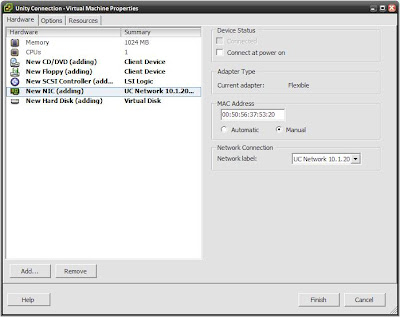
1. My VMware ESX 3.5 server is installed on a DL320-G5 with two 750GB drives and 8GB of memory. My first step was to create separate vSwitch for the 10.1.20.0/24 New York Management VLAN.
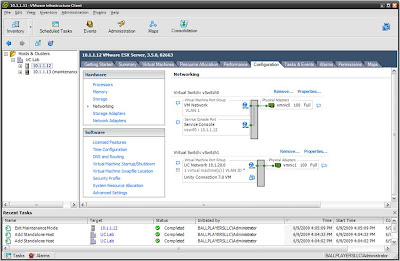
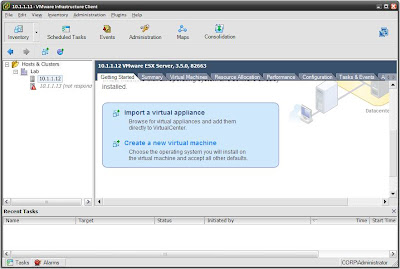 As I walk through the New Virtual Machine Wizard, I select the following:
- Virtual Machine Configuration: Typical
- Guest Operating System: Linux > Red Hat Enterprise Linux 4 (32-bit)
- Memory: set to 1024MB
- Create Network Connection: One NIC on vSwitch1 (UC Network 10.1.20.0)
- Disk Size: 146GB (drive size of a MCS7835)
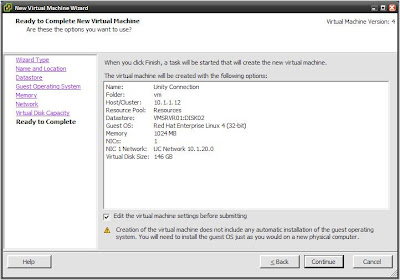
4. At this point, the wizard completes and the VM is created. You then can either boot the VM via an ISO image or DVD copy of Unity Connection. I opted to boot from an ISO copy of the image that I have on the storage of the ESX server; this is far quicker than booting and installing from the DVD.
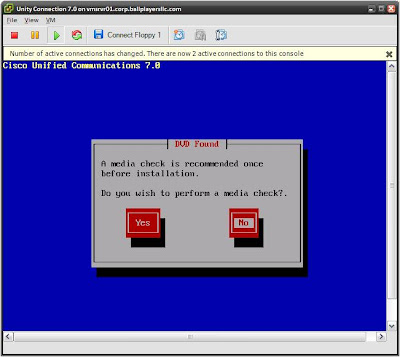
5. At this point, you can proceed with the normal installation process. Installing Unity Connection is fairly easy; the Installation Guide for Cisco Unity Connection Release 7.x provides clear instructions regarding the tasks and process.
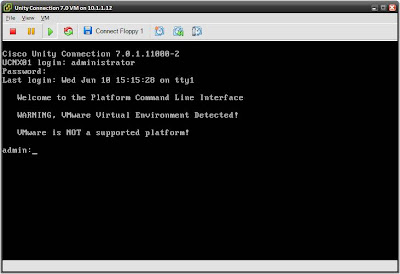
6. Once the installation process completes, login with your administrator username and password. Note, the console will tell you that VMware is not a supported platform.
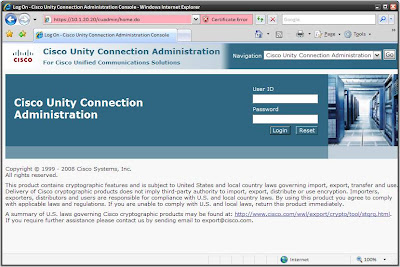
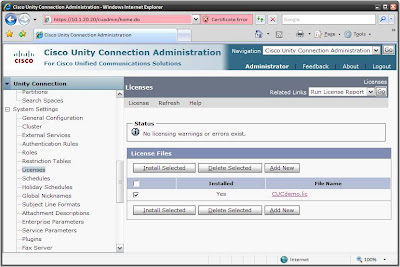
7. The final step of the installation process is to very login via the web interface; in the case of this lab https://10.1.20.20/cuadmin. You can also few the demo license that comes with Unity Connection, which supports 10 mailboxes and 2 ports. Lastly, I used the snapshot feature in ESX. This will make things very easy to roll back to the clean image for later labs and study.
Unity Connection-CUCME Lab 3 Wrap-up
I’ve configured a simple Windows 2003 Domain Controller and Active Directory domain, adding users depicted in diagram from the Unity Connection-CUCME Scenario Background posting. With the installation of Unity Connection complete, we will begin the process of configuring the three Ballplayers, LLC CUCME locations to interface with Unity Connection.
1. My VMware ESX 3.5 server is installed on a DL320-G5 with two 750GB drives and 8GB of memory. My first step was to create separate vSwitch for the 10.1.20.0/24 New York Management VLAN.

2. Next step is to launch the “Create a new virtual machine” wizard.
 As I walk through the New Virtual Machine Wizard, I select the following:
- Virtual Machine Configuration: Typical
- Guest Operating System: Linux > Red Hat Enterprise Linux 4 (32-bit)
- Memory: set to 1024MB
- Create Network Connection: One NIC on vSwitch1 (UC Network 10.1.20.0)
- Disk Size: 146GB (drive size of a MCS7835)

3. This next step is important… Prior to completing the wizard, check the “Edit the virtual machine settings before submitting” option. This allows us to statically assign the MAC address of the VM.

4. At this point, the wizard completes and the VM is created. You then can either boot the VM via an ISO image or DVD copy of Unity Connection. I opted to boot from an ISO copy of the image that I have on the storage of the ESX server; this is far quicker than booting and installing from the DVD.

5. At this point, you can proceed with the normal installation process. Installing Unity Connection is fairly easy; the Installation Guide for Cisco Unity Connection Release 7.x provides clear instructions regarding the tasks and process.
6. Once the installation process completes, login with your administrator username and password. Note, the console will tell you that VMware is not a supported platform.

7. The final step of the installation process is to very login via the web interface; in the case of this lab https://10.1.20.20/cuadmin. You can also few the demo license that comes with Unity Connection, which supports 10 mailboxes and 2 ports. Lastly, I used the snapshot feature in ESX. This will make things very easy to roll back to the clean image for later labs and study.


Unity Connection-CUCME Lab 3 Wrap-up
I’ve configured a simple Windows 2003 Domain Controller and Active Directory domain, adding users depicted in diagram from the Unity Connection-CUCME Scenario Background posting. With the installation of Unity Connection complete, we will begin the process of configuring the three Ballplayers, LLC CUCME locations to interface with Unity Connection.
Thursday, June 4, 2009
Lab 2.2 – Unity Connection-CUCME Setup Verification
The majority of the tasks in Unity Connection Lab 2.1 were covered in the CUCME-CUE labs. Rather than rehash previously covered topics, links are provided below, a discussion of any subtle differences or challenges, and finally the pertinent output from each ISR.
1. Installing and initializing the CUCME files is discussed in CUCME-CUE Lab 2 – Baltimore Basic CUCME System Setup for SCCP and CUCME-CUE Lab 3 – New York Basic CUCME System Setup for SIP. I did encounter a challenge, as previously discussed.
On the Baltimore SCCP router, the phone loads can be placed in a hierarchical file structure on the flash. Then, the alias keyword is used with the associated tftp-server commands.
baltimore#dir flash:/phone/7942-7962
Directory of flash:/phone/7942-7962/
185 -rw- 2918613 May 27 2009 21:59:06 -04:00 apps42.8-4-1-23.sbn
186 -rw- 485066 May 27 2009 21:59:10 -04:00 cnu42.8-4-1-23.sbn
187 -rw- 2659498 May 27 2009 21:59:24 -04:00 cvm42sccp.8-4-1-23.sbn
188 -rw- 335003 May 27 2009 21:59:26 -04:00 dsp42.8-4-1-23.sbn
189 -rw- 628112 May 27 2009 21:59:30 -04:00 jar42sccp.8-4-1-23.sbn
190 -rw- 658 May 27 2009 21:59:32 -04:00 SCCP42.8-4-2S.loads
191 -rw- 662 May 27 2009 21:59:32 -04:00 term42.default.loads
192 -rw- 662 May 27 2009 21:59:32 -04:00 term62.default.loads
260157440 bytes total (190967808 bytes free)
baltimore#
tftp-server flash:phone/7942-7962/apps42.8-4-1-23.sbn alias apps42.8-4-1-23.sbn
tftp-server flash:phone/7942-7962/cnu42.8-4-1-23.sbn alias cnu42.8-4-1-23.sbn
tftp-server flash:phone/7942-7962/cvm42sccp.8-4-1-23.sbn alias cvm42sccp.8-4-1-23.sbn
tftp-server flash:phone/7942-7962/dsp42.8-4-1-23.sbn alias dsp42.8-4-1-23.sbn
tftp-server flash:phone/7942-7962/jar42sccp.8-4-1-23.sbn alias jar42sccp.8-4-1-23.sbn
tftp-server flash:phone/7942-7962/SCCP42.8-4-2S.loads alias SCCP42.8-4-2S.loads
tftp-server flash:phone/7942-7962/term42.default.loads alias term42.default.loads
tftp-server flash:phone/7942-7962/term62.default.loads alias term62.default.loads
However, using the same procedure on the SIP locations, the phones fail to upgrade the phone loads. For Los Angeles and New York, the phone files are instead installed in the root location of the flash.
newyork#dir flash:
Directory of flash:/
1 -rw- 59224644 May 14 2009 22:41:26 -04:00 c2800nm-adventerprisek9_ivs-mz.124-22.YB1.bin
2 drw- 0 May 27 2009 22:39:18 -04:00 gui
21 drw- 0 May 27 2009 22:39:28 -04:00 ringtones
56 -rw- 2918613 May 27 2009 00:11:20 -04:00 apps42.8-4-1-23.sbn
57 -rw- 485066 May 27 2009 00:11:24 -04:00 cnu42.8-4-1-23.sbn
58 -rw- 3047459 May 27 2009 00:11:44 -04:00 cvm42sip.8-4-1-23.sbn
59 -rw- 335003 May 27 2009 00:11:46 -04:00 dsp42.8-4-1-23.sbn
60 -rw- 630128 May 27 2009 00:11:50 -04:00 jar42sip.8-4-1-23.sbn
61 -rw- 656 May 27 2009 00:11:50 -04:00 SIP42.8-4-2S.loads
62 -rw- 660 May 27 2009 00:11:52 -04:00 term42.default.loads
63 -rw- 660 May 27 2009 00:11:52 -04:00 term62.default.loads
64 -rw- 496521 May 27 2009 14:50:40 -04:00 music-on-hold.au
260943872 bytes total (192548864 bytes free)
newyork#
tftp-server flash:apps42.8-4-1-23.sbn
tftp-server flash:cnu42.8-4-1-23.sbn
tftp-server flash:cvm42sip.8-4-1-23.sbn
tftp-server flash:dsp42.8-4-1-23.sbn
tftp-server flash:jar42sip.8-4-1-23.sbn
tftp-server flash:SIP42.8-4-2S.loads
tftp-server flash:term42.default.loads
tftp-server flash:term62.default.loads
2. Refer to CUCME-CUE Lab 2 – Baltimore Basic CUCME System Setup to setting up the SCCP phones for Baltimore.
3. Refer to CUCME-CUE Lab 3 – New York Basic CUCME System Setup to setting up the SCCP phones for New York and Los Angeles.
4. For guidance on setting up the VOIP and POTS dial peers between all three locations, refer to CUCME-CUE Lab 4 – CUCME POTS & VoIP Dial Peers. However, since there is a potential for hairpin call routing, H.450.12 capabilities should be configured.
voice service voip
supplementary-service h450.12
5. CUCME-CUE Lab 7 – CUCME Conferencing & Transcoding will provide guidance on setting up the transcoding and conferencing.
6. Pertinent Baltimore CUCME configuration.
baltimore#sh run
!
card type t1 0 0
!
network-clock-participate wic 0
!
!
isdn switch-type primary-ni
!
!
voice service voip
allow-connections h323 to h323
allow-connections h323 to sip
allow-connections sip to h323
allow-connections sip to sip
supplementary-service h450.12
sip
registrar server expires max 600 min 300
!
!
voice class custom-cptone leavetone
dualtone conference
frequency 900 900
cadence 150 50 150 50
!
voice class custom-cptone jointone
dualtone conference
frequency 1200 1200
cadence 150 50 150 50
!
!
voice translation-rule 1
rule 1 /\(20..\)/ /212555\1/
rule 2 /\(30..\)/ /213555\1/
!
!
voice translation-profile prefix
translate called 1
!
!
voice-card 0
dsp services dspfarm
!
!
controller T1 0/0/0
cablelength short 110
pri-group timeslots 1-4,24
!
!
ip http server
ip http path flash:/gui
!
tftp-server flash:ringtones/Analog1.raw alias Analog1.raw
tftp-server flash:ringtones/AreYouThere.raw alias AreYouThere.raw
!output truncated!
!
voice-port 0/0/0:23
!
!
sccp local GigabitEthernet1/0.12
sccp ccm 10.1.12.1 identifier 1 priority 1 version 7.0
sccp
!
sccp ccm group 1
bind interface GigabitEthernet1/0.12
associate ccm 1 priority 1
associate profile 1 register conference
associate profile 2 register transcode
!
dspfarm profile 2 transcode
codec g711ulaw
codec g711alaw
codec g729ar8
codec g729abr8
codec g729br8
codec g722-64
maximum sessions 3
associate application SCCP
!
dspfarm profile 1 conference
codec g711ulaw
codec g711alaw
codec g729ar8
codec g729abr8
codec g729r8
codec g729br8
codec g722-64
maximum sessions 1
conference-join custom-cptone jointone
conference-leave custom-cptone leavetone
associate application SCCP
!
!
dial-peer voice 2000 voip
description VOIP Peer to New York
preference 1
destination-pattern 20..
session protocol sipv2
session target ipv4:2.2.2.2
dtmf-relay rtp-nte
codec g722-64
no vad
!
dial-peer voice 3000 voip
description VOIP Peer to Los Angeles
preference 1
destination-pattern 30..
session protocol sipv2
session target ipv4:3.3.3.3
dtmf-relay rtp-nte
codec g722-64
no vad
!
dial-peer voice 1 pots
description inbound PRI dial-peer
incoming called-number .
direct-inward-dial
port 0/0/0:23
!
dial-peer voice 2 pots
description outbound via pri
preference 1
destination-pattern 9[2-9].........
port 0/0/0:23
!
dial-peer voice 3 pots
translation-profile outgoing prefix
preference 2
destination-pattern [23]0..
port 0/0/0:23
forward-digits all
!
!
telephony-service
sdspfarm units 5
sdspfarm transcode sessions 3
sdspfarm tag 1 conference
sdspfarm tag 2 transcode
em logout 0:0 0:0 0:0
codec g722-64
max-ephones 42
max-dn 144
ip source-address 10.1.12.1 port 2000
service phone g722CodecSupport 2
service phone handsetWidebandEnable 1
service phone headsetWidebandEnable 0
service phone handsetWidebandUIControl 0
system message Ballplayers, LLC Baltimore
cnf-file location flash:
load 7942 SCCP42.8-4-2S
load 7962 SCCP42.8-4-2S
time-zone 12
dialplan-pattern 1 41055510.. extension-length 4
dialplan-pattern 2 21255520.. extension-length 4
dialplan-pattern 3 21355530.. extension-length 4
max-conferences 8 gain -6
moh music-on-hold.au
multicast moh 239.23.4.10 port 2000
web admin system name Cisco123 password Cisco123
transfer-system full-consult
transfer-pattern 10..
transfer-pattern 20..
transfer-pattern 30..
secondary-dialtone 9
directory entry 1 2001 name Ari Gold
directory entry 2 2002 name David Wright
directory entry 3 2003 name Eli Manning
directory entry 4 3001 name Jerry Maquire
directory entry 5 3002 name Kobe Bryant
create cnf-files version-stamp 7960 May 28 2009 12:02:02
!
!
ephone-template 1
conference drop-mode local
conference admin
softkeys seized Endcall Redial Cfwdall Meetme Pickup Callback
softkeys connected Hold Endcall Park Confrn Trnsfer Select Join ConfList RmLstC Flash
!
!
ephone-dn 1 dual-line
number 1001
label Arliss Michaels 1001
description 410-555-1001
name Arliss Michaels
!
!
ephone-dn 2 dual-line
number 1002
label Cal Ripken 1002
description 410-555-1002
name Cal Ripken
!
!
ephone-dn 3 octo-line
number 1020
name Baltimore AdHoc
conference ad-hoc
!
!
ephone-dn 4 octo-line
number 1021
name Baltimore MeetMe
conference meetme
!
!
ephone 1
device-security-mode none
description Arliss Michaels
mac-address 0024.97AB.1F83
ephone-template 1
username "amichaels" password null
codec g722-64
type 7962
button 1:1
!
!
ephone 2
device-security-mode none
description Cal Ripken
mac-address 0023.331A.EDCC
ephone-template 1
username "cripken" password null
codec g722-64
type 7962
button 1:2
!
7. Pertinent New York CUCME configuration. Los Angeles is nearly identical, except of course for different IP addresses and such.
newyork#sh run
!
card type t1 0 0
!
network-clock-participate wic 0
!
isdn switch-type primary-ni
!
!
voice service voip
allow-connections h323 to h323
allow-connections h323 to sip
allow-connections sip to h323
allow-connections sip to sip
supplementary-service h450.12
sip
registrar server expires max 600 min 300
!
!
voice class custom-cptone leavetone
dualtone conference
frequency 900 900
cadence 150 50 150 50
!
voice class custom-cptone jointone
dualtone conference
frequency 1200 1200
cadence 150 50 150 50
!
!
voice register global
mode cme
source-address 10.1.22.1 port 5060
no privacy
max-dn 144
max-pool 42
load 7962 SIP42.8-4-2S
load 7942 SIP42.8-4-2S
timezone 12
hold-alert
dialplan-pattern 1 41055510.. extension-length 4
dialplan-pattern 2 21255520.. extension-length 4
dialplan-pattern 3 21355530.. extension-length 4
call-forward system redirecting-expanded
url directory http://10.1.22.1:80/localdirectory
file text
create profile sync 0006512451546702
ntp-server 10.1.1.4 mode directedbroadcast
!
voice register dn 1
number 2001
name Ari Gold
label Ari Gold 2001
!
voice register dn 2
number 2002
name David Wright
label David Wright 2002
!
voice register dn 3
number 2003
name Eli Manning
label Eli Manning 2003
!
voice register template 1
softkeys hold Newcall Resume
softkeys idle Redial Newcall Cfwdall Pickup DND
softkeys seized Endcall Redial Cfwdall Pickup
softkeys connected Hold Endcall Park Confrn Trnsfer
softkeys remote-in-use Barge cBarge Newcall
!
voice register pool 1
id mac 0024.97AB.1FB5
type 7962
number 1 dn 1
template 1
dtmf-relay rtp-nte
description 212-555-2001
codec g722-64
no vad
!
voice register pool 2
id mac 0021.D8B9.BC72
type 7962
number 1 dn 2
template 1
dtmf-relay rtp-nte
description 212-555-2002
codec g722-64
no vad
!
voice register pool 3
id mac 0021.D8BA.2373
type 7942
number 1 dn 3
dtmf-relay rtp-nte
description 212-555-2003
codec g722-64
no vad
!
!
voice translation-rule 1
rule 1 /\(10..\)/ /410555\1/
rule 2 /\(30..\)/ /213555\1/
!
!
voice translation-profile prefix
translate called 1
!
!
voice-card 0
dsp services dspfarm
!
!
controller T1 0/0/0
cablelength short 110
pri-group timeslots 1-4,24
!
!
ip http server
ip http path flash:/gui
!
!
tftp-server flash:ringtones/Analog1.raw alias Analog1.raw
tftp-server flash:ringtones/AreYouThere.raw alias AreYouThere.raw
!output truncated!
!
voice-port 0/0/0:23
!
!
sccp local FastEthernet0/0.22
sccp ccm 10.1.22.1 identifier 1 priority 1 version 7.0
sccp
!
sccp ccm group 1
bind interface FastEthernet0/0.22
associate ccm 1 priority 1
associate profile 1 register conference
associate profile 2 register transcode
!
dspfarm profile 2 transcode
codec g711ulaw
codec g711alaw
codec g729ar8
codec g729abr8
codec g729br8
codec g729r8
codec g722-64
maximum sessions 3
associate application SCCP
!
dspfarm profile 1 conference
codec g711ulaw
codec g711alaw
codec g729ar8
codec g729abr8
codec g729r8
codec g729br8
codec g722-64
maximum sessions 1
conference-join custom-cptone jointone
conference-leave custom-cptone leavetone
associate application SCCP
!
!
dial-peer voice 1000 voip
description VOIP Peer to Baltimore
preference 1
destination-pattern 10..
session protocol sipv2
session target ipv4:1.1.1.1
dtmf-relay rtp-nte
codec g722-64
no vad
!
dial-peer voice 3000 voip
description VOIP Peer to Los Angeles
preference 1
destination-pattern 30..
session protocol sipv2
session target ipv4:2.2.2.2
dtmf-relay rtp-nte
codec g722-64
no vad
!
dial-peer voice 1 pots
description inbound PRI dial-peer
incoming called-number .
direct-inward-dial
port 0/0/0:23
!
dial-peer voice 2 pots
description outbound via pri
preference 1
destination-pattern 9[2-9].........
port 0/0/0:23
!
dial-peer voice 3 pots
translation-profile outgoing prefix
preference 2
destination-pattern [13]0..
port 0/0/0:23
forward-digits all
!
!
telephony-service
sdspfarm units 5
sdspfarm transcode sessions 3
sdspfarm tag 1 conference
sdspfarm tag 2 transcode
em logout 0:0 0:0 0:0
max-ephones 42
max-dn 144
ip source-address 10.1.22.1 port 2000
service phone g722CodecSupport 2
service phone handsetWidebandEnable 1
service phone headsetWidebandEnable 0
service phone handsetWidebandUIControl 0
time-zone 12
date-format dd-mm-yy
dialplan-pattern 1 41055510.. extension-length 4
dialplan-pattern 2 21255520.. extension-length 4
dialplan-pattern 3 21255530.. extension-length 4
max-conferences 8 gain -6
moh music-on-hold.au
multicast moh 239.23.4.10 port 2000
web admin system name Cisco123 password Cisco123
transfer-system full-consult
transfer-pattern 10..
transfer-pattern 20..
transfer-pattern 30..
secondary-dialtone 9
directory entry 1 1001 name Arliss Michaels
directory entry 2 1002 name Cal Ripken
directory entry 3 3001 name Jerry Maquire
directory entry 4 3002 name Kobe Bryant
create cnf-files version-stamp 7960 May 28 2009 12:01:41
!
!
ephone-dn 1 octo-line
number 2020
name NY AdHoc
conference ad-hoc
!
Unity Connection-CUCME Lab 2 Wrap-up
Now that the three Ballplayers, LLC locations up with CUCME, the next labs will actually look at Unity Connection. The first lab will discuss the installation and initial configuration on a VMware ESX 3.5 server.
1. Installing and initializing the CUCME files is discussed in CUCME-CUE Lab 2 – Baltimore Basic CUCME System Setup for SCCP and CUCME-CUE Lab 3 – New York Basic CUCME System Setup for SIP. I did encounter a challenge, as previously discussed.
On the Baltimore SCCP router, the phone loads can be placed in a hierarchical file structure on the flash. Then, the alias keyword is used with the associated tftp-server commands.
baltimore#dir flash:/phone/7942-7962
Directory of flash:/phone/7942-7962/
185 -rw- 2918613 May 27 2009 21:59:06 -04:00 apps42.8-4-1-23.sbn
186 -rw- 485066 May 27 2009 21:59:10 -04:00 cnu42.8-4-1-23.sbn
187 -rw- 2659498 May 27 2009 21:59:24 -04:00 cvm42sccp.8-4-1-23.sbn
188 -rw- 335003 May 27 2009 21:59:26 -04:00 dsp42.8-4-1-23.sbn
189 -rw- 628112 May 27 2009 21:59:30 -04:00 jar42sccp.8-4-1-23.sbn
190 -rw- 658 May 27 2009 21:59:32 -04:00 SCCP42.8-4-2S.loads
191 -rw- 662 May 27 2009 21:59:32 -04:00 term42.default.loads
192 -rw- 662 May 27 2009 21:59:32 -04:00 term62.default.loads
260157440 bytes total (190967808 bytes free)
baltimore#
tftp-server flash:phone/7942-7962/apps42.8-4-1-23.sbn alias apps42.8-4-1-23.sbn
tftp-server flash:phone/7942-7962/cnu42.8-4-1-23.sbn alias cnu42.8-4-1-23.sbn
tftp-server flash:phone/7942-7962/cvm42sccp.8-4-1-23.sbn alias cvm42sccp.8-4-1-23.sbn
tftp-server flash:phone/7942-7962/dsp42.8-4-1-23.sbn alias dsp42.8-4-1-23.sbn
tftp-server flash:phone/7942-7962/jar42sccp.8-4-1-23.sbn alias jar42sccp.8-4-1-23.sbn
tftp-server flash:phone/7942-7962/SCCP42.8-4-2S.loads alias SCCP42.8-4-2S.loads
tftp-server flash:phone/7942-7962/term42.default.loads alias term42.default.loads
tftp-server flash:phone/7942-7962/term62.default.loads alias term62.default.loads
However, using the same procedure on the SIP locations, the phones fail to upgrade the phone loads. For Los Angeles and New York, the phone files are instead installed in the root location of the flash.
newyork#dir flash:
Directory of flash:/
1 -rw- 59224644 May 14 2009 22:41:26 -04:00 c2800nm-adventerprisek9_ivs-mz.124-22.YB1.bin
2 drw- 0 May 27 2009 22:39:18 -04:00 gui
21 drw- 0 May 27 2009 22:39:28 -04:00 ringtones
56 -rw- 2918613 May 27 2009 00:11:20 -04:00 apps42.8-4-1-23.sbn
57 -rw- 485066 May 27 2009 00:11:24 -04:00 cnu42.8-4-1-23.sbn
58 -rw- 3047459 May 27 2009 00:11:44 -04:00 cvm42sip.8-4-1-23.sbn
59 -rw- 335003 May 27 2009 00:11:46 -04:00 dsp42.8-4-1-23.sbn
60 -rw- 630128 May 27 2009 00:11:50 -04:00 jar42sip.8-4-1-23.sbn
61 -rw- 656 May 27 2009 00:11:50 -04:00 SIP42.8-4-2S.loads
62 -rw- 660 May 27 2009 00:11:52 -04:00 term42.default.loads
63 -rw- 660 May 27 2009 00:11:52 -04:00 term62.default.loads
64 -rw- 496521 May 27 2009 14:50:40 -04:00 music-on-hold.au
260943872 bytes total (192548864 bytes free)
newyork#
tftp-server flash:apps42.8-4-1-23.sbn
tftp-server flash:cnu42.8-4-1-23.sbn
tftp-server flash:cvm42sip.8-4-1-23.sbn
tftp-server flash:dsp42.8-4-1-23.sbn
tftp-server flash:jar42sip.8-4-1-23.sbn
tftp-server flash:SIP42.8-4-2S.loads
tftp-server flash:term42.default.loads
tftp-server flash:term62.default.loads
2. Refer to CUCME-CUE Lab 2 – Baltimore Basic CUCME System Setup to setting up the SCCP phones for Baltimore.
3. Refer to CUCME-CUE Lab 3 – New York Basic CUCME System Setup to setting up the SCCP phones for New York and Los Angeles.
4. For guidance on setting up the VOIP and POTS dial peers between all three locations, refer to CUCME-CUE Lab 4 – CUCME POTS & VoIP Dial Peers. However, since there is a potential for hairpin call routing, H.450.12 capabilities should be configured.
voice service voip
supplementary-service h450.12
5. CUCME-CUE Lab 7 – CUCME Conferencing & Transcoding will provide guidance on setting up the transcoding and conferencing.
6. Pertinent Baltimore CUCME configuration.
baltimore#sh run
!
card type t1 0 0
!
network-clock-participate wic 0
!
!
isdn switch-type primary-ni
!
!
voice service voip
allow-connections h323 to h323
allow-connections h323 to sip
allow-connections sip to h323
allow-connections sip to sip
supplementary-service h450.12
sip
registrar server expires max 600 min 300
!
!
voice class custom-cptone leavetone
dualtone conference
frequency 900 900
cadence 150 50 150 50
!
voice class custom-cptone jointone
dualtone conference
frequency 1200 1200
cadence 150 50 150 50
!
!
voice translation-rule 1
rule 1 /\(20..\)/ /212555\1/
rule 2 /\(30..\)/ /213555\1/
!
!
voice translation-profile prefix
translate called 1
!
!
voice-card 0
dsp services dspfarm
!
!
controller T1 0/0/0
cablelength short 110
pri-group timeslots 1-4,24
!
!
ip http server
ip http path flash:/gui
!
tftp-server flash:ringtones/Analog1.raw alias Analog1.raw
tftp-server flash:ringtones/AreYouThere.raw alias AreYouThere.raw
!output truncated!
!
voice-port 0/0/0:23
!
!
sccp local GigabitEthernet1/0.12
sccp ccm 10.1.12.1 identifier 1 priority 1 version 7.0
sccp
!
sccp ccm group 1
bind interface GigabitEthernet1/0.12
associate ccm 1 priority 1
associate profile 1 register conference
associate profile 2 register transcode
!
dspfarm profile 2 transcode
codec g711ulaw
codec g711alaw
codec g729ar8
codec g729abr8
codec g729br8
codec g722-64
maximum sessions 3
associate application SCCP
!
dspfarm profile 1 conference
codec g711ulaw
codec g711alaw
codec g729ar8
codec g729abr8
codec g729r8
codec g729br8
codec g722-64
maximum sessions 1
conference-join custom-cptone jointone
conference-leave custom-cptone leavetone
associate application SCCP
!
!
dial-peer voice 2000 voip
description VOIP Peer to New York
preference 1
destination-pattern 20..
session protocol sipv2
session target ipv4:2.2.2.2
dtmf-relay rtp-nte
codec g722-64
no vad
!
dial-peer voice 3000 voip
description VOIP Peer to Los Angeles
preference 1
destination-pattern 30..
session protocol sipv2
session target ipv4:3.3.3.3
dtmf-relay rtp-nte
codec g722-64
no vad
!
dial-peer voice 1 pots
description inbound PRI dial-peer
incoming called-number .
direct-inward-dial
port 0/0/0:23
!
dial-peer voice 2 pots
description outbound via pri
preference 1
destination-pattern 9[2-9].........
port 0/0/0:23
!
dial-peer voice 3 pots
translation-profile outgoing prefix
preference 2
destination-pattern [23]0..
port 0/0/0:23
forward-digits all
!
!
telephony-service
sdspfarm units 5
sdspfarm transcode sessions 3
sdspfarm tag 1 conference
sdspfarm tag 2 transcode
em logout 0:0 0:0 0:0
codec g722-64
max-ephones 42
max-dn 144
ip source-address 10.1.12.1 port 2000
service phone g722CodecSupport 2
service phone handsetWidebandEnable 1
service phone headsetWidebandEnable 0
service phone handsetWidebandUIControl 0
system message Ballplayers, LLC Baltimore
cnf-file location flash:
load 7942 SCCP42.8-4-2S
load 7962 SCCP42.8-4-2S
time-zone 12
dialplan-pattern 1 41055510.. extension-length 4
dialplan-pattern 2 21255520.. extension-length 4
dialplan-pattern 3 21355530.. extension-length 4
max-conferences 8 gain -6
moh music-on-hold.au
multicast moh 239.23.4.10 port 2000
web admin system name Cisco123 password Cisco123
transfer-system full-consult
transfer-pattern 10..
transfer-pattern 20..
transfer-pattern 30..
secondary-dialtone 9
directory entry 1 2001 name Ari Gold
directory entry 2 2002 name David Wright
directory entry 3 2003 name Eli Manning
directory entry 4 3001 name Jerry Maquire
directory entry 5 3002 name Kobe Bryant
create cnf-files version-stamp 7960 May 28 2009 12:02:02
!
!
ephone-template 1
conference drop-mode local
conference admin
softkeys seized Endcall Redial Cfwdall Meetme Pickup Callback
softkeys connected Hold Endcall Park Confrn Trnsfer Select Join ConfList RmLstC Flash
!
!
ephone-dn 1 dual-line
number 1001
label Arliss Michaels 1001
description 410-555-1001
name Arliss Michaels
!
!
ephone-dn 2 dual-line
number 1002
label Cal Ripken 1002
description 410-555-1002
name Cal Ripken
!
!
ephone-dn 3 octo-line
number 1020
name Baltimore AdHoc
conference ad-hoc
!
!
ephone-dn 4 octo-line
number 1021
name Baltimore MeetMe
conference meetme
!
!
ephone 1
device-security-mode none
description Arliss Michaels
mac-address 0024.97AB.1F83
ephone-template 1
username "amichaels" password null
codec g722-64
type 7962
button 1:1
!
!
ephone 2
device-security-mode none
description Cal Ripken
mac-address 0023.331A.EDCC
ephone-template 1
username "cripken" password null
codec g722-64
type 7962
button 1:2
!
7. Pertinent New York CUCME configuration. Los Angeles is nearly identical, except of course for different IP addresses and such.
newyork#sh run
!
card type t1 0 0
!
network-clock-participate wic 0
!
isdn switch-type primary-ni
!
!
voice service voip
allow-connections h323 to h323
allow-connections h323 to sip
allow-connections sip to h323
allow-connections sip to sip
supplementary-service h450.12
sip
registrar server expires max 600 min 300
!
!
voice class custom-cptone leavetone
dualtone conference
frequency 900 900
cadence 150 50 150 50
!
voice class custom-cptone jointone
dualtone conference
frequency 1200 1200
cadence 150 50 150 50
!
!
voice register global
mode cme
source-address 10.1.22.1 port 5060
no privacy
max-dn 144
max-pool 42
load 7962 SIP42.8-4-2S
load 7942 SIP42.8-4-2S
timezone 12
hold-alert
dialplan-pattern 1 41055510.. extension-length 4
dialplan-pattern 2 21255520.. extension-length 4
dialplan-pattern 3 21355530.. extension-length 4
call-forward system redirecting-expanded
url directory http://10.1.22.1:80/localdirectory
file text
create profile sync 0006512451546702
ntp-server 10.1.1.4 mode directedbroadcast
!
voice register dn 1
number 2001
name Ari Gold
label Ari Gold 2001
!
voice register dn 2
number 2002
name David Wright
label David Wright 2002
!
voice register dn 3
number 2003
name Eli Manning
label Eli Manning 2003
!
voice register template 1
softkeys hold Newcall Resume
softkeys idle Redial Newcall Cfwdall Pickup DND
softkeys seized Endcall Redial Cfwdall Pickup
softkeys connected Hold Endcall Park Confrn Trnsfer
softkeys remote-in-use Barge cBarge Newcall
!
voice register pool 1
id mac 0024.97AB.1FB5
type 7962
number 1 dn 1
template 1
dtmf-relay rtp-nte
description 212-555-2001
codec g722-64
no vad
!
voice register pool 2
id mac 0021.D8B9.BC72
type 7962
number 1 dn 2
template 1
dtmf-relay rtp-nte
description 212-555-2002
codec g722-64
no vad
!
voice register pool 3
id mac 0021.D8BA.2373
type 7942
number 1 dn 3
dtmf-relay rtp-nte
description 212-555-2003
codec g722-64
no vad
!
!
voice translation-rule 1
rule 1 /\(10..\)/ /410555\1/
rule 2 /\(30..\)/ /213555\1/
!
!
voice translation-profile prefix
translate called 1
!
!
voice-card 0
dsp services dspfarm
!
!
controller T1 0/0/0
cablelength short 110
pri-group timeslots 1-4,24
!
!
ip http server
ip http path flash:/gui
!
!
tftp-server flash:ringtones/Analog1.raw alias Analog1.raw
tftp-server flash:ringtones/AreYouThere.raw alias AreYouThere.raw
!output truncated!
!
voice-port 0/0/0:23
!
!
sccp local FastEthernet0/0.22
sccp ccm 10.1.22.1 identifier 1 priority 1 version 7.0
sccp
!
sccp ccm group 1
bind interface FastEthernet0/0.22
associate ccm 1 priority 1
associate profile 1 register conference
associate profile 2 register transcode
!
dspfarm profile 2 transcode
codec g711ulaw
codec g711alaw
codec g729ar8
codec g729abr8
codec g729br8
codec g729r8
codec g722-64
maximum sessions 3
associate application SCCP
!
dspfarm profile 1 conference
codec g711ulaw
codec g711alaw
codec g729ar8
codec g729abr8
codec g729r8
codec g729br8
codec g722-64
maximum sessions 1
conference-join custom-cptone jointone
conference-leave custom-cptone leavetone
associate application SCCP
!
!
dial-peer voice 1000 voip
description VOIP Peer to Baltimore
preference 1
destination-pattern 10..
session protocol sipv2
session target ipv4:1.1.1.1
dtmf-relay rtp-nte
codec g722-64
no vad
!
dial-peer voice 3000 voip
description VOIP Peer to Los Angeles
preference 1
destination-pattern 30..
session protocol sipv2
session target ipv4:2.2.2.2
dtmf-relay rtp-nte
codec g722-64
no vad
!
dial-peer voice 1 pots
description inbound PRI dial-peer
incoming called-number .
direct-inward-dial
port 0/0/0:23
!
dial-peer voice 2 pots
description outbound via pri
preference 1
destination-pattern 9[2-9].........
port 0/0/0:23
!
dial-peer voice 3 pots
translation-profile outgoing prefix
preference 2
destination-pattern [13]0..
port 0/0/0:23
forward-digits all
!
!
telephony-service
sdspfarm units 5
sdspfarm transcode sessions 3
sdspfarm tag 1 conference
sdspfarm tag 2 transcode
em logout 0:0 0:0 0:0
max-ephones 42
max-dn 144
ip source-address 10.1.22.1 port 2000
service phone g722CodecSupport 2
service phone handsetWidebandEnable 1
service phone headsetWidebandEnable 0
service phone handsetWidebandUIControl 0
time-zone 12
date-format dd-mm-yy
dialplan-pattern 1 41055510.. extension-length 4
dialplan-pattern 2 21255520.. extension-length 4
dialplan-pattern 3 21255530.. extension-length 4
max-conferences 8 gain -6
moh music-on-hold.au
multicast moh 239.23.4.10 port 2000
web admin system name Cisco123 password Cisco123
transfer-system full-consult
transfer-pattern 10..
transfer-pattern 20..
transfer-pattern 30..
secondary-dialtone 9
directory entry 1 1001 name Arliss Michaels
directory entry 2 1002 name Cal Ripken
directory entry 3 3001 name Jerry Maquire
directory entry 4 3002 name Kobe Bryant
create cnf-files version-stamp 7960 May 28 2009 12:01:41
!
!
ephone-dn 1 octo-line
number 2020
name NY AdHoc
conference ad-hoc
!
Unity Connection-CUCME Lab 2 Wrap-up
Now that the three Ballplayers, LLC locations up with CUCME, the next labs will actually look at Unity Connection. The first lab will discuss the installation and initial configuration on a VMware ESX 3.5 server.
Friday, May 29, 2009
Unity Connection-CUCME Lab 2 – CUCME Setup
Lab 2 will focus on setting up CUCME for Unity Connection. Since CUCME was covered in depth in the CUCME-CUE Labs, and the focus of these labs is Unity Connection, I will keep the CUCME side basic. Advanced CUCME calling feature will be kept to a minimum.
Unity Connection-CUCME System Setup Prerequisites
Prior to configuring the CUCME phone tasks, the router requires the specific CUCME files to be installed on the router flash. These labs will be based on CME 7.1 and IOS 12.4(22)YB1.
If this task hasn’t been previously completed, now is the time to so. There are a couple of ways to accomplish this prerequisite. The processes and procedures for installing the CUCME files on the router flash are described in the Installing and Upgrading Cisco Unified CME Software chapter of the Cisco Unified Communications Manager Express System Administrator Guide. A further discussion is covered in CUCME-CUE Lab 2 – Baltimore Basic CUCME System Setup and CUCME-CUE Lab 3 – New York Basic CUCME System Setup.
Lab 2.1 – Unity Connection-CUCME Setup Tasks
Unity Connection-CUCME System Setup Prerequisites
Prior to configuring the CUCME phone tasks, the router requires the specific CUCME files to be installed on the router flash. These labs will be based on CME 7.1 and IOS 12.4(22)YB1.
If this task hasn’t been previously completed, now is the time to so. There are a couple of ways to accomplish this prerequisite. The processes and procedures for installing the CUCME files on the router flash are described in the Installing and Upgrading Cisco Unified CME Software chapter of the Cisco Unified Communications Manager Express System Administrator Guide. A further discussion is covered in CUCME-CUE Lab 2 – Baltimore Basic CUCME System Setup and CUCME-CUE Lab 3 – New York Basic CUCME System Setup.
Lab 2.1 – Unity Connection-CUCME Setup Tasks
1. Configure CUCME on the Baltimore, Los Angeles, and New York routers based on the information provided in Unity Connection-CUCME Scenario Background. You may not use the CUCME setup utility or any sort of auto registration process.
2. Baltimore phones should be SCCP; Los Angeles and New York phones should be SIP Phones.
3. Each phone and should also be able to customize their ringtones beyond the default chirp ringtone.
4. Each user’s phone should also display his/her name and full E.164 number.
5. Each CUCME router should be configure to support the appropriate localization, time-zone, a 12 hour time format, and a Month-Day-Year format.
6. Enable the wideband codec by default for all phones.
7. Create an appropriate E.164 dial-pattern.
8. Configure VOIP between all three locations. Ensure that the default VOIP codec is the wideband codec.
9. Transfer between all locations should be supported.
10. Configure the PRI at each location to support only 4 channels (to conserve DSP resources).
11. In the event of a WAN failure, calls should use the PSTN, but without users having to dial more than four digits. Use only a single dial-peer with a single translation rule to accomplish this task. You may not use a prefix.
12. Enable transcoding to support G.711, G.722, and G.729.
13. Enable Conferencing and Transcoding resources for all three locations.
14. Provide an audible alert when someone joins or leaves a conference. The alerts should be different for joining and leaving.
15. Baltimore should support eight attendees at the conference bridge. Baltimore should support both Ad-hoc and Meet-Me conferencing.
16. Enable Music on Hold for both internal and external callers.
17. Create the appropriate GUI Administrator parameters.
Friday, May 22, 2009
Unity Connection-CUCME Lab 1 – Initial Configuration
Unity Connection-CUCME Lab 1 Prerequisites
Prior to beginning the basic IP Setup for this series of Unity Connection-CUCME Labs, configure the Adtran Atlas 550 to support the simulated PSTN dial plan depicted in diagram in Unity Connection / CUCME Labs – Background. Please refer to VOIP Fundamentals Lab 1 - PSTN Setup on how to configure the Adtran for the dial plan depicted in CUCME-CUE Scenario Background.
The Unity Connection-CUCME labs also assume that you have the appropriate IOS files, CUCME files, and CUE files. These labs also assume that you have valid CCO access and licenses for any files that you may be downloading and installing on your lab equipment.
These labs will be based on CME 7.1 and IOS 12.4(22)YB1. If you need to upgrade the IOS refer to the Cisco Unified CME and Cisco IOS Software Version Compatibility Matrix. For now, my recommendation is not to install the CME files. I will cover that in a subsequent lab.
Lab 1.1 Unity Connection-CUCME– Initial IP Network Setup Tasks
1. Configure the IP addressing based on the diagram in Scenario Background.
2. Configure R7 to serve as the frame relay switch for WAN. Set the clocking to 512000.
3. Make sure you have an “external” NTP clocking source for your LAB. (Note, depending on your own lab, this may vary. I will discuss my configuration below.)
4. Configure the Frame Relay connections as a point-to-point interfaces.
5. Provide a loopback interface on each router.
6. Configure your LAN networks as depicted the Scenario Background posting.
7. On the Baltimore Router, the connection between the router and Ethernet Switch Module must be over a Layer 2 trunk.
8. Configure IP Services on each router to support IP Phones. Reserve the first 16 IP addresses accordingly.
9. Configure the LAN ports so that Phones receive their appropriate IP information and any PCs on those LAN ports receive their appropriate IP information.
10. Configure OSPF routing for the network. The WAN/Frame Cloud should use Area 0; Baltimore Area 1; New York Area 2; Los Angeles as Area 3.
11. The loopbacks should be placed into each area accordingly; these routes should be depicted in the route tables as /24 networks.
12. Configure the 10.1.1.0 network on each router as internet path. The subnet should not be routed via OSPF.
13. Verify that IP Phones at each location receive IP Addresses.
14. Test connectivity. Ping the DNS server from each subnet and each device. Ping phones from multiple locations to multiple locations. Etc.
Lab 1.2 Unity Connection-CUCME Verification
Although not exactly identical to the CUCME-CUE Lab 1 Setup, much of the configuration set up is very similar. Therefore, for the sake of brevity I will provide the configs below and highlight some differences.
1. Below is a snippet of router config on R7, which shows the configuration of the router as a Frame Relay switch. The router also synchronizes with an Internet NTP server.
ISP Router:
!
hostname ISP
!
ip host r1 2066 10.1.1.4
ip host r2 2067 10.1.1.4
ip host r3 2068 10.1.1.4
ip host r4 2069 10.1.1.4
ip host r5 2070 10.1.1.4
ip host r6 2071 10.1.1.4
ip host s1 2072 10.1.1.4
!
frame-relay switching
!
!
interface FastEthernet0/0
ip address 10.1.1.4 255.255.255.0
duplex auto
speed auto
ntp broadcast
!
!
interface Serial0/0/0
description frame-relay link to Baltimore
no ip address
encapsulation frame-relay
no fair-queue
clock rate 512000
frame-relay lmi-type cisco
frame-relay intf-type dce
frame-relay route 102 interface Serial0/0/1 201
!
interface Serial0/0/1
description frame-relay to New York
no ip address
encapsulation frame-relay
clock rate 512000
frame-relay lmi-type cisco
frame-relay intf-type dce
frame-relay route 201 interface Serial0/0/0 102
frame-relay route 203 interface Serial0/1/0 302
!
interface Serial0/1/0
description frame-relay link to Los Angeles
no ip address
encapsulation frame-relay
clock rate 512000
frame-relay lmi-type cisco
frame-relay intf-type dce
frame-relay route 302 interface Serial0/0/1 203
!
line 1/0 1/15
no exec
transport input all
!
ntp source FastEthernet0/0
ntp update-calendar
ntp server 198.82.1.201
2. The pertinent configuration parameters for the Baltimore CUCME router setup is below. Note, the Baltimore router has a EtherSwitch Service Module (NME-16ES-1G-P).
Baltimore CUCME Router:
baltimore#sh run
!
ip dhcp excluded-address 10.1.11.1 10.1.11.15
ip dhcp excluded-address 10.1.12.1 10.1.12.15
!
ip dhcp pool VOICE
network 10.1.12.0 255.255.255.0
update dns
default-router 10.1.12.1
option 150 ip 10.1.12.1
dns-server 10.1.20.10 4.2.2.1
domain-name corp.ballplayersllc.com
!
ip dhcp pool DATA
network 10.1.11.0 255.255.255.0
update dns
default-router 10.1.11.1
dns-server 10.1.20.10 4.2.2.1
domain-name corp.ballplayersllc.com
!
!
interface Loopback0
ip address 1.1.1.1 255.255.255.0
ip ospf network point-to-point
!
interface FastEthernet0/0
ip address 10.1.1.101 255.255.255.0
duplex auto
speed auto
!
!
!
interface Serial0/2/0
no ip address
encapsulation frame-relay
frame-relay lmi-type cisco
!
interface Serial0/2/0.102 point-to-point
ip address 172.16.1.1 255.255.255.252
ip ospf network point-to-point
snmp trap link-status
frame-relay interface-dlci 102
!
!
interface GigabitEthernet1/0
no ip address
!
interface GigabitEthernet1/0.10
description Baltimore Management
encapsulation dot1Q 10 native
ip address 10.1.10.1 255.255.255.0
!
interface GigabitEthernet1/0.11
description Baltimore Data
encapsulation dot1Q 11
ip address 10.1.11.1 255.255.255.0
!
interface GigabitEthernet1/0.12
description Baltimore Voice
encapsulation dot1Q 12
ip address 10.1.12.1 255.255.255.0
!
router ospf 1
router-id 1.1.1.1
log-adjacency-changes
network 1.1.1.0 0.0.0.255 area 1
network 10.1.10.0 0.0.0.255 area 1
network 10.1.11.0 0.0.0.255 area 1
network 10.1.12.0 0.0.0.255 area 1
network 172.16.1.0 0.0.0.3 area 0
!
ip forward-protocol nd
ip route 0.0.0.0 0.0.0.0 10.1.1.1
!
ntp source FastEthernet0/0
ntp update-calendar
ntp server 10.1.1.4
end
3. Configuring the EtherSwitch Service Module (NME-16ES-1G-P) via a Layer 2 trunk was described in CUCME-CUE Lab 1 – Initial Configuration. Below is the configuration.
Baltimore EtherSwitch Service Module:
baltimore-sw#sh run
!
!
vlan 10
name Baltimore-Management
!
vlan 11
name Baltimore-Data
!
vlan 12
name Baltimore-Voice
!
!
!
interface FastEthernet1/0/1
switchport trunk encapsulation dot1q
switchport trunk native vlan 11
switchport voice vlan 12
spanning-tree portfast
!
!omitted!
!
!
interface GigabitEthernet1/0/2
switchport trunk encapsulation dot1q
switchport trunk native vlan 10
switchport trunk allowed vlan 10-12
switchport mode trunk
spanning-tree portfast trunk
!
interface Vlan10
description Baltimore-Management
ip address 10.1.10.2 255.255.255.0
!
interface Vlan11
description Baltimore Data
ip address 10.1.11.2 255.255.255.0
!
interface Vlan12
description Baltimore Vlan
ip address 10.1.12.2 255.255.255.0
!
ip classless
ip route 0.0.0.0 0.0.0.0 10.1.10.1
!
ntp source Vlan10
ntp server 10.1.1.4
4. The configuration for the New York City CUCME router, which is the “hub” site for Ballplayers, LLC, is as follows.
New York CUCME Router:
newyork#sh run
!
p dhcp excluded-address 10.1.21.1 10.1.21.15
ip dhcp excluded-address 10.1.22.1 10.1.22.15
!
ip dhcp pool VOICE
network 10.1.22.0 255.255.255.0
update dns
default-router 10.1.22.1
option 150 ip 10.1.22.1
dns-server 10.1.20.10 4.2.2.1
domain-name corp.ballplayersllc.com
!
ip dhcp pool DATA
network 10.1.21.0 255.255.255.0
update dns
default-router 10.1.21.1
dns-server 10.1.20.10 4.2.2.1
domain-name corp.ballplayersllc.com
!
!
interface Loopback0
ip address 2.2.2.2 255.255.255.0
ip ospf network point-to-point
!
interface FastEthernet0/0
no ip address
duplex auto
speed auto
!
interface FastEthernet0/0.1
encapsulation dot1Q 1
ip address 10.1.1.102 255.255.255.0
!
interface FastEthernet0/0.20
encapsulation dot1Q 20 native
ip address 10.1.20.1 255.255.255.0
!
interface FastEthernet0/0.21
encapsulation dot1Q 21
ip address 10.1.21.1 255.255.255.0
!
interface FastEthernet0/0.22
encapsulation dot1Q 22
ip address 10.1.22.1 255.255.255.0
!
!
interface Serial0/2/0
no ip address
encapsulation frame-relay
frame-relay lmi-type cisco
!
interface Serial0/2/0.201 point-to-point
ip address 172.16.1.2 255.255.255.252
ip ospf network point-to-point
snmp trap link-status
frame-relay interface-dlci 201
!
interface Serial0/2/0.203 point-to-point
ip address 172.16.1.6 255.255.255.252
snmp trap link-status
frame-relay interface-dlci 203
!
!
router ospf 1
router-id 2.2.2.2
log-adjacency-changes
network 2.2.2.0 0.0.0.255 area 2
network 10.1.1.0 0.0.0.0 area 0
network 10.1.20.0 0.0.0.255 area 2
network 10.1.21.0 0.0.0.255 area 2
network 10.1.22.0 0.0.0.255 area 2
network 172.16.1.0 0.0.0.255 area 0
!
ip route 0.0.0.0 0.0.0.0 10.1.1.1
!
ntp source FastEthernet0/0.1
ntp update-calendar
ntp server 10.1.1.4
5. Configuration for Los Angeles shares similarities with both Baltimore and New York. At the moment, I am using the same 3750 switch to service both New York and Los Angeles. The LA router does have a four-port fast Ethernet HWIC. However, I do not have the upgrade power supply to provide POE on these ports. Once I obtain the new power supply, I will modify LA to support it phone locally.
Los Angeles CUCME Router:
losangeles#sh run
ip dhcp excluded-address 10.1.31.1 10.1.31.15
ip dhcp excluded-address 10.1.32.1 10.1.32.15
!
ip dhcp pool VOICE
network 10.1.32.0 255.255.255.0
update dns
default-router 10.1.32.1
option 150 ip 10.1.32.1
dns-server 10.1.20.10 4.2.2.1
domain-name corp.ballplayersllc.com
!
ip dhcp pool DATA
network 10.1.31.0 255.255.255.0
update dns
default-router 10.1.31.1
dns-server 10.1.20.10 4.2.2.1
domain-name corp.ballplayersllc.com
!
!
interface Loopback0
ip address 3.3.3.3 255.255.255.0
ip ospf network point-to-point
!
interface FastEthernet0/0
no ip address
duplex auto
speed auto
!
interface FastEthernet0/0.1
encapsulation dot1Q 1
ip address 10.1.1.103 255.255.255.0
!
interface FastEthernet0/0.30
description LosAngeles Management
encapsulation dot1Q 30 native
ip address 10.1.30.1 255.255.255.0
!
interface FastEthernet0/0.31
description LosAngeles Data
encapsulation dot1Q 31
ip address 10.1.31.1 255.255.255.0
!
interface FastEthernet0/0.32
description LosAngeles Voice
encapsulation dot1Q 32
ip address 10.1.32.1 255.255.255.0
!
!
interface FastEthernet0/3/0
!
interface FastEthernet0/3/1
!
interface FastEthernet0/3/2
!
interface FastEthernet0/3/3
!
interface Serial0/2/0
no ip address
encapsulation frame-relay
frame-relay lmi-type cisco
!
interface Serial0/2/0.302 point-to-point
ip address 172.16.1.5 255.255.255.252
ip ospf network point-to-point
snmp trap link-status
frame-relay interface-dlci 302
!
!
router ospf 1
router-id 3.3.3.3
log-adjacency-changes
network 3.3.3.0 0.0.0.255 area 3
network 10.1.30.0 0.0.0.255 area 3
network 10.1.31.0 0.0.0.255 area 3
network 10.1.32.0 0.0.0.255 area 3
network 172.16.1.4 0.0.0.3 area 0
!
ip forward-protocol nd
!
ntp source FastEthernet0/0.1
ntp update-calendar
ntp server 10.1.1.4
6. As discussed above, I am sharing one 3750 switch for the LAN side of both New York and Los Angeles. The switch also provides internet access for my lab. As such, I have to configure the 3750 carefully so that I avoid using it to route traffic and bypassing the “WAN”.
First, I configure the appropriate VLANs and VLAN interfaces to support NY and LA.
!
interface Vlan1
ip address 10.1.1.3 255.255.255.0
!
interface Vlan20
ip address 10.1.20.2 255.255.255.0
!
interface Vlan21
ip address 10.1.21.2 255.255.255.0
!
interface Vlan22
ip address 10.1.22.2 255.255.255.0
!
interface Vlan30
ip address 10.1.30.2 255.255.255.0
!
interface Vlan31
ip address 10.1.31.2 255.255.255.0
!
interface Vlan32
ip address 10.1.32.2 255.255.255.0
Secondly, I configure the interfaces to support each router. Note the differences between the configuration to support Baltimore as compared to NY and LA.
!
interface FastEthernet1/0/1
description R1 FA0/0 (baltimore)
spanning-tree portfast
!
interface FastEthernet1/0/2
description R2 FA0/0 (newyork)
switchport trunk encapsulation dot1q
switchport trunk native vlan 20
switchport trunk allowed vlan 1,20-22
switchport mode trunk
spanning-tree portfast trunk
!
interface FastEthernet1/0/3
description R3 FA0/0 (losangeles)
switchport trunk encapsulation dot1q
switchport trunk native vlan 30
switchport trunk allowed vlan 1,30-32
switchport mode trunk
spanning-tree portfast trunk
!
The next step is to configure static routes that basically tells any IP traffic from hosts connected to the switch to use NY as the next hop. From NY, the traffic will be routed dynamically via OSPF.
ip route 0.0.0.0 0.0.0.0 10.1.1.1
ip route 1.1.1.0 255.255.255.0 10.1.20.1
ip route 2.2.2.0 255.255.255.0 10.1.20.1
ip route 3.3.3.0 255.255.255.0 10.1.20.1
ip route 10.1.0.0 255.255.0.0 10.1.20.1
ip route 172.16.1.0 255.255.255.0 10.1.20.1
The switch ports for NY and LA phones are configured appropriately. Again, compare the differences between a port that supports LA phones versus a port that supports NY phones.
!
interface FastEthernet1/0/9
description LA PHONE PORT
switchport trunk encapsulation dot1q
switchport trunk native vlan 31
switchport voice vlan 32
spanning-tree portfast
!
!
interface FastEthernet1/0/13
description NY PHONE PORT
switchport trunk encapsulation dot1q
switchport trunk native vlan 21
switchport voice vlan 22
spanning-tree portfast
!
7. Finally, ping tests across the Lab setup verify end-to-end connectivity. The first ping test below demonstrates the ability to ping from the Baltimore EtherSwitch module to my Windows 2003 AD/DNS server (10.1.20.10).
baltimore-sw#ping 10.1.20.10
Type escape sequence to abort.
Sending 5, 100-byte ICMP Echos to 10.1.20.10, timeout is 2 seconds:
!!!!!
Success rate is 100 percent (5/5), round-trip min/avg/max = 8/8/9 ms
Another test from Los Angeles verifies the ability to ping a phone on Baltimore’s EtherSwitch module.
losangeles#ping 10.1.12.16
Type escape sequence to abort.
Sending 5, 100-byte ICMP Echos to 10.1.12.16, timeout is 2 seconds:
!!!!!
Success rate is 100 percent (5/5), round-trip min/avg/max = 12/13/20 ms
And finally, a ping test from New York to a phone associated with LA verifies connectivity. Note the delay, which suggests that the path between the two is via the WAN link. If the delay was between 1ms and 4ms, this would have suggested the path remained within the switch.
newyork#ping 10.1.32.20
Type escape sequence to abort.
Sending 5, 100-byte ICMP Echos to 10.1.32.20, timeout is 2 seconds:
!!!!!
Success rate is 100 percent (5/5), round-trip min/avg/max = 8/8/8 ms
Unity Connection-CUCME Lab 1 Wrap Up
Not much in this lab relating to Unity or CUCME for that matter. The next lab will build out our CUCME configuration in anticipation of moving towards Unity Connection integration.
Prior to beginning the basic IP Setup for this series of Unity Connection-CUCME Labs, configure the Adtran Atlas 550 to support the simulated PSTN dial plan depicted in diagram in Unity Connection / CUCME Labs – Background. Please refer to VOIP Fundamentals Lab 1 - PSTN Setup on how to configure the Adtran for the dial plan depicted in CUCME-CUE Scenario Background.
The Unity Connection-CUCME labs also assume that you have the appropriate IOS files, CUCME files, and CUE files. These labs also assume that you have valid CCO access and licenses for any files that you may be downloading and installing on your lab equipment.
These labs will be based on CME 7.1 and IOS 12.4(22)YB1. If you need to upgrade the IOS refer to the Cisco Unified CME and Cisco IOS Software Version Compatibility Matrix. For now, my recommendation is not to install the CME files. I will cover that in a subsequent lab.
Lab 1.1 Unity Connection-CUCME– Initial IP Network Setup Tasks
1. Configure the IP addressing based on the diagram in Scenario Background.
2. Configure R7 to serve as the frame relay switch for WAN. Set the clocking to 512000.
3. Make sure you have an “external” NTP clocking source for your LAB. (Note, depending on your own lab, this may vary. I will discuss my configuration below.)
4. Configure the Frame Relay connections as a point-to-point interfaces.
5. Provide a loopback interface on each router.
6. Configure your LAN networks as depicted the Scenario Background posting.
7. On the Baltimore Router, the connection between the router and Ethernet Switch Module must be over a Layer 2 trunk.
8. Configure IP Services on each router to support IP Phones. Reserve the first 16 IP addresses accordingly.
9. Configure the LAN ports so that Phones receive their appropriate IP information and any PCs on those LAN ports receive their appropriate IP information.
10. Configure OSPF routing for the network. The WAN/Frame Cloud should use Area 0; Baltimore Area 1; New York Area 2; Los Angeles as Area 3.
11. The loopbacks should be placed into each area accordingly; these routes should be depicted in the route tables as /24 networks.
12. Configure the 10.1.1.0 network on each router as internet path. The subnet should not be routed via OSPF.
13. Verify that IP Phones at each location receive IP Addresses.
14. Test connectivity. Ping the DNS server from each subnet and each device. Ping phones from multiple locations to multiple locations. Etc.
Lab 1.2 Unity Connection-CUCME Verification
Although not exactly identical to the CUCME-CUE Lab 1 Setup, much of the configuration set up is very similar. Therefore, for the sake of brevity I will provide the configs below and highlight some differences.
1. Below is a snippet of router config on R7, which shows the configuration of the router as a Frame Relay switch. The router also synchronizes with an Internet NTP server.
ISP Router:
!
hostname ISP
!
ip host r1 2066 10.1.1.4
ip host r2 2067 10.1.1.4
ip host r3 2068 10.1.1.4
ip host r4 2069 10.1.1.4
ip host r5 2070 10.1.1.4
ip host r6 2071 10.1.1.4
ip host s1 2072 10.1.1.4
!
frame-relay switching
!
!
interface FastEthernet0/0
ip address 10.1.1.4 255.255.255.0
duplex auto
speed auto
ntp broadcast
!
!
interface Serial0/0/0
description frame-relay link to Baltimore
no ip address
encapsulation frame-relay
no fair-queue
clock rate 512000
frame-relay lmi-type cisco
frame-relay intf-type dce
frame-relay route 102 interface Serial0/0/1 201
!
interface Serial0/0/1
description frame-relay to New York
no ip address
encapsulation frame-relay
clock rate 512000
frame-relay lmi-type cisco
frame-relay intf-type dce
frame-relay route 201 interface Serial0/0/0 102
frame-relay route 203 interface Serial0/1/0 302
!
interface Serial0/1/0
description frame-relay link to Los Angeles
no ip address
encapsulation frame-relay
clock rate 512000
frame-relay lmi-type cisco
frame-relay intf-type dce
frame-relay route 302 interface Serial0/0/1 203
!
line 1/0 1/15
no exec
transport input all
!
ntp source FastEthernet0/0
ntp update-calendar
ntp server 198.82.1.201
2. The pertinent configuration parameters for the Baltimore CUCME router setup is below. Note, the Baltimore router has a EtherSwitch Service Module (NME-16ES-1G-P).
Baltimore CUCME Router:
baltimore#sh run
!
ip dhcp excluded-address 10.1.11.1 10.1.11.15
ip dhcp excluded-address 10.1.12.1 10.1.12.15
!
ip dhcp pool VOICE
network 10.1.12.0 255.255.255.0
update dns
default-router 10.1.12.1
option 150 ip 10.1.12.1
dns-server 10.1.20.10 4.2.2.1
domain-name corp.ballplayersllc.com
!
ip dhcp pool DATA
network 10.1.11.0 255.255.255.0
update dns
default-router 10.1.11.1
dns-server 10.1.20.10 4.2.2.1
domain-name corp.ballplayersllc.com
!
!
interface Loopback0
ip address 1.1.1.1 255.255.255.0
ip ospf network point-to-point
!
interface FastEthernet0/0
ip address 10.1.1.101 255.255.255.0
duplex auto
speed auto
!
!
!
interface Serial0/2/0
no ip address
encapsulation frame-relay
frame-relay lmi-type cisco
!
interface Serial0/2/0.102 point-to-point
ip address 172.16.1.1 255.255.255.252
ip ospf network point-to-point
snmp trap link-status
frame-relay interface-dlci 102
!
!
interface GigabitEthernet1/0
no ip address
!
interface GigabitEthernet1/0.10
description Baltimore Management
encapsulation dot1Q 10 native
ip address 10.1.10.1 255.255.255.0
!
interface GigabitEthernet1/0.11
description Baltimore Data
encapsulation dot1Q 11
ip address 10.1.11.1 255.255.255.0
!
interface GigabitEthernet1/0.12
description Baltimore Voice
encapsulation dot1Q 12
ip address 10.1.12.1 255.255.255.0
!
router ospf 1
router-id 1.1.1.1
log-adjacency-changes
network 1.1.1.0 0.0.0.255 area 1
network 10.1.10.0 0.0.0.255 area 1
network 10.1.11.0 0.0.0.255 area 1
network 10.1.12.0 0.0.0.255 area 1
network 172.16.1.0 0.0.0.3 area 0
!
ip forward-protocol nd
ip route 0.0.0.0 0.0.0.0 10.1.1.1
!
ntp source FastEthernet0/0
ntp update-calendar
ntp server 10.1.1.4
end
3. Configuring the EtherSwitch Service Module (NME-16ES-1G-P) via a Layer 2 trunk was described in CUCME-CUE Lab 1 – Initial Configuration. Below is the configuration.
Baltimore EtherSwitch Service Module:
baltimore-sw#sh run
!
!
vlan 10
name Baltimore-Management
!
vlan 11
name Baltimore-Data
!
vlan 12
name Baltimore-Voice
!
!
!
interface FastEthernet1/0/1
switchport trunk encapsulation dot1q
switchport trunk native vlan 11
switchport voice vlan 12
spanning-tree portfast
!
!omitted!
!
!
interface GigabitEthernet1/0/2
switchport trunk encapsulation dot1q
switchport trunk native vlan 10
switchport trunk allowed vlan 10-12
switchport mode trunk
spanning-tree portfast trunk
!
interface Vlan10
description Baltimore-Management
ip address 10.1.10.2 255.255.255.0
!
interface Vlan11
description Baltimore Data
ip address 10.1.11.2 255.255.255.0
!
interface Vlan12
description Baltimore Vlan
ip address 10.1.12.2 255.255.255.0
!
ip classless
ip route 0.0.0.0 0.0.0.0 10.1.10.1
!
ntp source Vlan10
ntp server 10.1.1.4
4. The configuration for the New York City CUCME router, which is the “hub” site for Ballplayers, LLC, is as follows.
New York CUCME Router:
newyork#sh run
!
p dhcp excluded-address 10.1.21.1 10.1.21.15
ip dhcp excluded-address 10.1.22.1 10.1.22.15
!
ip dhcp pool VOICE
network 10.1.22.0 255.255.255.0
update dns
default-router 10.1.22.1
option 150 ip 10.1.22.1
dns-server 10.1.20.10 4.2.2.1
domain-name corp.ballplayersllc.com
!
ip dhcp pool DATA
network 10.1.21.0 255.255.255.0
update dns
default-router 10.1.21.1
dns-server 10.1.20.10 4.2.2.1
domain-name corp.ballplayersllc.com
!
!
interface Loopback0
ip address 2.2.2.2 255.255.255.0
ip ospf network point-to-point
!
interface FastEthernet0/0
no ip address
duplex auto
speed auto
!
interface FastEthernet0/0.1
encapsulation dot1Q 1
ip address 10.1.1.102 255.255.255.0
!
interface FastEthernet0/0.20
encapsulation dot1Q 20 native
ip address 10.1.20.1 255.255.255.0
!
interface FastEthernet0/0.21
encapsulation dot1Q 21
ip address 10.1.21.1 255.255.255.0
!
interface FastEthernet0/0.22
encapsulation dot1Q 22
ip address 10.1.22.1 255.255.255.0
!
!
interface Serial0/2/0
no ip address
encapsulation frame-relay
frame-relay lmi-type cisco
!
interface Serial0/2/0.201 point-to-point
ip address 172.16.1.2 255.255.255.252
ip ospf network point-to-point
snmp trap link-status
frame-relay interface-dlci 201
!
interface Serial0/2/0.203 point-to-point
ip address 172.16.1.6 255.255.255.252
snmp trap link-status
frame-relay interface-dlci 203
!
!
router ospf 1
router-id 2.2.2.2
log-adjacency-changes
network 2.2.2.0 0.0.0.255 area 2
network 10.1.1.0 0.0.0.0 area 0
network 10.1.20.0 0.0.0.255 area 2
network 10.1.21.0 0.0.0.255 area 2
network 10.1.22.0 0.0.0.255 area 2
network 172.16.1.0 0.0.0.255 area 0
!
ip route 0.0.0.0 0.0.0.0 10.1.1.1
!
ntp source FastEthernet0/0.1
ntp update-calendar
ntp server 10.1.1.4
5. Configuration for Los Angeles shares similarities with both Baltimore and New York. At the moment, I am using the same 3750 switch to service both New York and Los Angeles. The LA router does have a four-port fast Ethernet HWIC. However, I do not have the upgrade power supply to provide POE on these ports. Once I obtain the new power supply, I will modify LA to support it phone locally.
Los Angeles CUCME Router:
losangeles#sh run
ip dhcp excluded-address 10.1.31.1 10.1.31.15
ip dhcp excluded-address 10.1.32.1 10.1.32.15
!
ip dhcp pool VOICE
network 10.1.32.0 255.255.255.0
update dns
default-router 10.1.32.1
option 150 ip 10.1.32.1
dns-server 10.1.20.10 4.2.2.1
domain-name corp.ballplayersllc.com
!
ip dhcp pool DATA
network 10.1.31.0 255.255.255.0
update dns
default-router 10.1.31.1
dns-server 10.1.20.10 4.2.2.1
domain-name corp.ballplayersllc.com
!
!
interface Loopback0
ip address 3.3.3.3 255.255.255.0
ip ospf network point-to-point
!
interface FastEthernet0/0
no ip address
duplex auto
speed auto
!
interface FastEthernet0/0.1
encapsulation dot1Q 1
ip address 10.1.1.103 255.255.255.0
!
interface FastEthernet0/0.30
description LosAngeles Management
encapsulation dot1Q 30 native
ip address 10.1.30.1 255.255.255.0
!
interface FastEthernet0/0.31
description LosAngeles Data
encapsulation dot1Q 31
ip address 10.1.31.1 255.255.255.0
!
interface FastEthernet0/0.32
description LosAngeles Voice
encapsulation dot1Q 32
ip address 10.1.32.1 255.255.255.0
!
!
interface FastEthernet0/3/0
!
interface FastEthernet0/3/1
!
interface FastEthernet0/3/2
!
interface FastEthernet0/3/3
!
interface Serial0/2/0
no ip address
encapsulation frame-relay
frame-relay lmi-type cisco
!
interface Serial0/2/0.302 point-to-point
ip address 172.16.1.5 255.255.255.252
ip ospf network point-to-point
snmp trap link-status
frame-relay interface-dlci 302
!
!
router ospf 1
router-id 3.3.3.3
log-adjacency-changes
network 3.3.3.0 0.0.0.255 area 3
network 10.1.30.0 0.0.0.255 area 3
network 10.1.31.0 0.0.0.255 area 3
network 10.1.32.0 0.0.0.255 area 3
network 172.16.1.4 0.0.0.3 area 0
!
ip forward-protocol nd
!
ntp source FastEthernet0/0.1
ntp update-calendar
ntp server 10.1.1.4
6. As discussed above, I am sharing one 3750 switch for the LAN side of both New York and Los Angeles. The switch also provides internet access for my lab. As such, I have to configure the 3750 carefully so that I avoid using it to route traffic and bypassing the “WAN”.
First, I configure the appropriate VLANs and VLAN interfaces to support NY and LA.
!
interface Vlan1
ip address 10.1.1.3 255.255.255.0
!
interface Vlan20
ip address 10.1.20.2 255.255.255.0
!
interface Vlan21
ip address 10.1.21.2 255.255.255.0
!
interface Vlan22
ip address 10.1.22.2 255.255.255.0
!
interface Vlan30
ip address 10.1.30.2 255.255.255.0
!
interface Vlan31
ip address 10.1.31.2 255.255.255.0
!
interface Vlan32
ip address 10.1.32.2 255.255.255.0
Secondly, I configure the interfaces to support each router. Note the differences between the configuration to support Baltimore as compared to NY and LA.
!
interface FastEthernet1/0/1
description R1 FA0/0 (baltimore)
spanning-tree portfast
!
interface FastEthernet1/0/2
description R2 FA0/0 (newyork)
switchport trunk encapsulation dot1q
switchport trunk native vlan 20
switchport trunk allowed vlan 1,20-22
switchport mode trunk
spanning-tree portfast trunk
!
interface FastEthernet1/0/3
description R3 FA0/0 (losangeles)
switchport trunk encapsulation dot1q
switchport trunk native vlan 30
switchport trunk allowed vlan 1,30-32
switchport mode trunk
spanning-tree portfast trunk
!
The next step is to configure static routes that basically tells any IP traffic from hosts connected to the switch to use NY as the next hop. From NY, the traffic will be routed dynamically via OSPF.
ip route 0.0.0.0 0.0.0.0 10.1.1.1
ip route 1.1.1.0 255.255.255.0 10.1.20.1
ip route 2.2.2.0 255.255.255.0 10.1.20.1
ip route 3.3.3.0 255.255.255.0 10.1.20.1
ip route 10.1.0.0 255.255.0.0 10.1.20.1
ip route 172.16.1.0 255.255.255.0 10.1.20.1
The switch ports for NY and LA phones are configured appropriately. Again, compare the differences between a port that supports LA phones versus a port that supports NY phones.
!
interface FastEthernet1/0/9
description LA PHONE PORT
switchport trunk encapsulation dot1q
switchport trunk native vlan 31
switchport voice vlan 32
spanning-tree portfast
!
!
interface FastEthernet1/0/13
description NY PHONE PORT
switchport trunk encapsulation dot1q
switchport trunk native vlan 21
switchport voice vlan 22
spanning-tree portfast
!
7. Finally, ping tests across the Lab setup verify end-to-end connectivity. The first ping test below demonstrates the ability to ping from the Baltimore EtherSwitch module to my Windows 2003 AD/DNS server (10.1.20.10).
baltimore-sw#ping 10.1.20.10
Type escape sequence to abort.
Sending 5, 100-byte ICMP Echos to 10.1.20.10, timeout is 2 seconds:
!!!!!
Success rate is 100 percent (5/5), round-trip min/avg/max = 8/8/9 ms
Another test from Los Angeles verifies the ability to ping a phone on Baltimore’s EtherSwitch module.
losangeles#ping 10.1.12.16
Type escape sequence to abort.
Sending 5, 100-byte ICMP Echos to 10.1.12.16, timeout is 2 seconds:
!!!!!
Success rate is 100 percent (5/5), round-trip min/avg/max = 12/13/20 ms
And finally, a ping test from New York to a phone associated with LA verifies connectivity. Note the delay, which suggests that the path between the two is via the WAN link. If the delay was between 1ms and 4ms, this would have suggested the path remained within the switch.
newyork#ping 10.1.32.20
Type escape sequence to abort.
Sending 5, 100-byte ICMP Echos to 10.1.32.20, timeout is 2 seconds:
!!!!!
Success rate is 100 percent (5/5), round-trip min/avg/max = 8/8/8 ms
Unity Connection-CUCME Lab 1 Wrap Up
Not much in this lab relating to Unity or CUCME for that matter. The next lab will build out our CUCME configuration in anticipation of moving towards Unity Connection integration.
Unity Connection-CUCME Scenario Background
Ballplayers, Inc. is a sports marketing firm with locations in New York City, NY and Baltimore, MD. The firm represents both current and retired athletes and their associated marketing ventures. After successfully pilot Cisco Unified Communications Manager Express and Cisco Unity Express between New York and Baltimore, the firm’s CIO Fuzzy Dunlop has given you the go ahead to expand the pilot. This new phase will add Los Angeles as third CUCME location. Finally, CUE will be replace with a centralized Cisco Unity Connection integrated messaging solution.
Below is a high-level design of the Cisco Unity Connection Pilot.
Below is a high-level design of the Cisco Unity Connection Pilot.

The table below describes the IP Adressing & PSTN configuration.
 The first Lab will walk through the requirements to configure the routing between Baltimore, New York, and Los Angeles.
Subscribe to:
Posts (Atom)


