Showing posts with label CUCME. Show all posts

Tuesday, November 10, 2009

CCIE Voice Lab 1.6 – Call Routing

This lab focuses on developing the Call Routing and dial plan for Ballplayers, LLC. Please note, depending on your PSTN simulation, some task may require digit manipulation not explicitly defined in the tasks. For example, my Adtran does not accept the London international dial plan. Therefore, I will need to strip the 011+44 from the international dialing from New York and Los Angeles. Your solution may vary, depending on what you are using to simulate the PSTN, and what digits that device will accept.

CCIE Voice Lab 1.6 Tasks

1. Ari Gold (1001) and Arliss Michaels (2001) are allowed full dialing privileges, including international. David Wright (1002) and Kobe Bryant (2002) are not allowed international dialing. Finally, Eli Manning can only call on-net calls.

2. New York should be configured with the following call routing options and parameters:

Calls to London: 7+4 digits
Emergency: 911 and 9911
Local: 9+10 digits
Long Distance: 9+1+10 digits
International: 9+011+any number of digits

In addition:

2a. Local calls from New York should user the local VGWY, followed by the Los Angeles VGWY.

2b. Long Distance calls from New York should user the local VGWY, followed by the LA VGWY.

2c. Calls from NY to the LA area code (213) should route via the LA VGWY, followed by the NY VGWY.

2d. International calls to London from NY should use the 7+4 digit pattern via the gatekeeper, followed by the local NY VGWY. Users should not receive secondary dial-tone when calling London extensions.

2e. All other International calls should route via the NY VGWY, followed by the LA VGWY. Eli should be able to call London an on-net call.

3. Los Angeles should be configured with the following call routing options and parameters:

Calls to London: 7+4 digits
Emergency: 911 and 9911
Local: 9+10 digits
Long Distance: 9+1+10 digits
International: 9+011+any number of digits

In addition:

3a. Local calls from LA should user the local VGWY, followed by the NY VGWY.

3b. Long Distance calls from LA should user the local VGWY, followed by the NY VGWY.

3c. Calls from LA to the NY area code (212) should route via the NY VGWY, followed by the LA VGWY.

3d. International calls to London from LA should use the 7+4 digit pattern via the gatekeeper, followed by the local LA VGWY. Users should not receive secondary dial-tone when calling London extensions.

3e. All other International calls should route via the LA VGWY, followed by the NY VGWY. Eli should be able to call London an on-net call.

4. The London dial plan should be configured as follows:

Calls to New York and Los Angeles: 7+4 digits
Emergency: 999 and 9999
Local London: 9+8 digits
Long Distance UK: 9+0+8 digits
International to US: 9+001+any number of digits


5. You may not use any call blocking mechanisms or local routing to accomplish the task in this lab.

6. You may not use the 9.@ NANP wildcard.

7. All external callers should receive the proper E.164 Call ID from the Calling Party.


CCIE Voice Lab 1.6 Solutions
There are three ways to design a dial plan:

• The Traditional Partition/Calling Search Space approach
• The Line/Device CSS approach
• The New Local Route Groups approach

The wording of this lab, in particular task 5 disallowing the use of blocking mechanism and local routing is an attempt to force the user to configure the dial plan using the Traditional Partition/Calling Search Space approach. The dial plan configuration for both New York and Los Angeles is very similar, so the steps below apply to both.

1. First, begin by creating the appropriate partitions for each location.


2. Next, create the Calling Search Spaces (CSS) and assign the Partitions accordingly


3. Route groups are configured next. For each respective route group, only assign the local gateway. For example, for “RG_LA_MGCP_VGWY” only assign the LA VGWY; for RG_NY_H323_VGWY only assign the NY VGWY; and for RG_GKPR only assign gatekeeper trunk configured in the previous lab.

One note about this lab…. During my testing and staging, I ended up removing the Technology Prefix that was required in Lab 1.5. Therefore, you will need to remove this configuration from the trunk as well as the Gatekeeper.


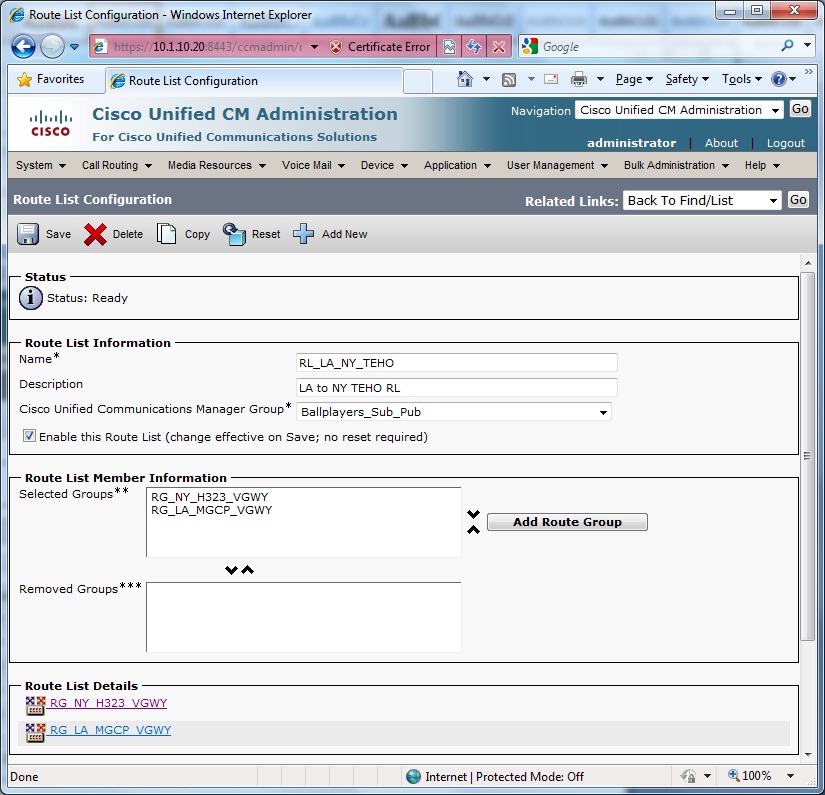
4. The Route Groups are then added to Route Lists. Pay attention to the ordering of the Route Lists in the Route Groups, so that the task requirements are met. For example, below is the ordering for the LA to NY Tail End Hop Off (TEHO) described in the tasks.



5. The Route Patterns are created next, and assigned to the appropriate Route Lists. Here, your configuration may vary slightly from mine, based on your particular PSTN simulator.


For example, in my Adtran only accepts 10-digit dialing (or, at least that is all I could figure it out to accept). Therefore, I apply a “XXXXXXXXXX” mask so that only the trailing ten digits of a call to London is sent. In this example, if a user in NY dials 9-011-44-20-7654-3001, only “20-7654-3001”, which my Adtran then routes to the London PRI. Don’t forget thing such as “Urgent Priority” for 911 and selecting Discard Digits options where appropriate.


6. Lastly, assign the phones and lines to their appropriate partitions in order to honor the Class of Service described in the task.

7. Networking between CUCM and CUCME can be tricky, especially given the tasks as described. For the 7+4-digit dialing, you need to create a translation rule. A rule is also required to add the appropriate prefix to route calls out the PSTN. Finally, for my testing purpose, I create a rule to translate “999” to “911” so that I could test 911 emergency call to my Adtran.

Another helpful hint during testing is to change the preferences of the dial-peer and observe the behavior of the phone class using the “sh voice call summary” command.

!
voice service voip
allow-connections h323 to h323
allow-connections h323 to sip
allow-connections sip to h323
allow-connections sip to sip
supplementary-service h450.12
h323
!
!
!
voice class codec 1
codec preference 1 g729r8
codec preference 2 g722-64
codec preference 3 g711ulaw
codec preference 4 g711alaw
!
!
translation-rule 1
Rule 1 71 1
Rule 2 72 2
!
!
translation-rule 2
Rule 0 ^999 911
!
!
translation-rule 3
Rule 1 71 2124321
Rule 2 72 2135432
!
!
dial-peer voice 1 pots
description inbound PRI dial-peer
incoming called-number .
direct-inward-dial
port 0/0/0:23
!
dial-peer voice 999 pots
destination-pattern 999
translate-outgoing called 2
port 0/0/0:23
forward-digits 3
!
dial-peer voice 2 pots
description International
destination-pattern 9001T
port 0/0/0:23
!
dial-peer voice 3 pots
description London Local
destination-pattern 9[2-9].......
port 0/0/0:23
!
dial-peer voice 4 pots
description UK Long Distance
destination-pattern 90[2-9].......
port 0/0/0:23
!
dial-peer voice 1000 voip
preference 2
destination-pattern 71...
translate-outgoing called 1
voice-class codec 1
session target ras
dtmf-relay h245-alphanumeric
!
dial-peer voice 2000 voip
preference 2
destination-pattern 72...
translate-outgoing called 1
voice-class codec 1
session target ras
dtmf-relay h245-alphanumeric
!
dial-peer voice 1001 pots
preference 1
destination-pattern 71...
translate-outgoing called 3
port 0/0/0:23
!
dial-peer voice 2001 pots
preference 1
destination-pattern 72...
translate-outgoing called 3
port 0/0/0:23
!

Wednesday, October 7, 2009

CCIE Voice Lab 1.4 – CUCME London

Lab 1.4 focuses on setting up Cisco Unified Communications Manager Express for Ballplayers LLC’s London, UK office.

CCIE Voice Lab 1.4 Tasks

1. Configure the CUCME router in London using the four digit extensions in CCIE Voice Lab 1 Scenario Background. The phones should be provisioned as SCCP phones. Enable call waiting on all extensions.

2. Enable support for g.722 wideband codec.

3. Configure extensions 3003 and 3004. On Jerry Maquire’s phone, 3003 and 3004 should ring on the second line appearance. Since David Beckham only has a two-button phone, his primary extension plus 3003 and 3004 should ring his first line appearance. However, his name and primary extension should be displayed next to the line appearance.

4. Configure extension 3005 and assign this to Jerry Maquire. This line should not support call waiting.

5. Since Jerry Maquire is the lead agent and branch manager in London, assign him a 7962.

6. When a call comes into either 3003 or 3004, and a user is on the phone, the incoming call on the busy phone should disable a visible indicator with no ring. Any phone not busy should ring as normal.

7. The layout of the displays on Jerry Maquire’s and David Beckham’s IP Phones should be identical in appearance to the displays for the New York and Los Angeles IP Phones.

8. David Beckham as a nasty habit of accidentally dialing his wife, Posh Spice (Victoria). Therefore, allow dialing on David Beckham’s phone only by selecting the specific line appearance.

9. David Beckham’s published number to the general public is 44-20-7654-3333. When someone from the PSTN dials this number, Jerry Macquire’s phone should ring first, followed by David Beckham’s phone. If no one answers the call for 10 seconds, it is assumed the person is busy and should be switched to DND mode. If neither Jerry nor David answers, the call should be forwarded to DN 3000.

CCIE Voice Lab 1.4 Solutions

1. Since I have previously discussed in detail setting up CUCME in both the CUCME-CUE Labs and Connection-CUCME Labs, I will not revisit the setup in detail. Below is the initial telephony-service configuration.


london#
!
tftp-server flash:ringtones/Analog1.raw alias Analog1.raw
tftp-server flash:ringtones/Analog2.raw alias Analog2.raw
!etc
!
!
telephony-service
em logout 0:0 0:0 0:0
max-ephones 10
max-dn 20
ip source-address 10.1.32.1 port 2000
service phone g722CodecSupport 2
service phone handsetWidebandEnable 1
service phone headsetWidebandEnable 0
service phone handsetWidebandUIControl 0
system message Your current options
load 7942 SCCP42.8-4-2S
load 7962 SCCP42.8-4-2S
dialplan-pattern 1 442076543... extension-length 4
max-conferences 8 gain -6
transfer-system full-consult
secondary-dialtone 9
create cnf-files version-stamp 7960 Oct 06 2009 21:46:31

2. Configuring the ephone DNs is fairly simple. Keep in mind, extension 3001 – 3004 are dual line; extension 3005 is a single line, thereby disabling call waiting.

!
ephone-dn 1 dual-line
number 3001
label Jerry Maquire 3001
description 44-20-7654-3001
name Jerry Maquire
!
!
ephone-dn 2 dual-line
number 3002
label David Beckham 3002
description 44-20-7654-3002
name David Beckham
!
!
ephone-dn 3 dual-line
number 3003
!
!
ephone-dn 4 dual-line
number 3004
!
!
ephone-dn 5
number 3005
!


3. Things get a little more tricky when configuring the IP Phones.

For Jerry Maquire, ephone-dn 1 is assigned to button 1; ephone-dn 3 and ephone-dn 4 are assigned to button 2 as overlays, using the “c” option rather than the “o” option, which enables call-waiting. Extension 3005, ephone-dn 5, is assigned to button 3.

On David Beckham’s phone, ephone-dn’s 2, 3, and 4 are assigned to button 1 as overlays, also using the “c” option rather than the “o” option. In addition, the “auto-line incoming” command is add, forcing David to either pick up his handset or pressing the speaker-phone button, then pressing line appearance button 1, in order to place a call. This should help prevent him from accidentally dialing his wife, “Posh Spice”.

!
ephone 1
device-security-mode none
description Jerry Maquire
mac-address 0024.97AB.1FB5
username "jmaquire" password null
codec g722-64
type 7962
button 1:1 2c3,4 3:5
!
!
!
ephone 2
device-security-mode none
description David Beckham
mac-address 0021.D8BA.23A1
username "dbeckham" password null
codec g722-64
type 7942
auto-line incoming
button 1c2,3,4
!

4. Finally, a sequential hunt-group will route incoming calls to 3333 (or 44-20-7654-3333) to Jerry Maquire first, followed by David Beckham.

!
ephone-hunt 1 sequential
pilot 3333
list 3001, 3002
final 3000
timeout 10, 10
auto logout 1
!

Monday, August 31, 2009

Unity Connection-CUCME Lab 7 – Baltimore CUE

This lab will revisit setting up CUE in Baltimore for eventual integration with Unity Connection via VPIM. It will be very similar to CUCME-CUE Lab 8.


Unity Connection Lab 7.1 – Baltimore CUE Tasks

1. Configure the Baltimore CUCME router to interface with CUE, using IP address 10.1.12.3/24.

2. Use extension 1999 as the voicemail pilot.

3, Use 8000 and 8001 for MWI.

4. Create voicemail users and mailboxes via the CUE CLI.

5. Mailboxes should be limited in size to accommodate up to 50 users on a AIM-CUE.

6. Make sure that messages can be forward via either dial by name or by extension.

7. Provision the system for GUI access.


Unity Connection Lab 7.2 – Baltimore CUE Verification

Since the tasks here are almost identical to CUCME-CUE Lab 8, please refer to that previous post for help on answers. Note, the Baltimore dial plan for Arliss Michaels and Cal Ripken is slightly different, refer to Unity Connection-CUCME Scenario Background.


Unity Connection Lab 7.3 – Baltimore CUE Wrap-up

The original intention for this lab was to stage Baltimore and then integrate with Unity Connection via VPIM. However, after some thought, I am not sure this is applicable for the CCIE Voice Lab. During the CCIE Voice Techtorial and Cisco Live 2009, the present suggested that the CCIE Voice lab would not have a DNS server. Based on some initial research for VPIM integration, DNS is a requirement. Therefore, one could infer that VPIM would not be tested in the Voice Lab.

That said, I will spend some time pretesting VPIM integration between Baltimore CUE and Unity Connection. If this testing consumes too much time and integration with DNS, I may abort and move on to some other items.

Tuesday, August 11, 2009

Unity Connection-CUCME Lab 5 – Unity Connection & CUCME Baltimore Integration

Now that the New York CUCME has been integrated with Unity Connection, we will now provision basic voice mail connectivity for the CUCME users in Baltimore.

Lab 5.1 – Unity Connection & Baltimore CUCME Integration Tasks

1. Configure the Baltimore CUCME router to interface with Unity Connection via SCCP.

2. Use extension 2999 as the voicemail pilot.

3. Create voicemail users and mailboxes for Baltimore users for testing purposes.

4. Use PIN 135246 for each user and ensure that it never expires.

5. Users should be forced to enroll the first time they access Unity Connection.

6. Ensure that users receive their proper greeting when they dial from their Cisco IP Phone.


Lab 5.2 – Unity Connection & Baltimore CUCME Integration Verification

1. The first step for this lab is to configure the Baltimore CUCME router to integrate with Unity Connection. The first document to review is the Cisco Unified Communications Manager Express SCCP Integration Guide for Cisco Unity Connection Release 7.x, specifically the section “Programming a Cisco Unified Communications Manager Express Router to Integrate with Cisco Unity Connection (Without a Connection Cluster)”.

Note, this document does not call out the need for a VOIP dial-peer, which of course is necessary in order for Baltimore to connect with Unity Connection in New York. Also, pay attention to both how the actual ephone integration works, as well as MWI; both are different than CUE.

The appropriate sections of the configuration are below.

baltimore#sh run
!
!
dial-peer voice 2999 voip
description VOIP peer to Unity Connection
destination-pattern 2999
session target ipv4:10.1.20.20
codec g711ulaw
no vad
!
!
telephony-service
voicemail 2999
!
!
ephone-dn 1 dual-line
number 1001
label Arliss Michaels 1001
description 410-555-1001
name Arliss Michaels
call-forward busy 2999
call-forward noan 2999 timeout 4
!
!
ephone-dn 2 dual-line
number 1002
label Cal Ripken 1002
description 410-555-1002
name Cal Ripken
call-forward busy 2999
call-forward noan 2999 timeout 4
!
!
!
!
ephone-dn 5 dual-line
number 2999
description CUC1-VI1
name Unity Conneciton
huntstop channel
!
!
ephone-dn 6
number 8000 secondary 8001
mwi on-off
!
!
!
ephone 3
device-security-mode none
vm-device-id CUC1-VI1
button 1:5
!


2. The Unity Connection Integration is clearly documented in the “Creating a New Integration with Cisco Unified Communications Manager Express” section of the Cisco Unified Communications Manager Express SCCP Integration Guide for Cisco Unity Connection Release 7.x guide.

3. Add Arliss Michaels and Cal Ripken in much the same fashion as you did for Lab 4. Then, set up each user’s voicemail box and leave some test messages. Also, try forward messages to users in New York, and vice versa.


Lab 5.3 – Unity Connection & Baltimore CUCME Wrap-up

Since the Unity Connection Demo License only has two ports, we are somewhat constrained on integrating Los Angeles. I’ve played with some possible work-arounds, where users in Los Angeles were able to access Unity Connection. However, I was unable to get MWI to function properly. Therefore, the next couple of labs will involve removing the Baltimore CUCME Integration, adding Los Angeles, reconfiguring CUE in Baltimore, and then attempt to integrate CUE with Unity Connection.

Tuesday, July 28, 2009

Unity Connection-CUCME Lab 4 – Unity Connection & CUCME New York Integration

With the basic CUCME setup completed in Lab 2 and an initial installation of Unity Connection in Lab 3, we will now provision basic voice mail connectivity for the CUCME users in New York.

Lab 4.1 – Unity Connection & New York CUCME Integration Tasks

1. Configure the New York CUCME router to interface with Unity Connection via a SIP Trunk.

2. Use extension 2999 as the voicemail pilot.

3. Create voicemail users and mailboxes for NYC users for testing purposes.

4. Use PIN 135246 for each user and ensure that it never expires.

5. Users should be forced to enroll the first time they access Unity Connection.

6. Ensure that users receive their proper greeting when they dial from their Cisco IP Phone.


Lab 4.2 – Unity Connection & New York CUCME Integration Verification
Seemingly simple, this lab presented me with a challenging troubleshooting curve ball.

1. To configure the SIP Trunk from the NYC CUCME Router to Unity Connection, refer to the Cisco Unified Communications Manager Express SIP Trunk Integration Guide for Cisco Unity Connection Release 7.x. I suggest reading this entire document prior to beginning this lab.

For the CUCME CLI configuration, follow the instructions provided in the section “Programming the Cisco Unified Communications Manager Express Phone System for Integrating with Cisco Unity Connection”. The truncated output is as follows:

newyork#sh run
!
voice service voip
no supplementary-service sip moved-temporarily
!
!
!
dial-peer voice 2001 voip
description ucnx01
max-conn 2
destination-pattern 2999
session protocol sipv2
session target ipv4:10.1.20.20
dtmf-relay rtp-nte
codec g711ulaw
no vad
!


2. The next step, although not articulated in the Cisco Unified Communications Manager Express SIP Trunk Integration Guide for Cisco Unity Connection Release 7.x document, is to provision the CUCME SIP phones for voicemail. The process is very similar to the CUCME-CUE Lab 9 – New York City Messaging lab. Below are the truncated commands.


!
voice register global
mwi stutter
mwi reg-e164
!
!
!
voice register dn 1
number 2001
call-forward b2bua busy 2999
call-forward b2bua mailbox 2999
call-forward b2bua noan 2999 timeout 20
name Ari Gold
label Ari Gold 2001
mwi
!
voice register dn 2
number 2002
call-forward b2bua busy 2999
call-forward b2bua mailbox 2999
call-forward b2bua noan 2999 timeout 20
name David Wright
label David Wright 2002
mwi
!
voice register dn 3
number 2003
call-forward b2bua busy 2999
call-forward b2bua mailbox 2999
call-forward b2bua noan 2999 timeout 20
name Eli Manning
label Eli Manning 2003
mwi
!


3. I then return to the Cisco Unified Communications Manager Express SIP Trunk Integration Guide for Cisco Unity Connection Release 7.x document, following the step to configure Unity Connection as discussed in Creating a New Integration with Cisco Unified Communications Manager Express. The integration on Unity Connection is fairly straight forward, so I will not rehash the steps, which are pretty clear in the document and links referenced above.


4. Finally, I add the voicemail user profiles for Arliss Michaels, David Wright, and Eli Manning as described in the Testing the Integration section of the Cisco Unified Communications Manager Express SIP Trunk Integration Guide for Cisco Unity Connection Release 7.x guide. Here I will point out a few modifications. First, for the ease of lab management, I disable the complex password requirements for users under System Settings > Authentication Rules > Recommended Voice Mail Authentication Rule by un-checking the “Check for Trivial Passwords” box.


For each user I modify their Password Settings by checking the “Does Not Expire” box and supplying a default password of 123456.

5. At this point, I am ready to set up each user’s voicemail TUI. On each phone, I press the voicemail key and walk through the Setup Wizard. I then proceed to leave a view voicemails, but quickly notice that MWI is not functioning. I first reviewed the MWI parameters on Unity Connection in regards to the Cisco Unified Communications Manager Express SIP Trunk Integration Guide for Cisco Unity Connection Release 7.x guide, and everything seems to match. Next, I review my previous CUCME-CUE integration from the CUCME-CUE Lab 9 – New York City Messaging lab and notice that I’ve missed the following commands:

sip-ua
mwi-server ipv4:10.1.20.20 expires 3600 port 5060 transport udp


However, within a few minutes of adding these commands I noticed that my SIP phones were spontaneous rebooting. When logging into the router CLI, I also notice horrific response time. My next step was to refer to the Cisco Unity Connection Integration of the Cisco Unified Communications Manager Express System Administrator Guide. Unfortunately, this document was of little value, since it points to a much older Unity Connection 1.1 integration document.

Next, I run the “sh processes cpu sorted” command and notice the two SIP process have consumed the majority of the CPU cycles.

newyork#sh processes cpu sorted
CPU utilization for five seconds: 98%/6%; one minute: 20%; five minutes: 8%
PID Runtime(ms) Invoked uSecs 5Sec 1Min 5Min TTY Process
327 49040 12373 3963 60.20% 10.58% 2.63% 0 CCSIP_SPI_CONTRO
329 22812 10307 2213 21.92% 3.86% 0.98% 0 CCSIP_UDP_SOCKET


Here’s where some dumb luck saved the day…

I add the “unsolicited” keyword to the mwi-server command above, and vola, issue solved.

sip-ua
mwi-server ipv4:10.1.20.20 expires 3600 port 5060 transport udp unsolicited


We can see almost immediately that the SIP process begins to return to normal. An explanation of the unsolicited option is available here.

newyork#sh processes cpu sorted
CPU utilization for five seconds: 12%/0%; one minute: 41%; five minutes: 19%
PID Runtime(ms) Invoked uSecs 5Sec 1Min 5Min TTY Process
327 73376 15862 4625 4.55% 20.75% 8.98% 0 CCSIP_SPI_CONTRO
329 37644 13965 2695 2.15% 11.87% 4.61% 0 CCSIP_UDP_SOCKET


Lab 4 Unity Connection & New York CUCME Integration Wrap-up

One final note. During my staging and configuration, I could not help but notice that my VM image of Unity Connection was running extremely slow. The Performance tab VMWare Infrastructure Client was informing me that the memory utilization was running constantly near 100%. As a result, I have adjusted the amount of memory allocated from the original 1024MB, as described in Unity Connection-CUCME Lab 3 – Unity Connection Installation on VMware ESX 3.5, to 2048MB.

Thursday, June 4, 2009

Lab 2.2 – Unity Connection-CUCME Setup Verification

The majority of the tasks in Unity Connection Lab 2.1 were covered in the CUCME-CUE labs. Rather than rehash previously covered topics, links are provided below, a discussion of any subtle differences or challenges, and finally the pertinent output from each ISR.

1. Installing and initializing the CUCME files is discussed in CUCME-CUE Lab 2 – Baltimore Basic CUCME System Setup for SCCP and CUCME-CUE Lab 3 – New York Basic CUCME System Setup for SIP. I did encounter a challenge, as previously discussed.

On the Baltimore SCCP router, the phone loads can be placed in a hierarchical file structure on the flash. Then, the alias keyword is used with the associated tftp-server commands.

baltimore#dir flash:/phone/7942-7962
Directory of flash:/phone/7942-7962/

185 -rw- 2918613 May 27 2009 21:59:06 -04:00 apps42.8-4-1-23.sbn
186 -rw- 485066 May 27 2009 21:59:10 -04:00 cnu42.8-4-1-23.sbn
187 -rw- 2659498 May 27 2009 21:59:24 -04:00 cvm42sccp.8-4-1-23.sbn
188 -rw- 335003 May 27 2009 21:59:26 -04:00 dsp42.8-4-1-23.sbn
189 -rw- 628112 May 27 2009 21:59:30 -04:00 jar42sccp.8-4-1-23.sbn
190 -rw- 658 May 27 2009 21:59:32 -04:00 SCCP42.8-4-2S.loads
191 -rw- 662 May 27 2009 21:59:32 -04:00 term42.default.loads
192 -rw- 662 May 27 2009 21:59:32 -04:00 term62.default.loads

260157440 bytes total (190967808 bytes free)

baltimore#
tftp-server flash:phone/7942-7962/apps42.8-4-1-23.sbn alias apps42.8-4-1-23.sbn
tftp-server flash:phone/7942-7962/cnu42.8-4-1-23.sbn alias cnu42.8-4-1-23.sbn
tftp-server flash:phone/7942-7962/cvm42sccp.8-4-1-23.sbn alias cvm42sccp.8-4-1-23.sbn
tftp-server flash:phone/7942-7962/dsp42.8-4-1-23.sbn alias dsp42.8-4-1-23.sbn
tftp-server flash:phone/7942-7962/jar42sccp.8-4-1-23.sbn alias jar42sccp.8-4-1-23.sbn
tftp-server flash:phone/7942-7962/SCCP42.8-4-2S.loads alias SCCP42.8-4-2S.loads
tftp-server flash:phone/7942-7962/term42.default.loads alias term42.default.loads
tftp-server flash:phone/7942-7962/term62.default.loads alias term62.default.loads

However, using the same procedure on the SIP locations, the phones fail to upgrade the phone loads. For Los Angeles and New York, the phone files are instead installed in the root location of the flash.

newyork#dir flash:
Directory of flash:/

1 -rw- 59224644 May 14 2009 22:41:26 -04:00 c2800nm-adventerprisek9_ivs-mz.124-22.YB1.bin
2 drw- 0 May 27 2009 22:39:18 -04:00 gui
21 drw- 0 May 27 2009 22:39:28 -04:00 ringtones
56 -rw- 2918613 May 27 2009 00:11:20 -04:00 apps42.8-4-1-23.sbn
57 -rw- 485066 May 27 2009 00:11:24 -04:00 cnu42.8-4-1-23.sbn
58 -rw- 3047459 May 27 2009 00:11:44 -04:00 cvm42sip.8-4-1-23.sbn
59 -rw- 335003 May 27 2009 00:11:46 -04:00 dsp42.8-4-1-23.sbn
60 -rw- 630128 May 27 2009 00:11:50 -04:00 jar42sip.8-4-1-23.sbn
61 -rw- 656 May 27 2009 00:11:50 -04:00 SIP42.8-4-2S.loads
62 -rw- 660 May 27 2009 00:11:52 -04:00 term42.default.loads
63 -rw- 660 May 27 2009 00:11:52 -04:00 term62.default.loads
64 -rw- 496521 May 27 2009 14:50:40 -04:00 music-on-hold.au

260943872 bytes total (192548864 bytes free)

newyork#
tftp-server flash:apps42.8-4-1-23.sbn
tftp-server flash:cnu42.8-4-1-23.sbn
tftp-server flash:cvm42sip.8-4-1-23.sbn
tftp-server flash:dsp42.8-4-1-23.sbn
tftp-server flash:jar42sip.8-4-1-23.sbn
tftp-server flash:SIP42.8-4-2S.loads
tftp-server flash:term42.default.loads
tftp-server flash:term62.default.loads


2. Refer to CUCME-CUE Lab 2 – Baltimore Basic CUCME System Setup to setting up the SCCP phones for Baltimore.


3. Refer to CUCME-CUE Lab 3 – New York Basic CUCME System Setup to setting up the SCCP phones for New York and Los Angeles.

4. For guidance on setting up the VOIP and POTS dial peers between all three locations, refer to CUCME-CUE Lab 4 – CUCME POTS & VoIP Dial Peers. However, since there is a potential for hairpin call routing, H.450.12 capabilities should be configured.

voice service voip
supplementary-service h450.12


5. CUCME-CUE Lab 7 – CUCME Conferencing & Transcoding will provide guidance on setting up the transcoding and conferencing.


6. Pertinent Baltimore CUCME configuration.

baltimore#sh run
!
card type t1 0 0
!
network-clock-participate wic 0
!
!
isdn switch-type primary-ni
!
!
voice service voip
allow-connections h323 to h323
allow-connections h323 to sip
allow-connections sip to h323
allow-connections sip to sip
supplementary-service h450.12
sip
registrar server expires max 600 min 300
!
!
voice class custom-cptone leavetone
dualtone conference
frequency 900 900
cadence 150 50 150 50
!
voice class custom-cptone jointone
dualtone conference
frequency 1200 1200
cadence 150 50 150 50
!
!
voice translation-rule 1
rule 1 /\(20..\)/ /212555\1/
rule 2 /\(30..\)/ /213555\1/
!
!
voice translation-profile prefix
translate called 1
!
!
voice-card 0
dsp services dspfarm
!
!
controller T1 0/0/0
cablelength short 110
pri-group timeslots 1-4,24
!
!
ip http server
ip http path flash:/gui
!
tftp-server flash:ringtones/Analog1.raw alias Analog1.raw
tftp-server flash:ringtones/AreYouThere.raw alias AreYouThere.raw
!output truncated!
!
voice-port 0/0/0:23
!
!
sccp local GigabitEthernet1/0.12
sccp ccm 10.1.12.1 identifier 1 priority 1 version 7.0
sccp
!
sccp ccm group 1
bind interface GigabitEthernet1/0.12
associate ccm 1 priority 1
associate profile 1 register conference
associate profile 2 register transcode
!
dspfarm profile 2 transcode
codec g711ulaw
codec g711alaw
codec g729ar8
codec g729abr8
codec g729br8
codec g722-64
maximum sessions 3
associate application SCCP
!
dspfarm profile 1 conference
codec g711ulaw
codec g711alaw
codec g729ar8
codec g729abr8
codec g729r8
codec g729br8
codec g722-64
maximum sessions 1
conference-join custom-cptone jointone
conference-leave custom-cptone leavetone
associate application SCCP
!
!
dial-peer voice 2000 voip
description VOIP Peer to New York
preference 1
destination-pattern 20..
session protocol sipv2
session target ipv4:2.2.2.2
dtmf-relay rtp-nte
codec g722-64
no vad
!
dial-peer voice 3000 voip
description VOIP Peer to Los Angeles
preference 1
destination-pattern 30..
session protocol sipv2
session target ipv4:3.3.3.3
dtmf-relay rtp-nte
codec g722-64
no vad
!
dial-peer voice 1 pots
description inbound PRI dial-peer
incoming called-number .
direct-inward-dial
port 0/0/0:23
!
dial-peer voice 2 pots
description outbound via pri
preference 1
destination-pattern 9[2-9].........
port 0/0/0:23
!
dial-peer voice 3 pots
translation-profile outgoing prefix
preference 2
destination-pattern [23]0..
port 0/0/0:23
forward-digits all
!
!
telephony-service
sdspfarm units 5
sdspfarm transcode sessions 3
sdspfarm tag 1 conference
sdspfarm tag 2 transcode
em logout 0:0 0:0 0:0
codec g722-64
max-ephones 42
max-dn 144
ip source-address 10.1.12.1 port 2000
service phone g722CodecSupport 2
service phone handsetWidebandEnable 1
service phone headsetWidebandEnable 0
service phone handsetWidebandUIControl 0
system message Ballplayers, LLC Baltimore
cnf-file location flash:
load 7942 SCCP42.8-4-2S
load 7962 SCCP42.8-4-2S
time-zone 12
dialplan-pattern 1 41055510.. extension-length 4
dialplan-pattern 2 21255520.. extension-length 4
dialplan-pattern 3 21355530.. extension-length 4
max-conferences 8 gain -6
moh music-on-hold.au
multicast moh 239.23.4.10 port 2000
web admin system name Cisco123 password Cisco123
transfer-system full-consult
transfer-pattern 10..
transfer-pattern 20..
transfer-pattern 30..
secondary-dialtone 9
directory entry 1 2001 name Ari Gold
directory entry 2 2002 name David Wright
directory entry 3 2003 name Eli Manning
directory entry 4 3001 name Jerry Maquire
directory entry 5 3002 name Kobe Bryant
create cnf-files version-stamp 7960 May 28 2009 12:02:02
!
!
ephone-template 1
conference drop-mode local
conference admin
softkeys seized Endcall Redial Cfwdall Meetme Pickup Callback
softkeys connected Hold Endcall Park Confrn Trnsfer Select Join ConfList RmLstC Flash
!
!
ephone-dn 1 dual-line
number 1001
label Arliss Michaels 1001
description 410-555-1001
name Arliss Michaels
!
!
ephone-dn 2 dual-line
number 1002
label Cal Ripken 1002
description 410-555-1002
name Cal Ripken
!
!
ephone-dn 3 octo-line
number 1020
name Baltimore AdHoc
conference ad-hoc
!
!
ephone-dn 4 octo-line
number 1021
name Baltimore MeetMe
conference meetme
!
!
ephone 1
device-security-mode none
description Arliss Michaels
mac-address 0024.97AB.1F83
ephone-template 1
username "amichaels" password null
codec g722-64
type 7962
button 1:1
!
!
ephone 2
device-security-mode none
description Cal Ripken
mac-address 0023.331A.EDCC
ephone-template 1
username "cripken" password null
codec g722-64
type 7962
button 1:2
!


7. Pertinent New York CUCME configuration. Los Angeles is nearly identical, except of course for different IP addresses and such.

newyork#sh run
!
card type t1 0 0
!
network-clock-participate wic 0
!
isdn switch-type primary-ni
!
!
voice service voip
allow-connections h323 to h323
allow-connections h323 to sip
allow-connections sip to h323
allow-connections sip to sip
supplementary-service h450.12
sip
registrar server expires max 600 min 300
!

!
voice class custom-cptone leavetone
dualtone conference
frequency 900 900
cadence 150 50 150 50
!
voice class custom-cptone jointone
dualtone conference
frequency 1200 1200
cadence 150 50 150 50
!
!
voice register global
mode cme
source-address 10.1.22.1 port 5060
no privacy
max-dn 144
max-pool 42
load 7962 SIP42.8-4-2S
load 7942 SIP42.8-4-2S
timezone 12
hold-alert
dialplan-pattern 1 41055510.. extension-length 4
dialplan-pattern 2 21255520.. extension-length 4
dialplan-pattern 3 21355530.. extension-length 4
call-forward system redirecting-expanded
url directory http://10.1.22.1:80/localdirectory
file text
create profile sync 0006512451546702
ntp-server 10.1.1.4 mode directedbroadcast
!
voice register dn 1
number 2001
name Ari Gold
label Ari Gold 2001
!
voice register dn 2
number 2002
name David Wright
label David Wright 2002
!
voice register dn 3
number 2003
name Eli Manning
label Eli Manning 2003
!
voice register template 1
softkeys hold Newcall Resume
softkeys idle Redial Newcall Cfwdall Pickup DND
softkeys seized Endcall Redial Cfwdall Pickup
softkeys connected Hold Endcall Park Confrn Trnsfer
softkeys remote-in-use Barge cBarge Newcall
!
voice register pool 1
id mac 0024.97AB.1FB5
type 7962
number 1 dn 1
template 1
dtmf-relay rtp-nte
description 212-555-2001
codec g722-64
no vad
!
voice register pool 2
id mac 0021.D8B9.BC72
type 7962
number 1 dn 2
template 1
dtmf-relay rtp-nte
description 212-555-2002
codec g722-64
no vad
!
voice register pool 3
id mac 0021.D8BA.2373
type 7942
number 1 dn 3
dtmf-relay rtp-nte
description 212-555-2003
codec g722-64
no vad
!
!
voice translation-rule 1
rule 1 /\(10..\)/ /410555\1/
rule 2 /\(30..\)/ /213555\1/
!
!
voice translation-profile prefix
translate called 1
!
!
voice-card 0
dsp services dspfarm
!
!
controller T1 0/0/0
cablelength short 110
pri-group timeslots 1-4,24
!
!
ip http server
ip http path flash:/gui
!
!
tftp-server flash:ringtones/Analog1.raw alias Analog1.raw
tftp-server flash:ringtones/AreYouThere.raw alias AreYouThere.raw
!output truncated!
!
voice-port 0/0/0:23
!
!
sccp local FastEthernet0/0.22
sccp ccm 10.1.22.1 identifier 1 priority 1 version 7.0
sccp
!
sccp ccm group 1
bind interface FastEthernet0/0.22
associate ccm 1 priority 1
associate profile 1 register conference
associate profile 2 register transcode
!
dspfarm profile 2 transcode
codec g711ulaw
codec g711alaw
codec g729ar8
codec g729abr8
codec g729br8
codec g729r8
codec g722-64
maximum sessions 3
associate application SCCP
!
dspfarm profile 1 conference
codec g711ulaw
codec g711alaw
codec g729ar8
codec g729abr8
codec g729r8
codec g729br8
codec g722-64
maximum sessions 1
conference-join custom-cptone jointone
conference-leave custom-cptone leavetone
associate application SCCP
!
!
dial-peer voice 1000 voip
description VOIP Peer to Baltimore
preference 1
destination-pattern 10..
session protocol sipv2
session target ipv4:1.1.1.1
dtmf-relay rtp-nte
codec g722-64
no vad
!
dial-peer voice 3000 voip
description VOIP Peer to Los Angeles
preference 1
destination-pattern 30..
session protocol sipv2
session target ipv4:2.2.2.2
dtmf-relay rtp-nte
codec g722-64
no vad
!
dial-peer voice 1 pots
description inbound PRI dial-peer
incoming called-number .
direct-inward-dial
port 0/0/0:23
!
dial-peer voice 2 pots
description outbound via pri
preference 1
destination-pattern 9[2-9].........
port 0/0/0:23
!
dial-peer voice 3 pots
translation-profile outgoing prefix
preference 2
destination-pattern [13]0..
port 0/0/0:23
forward-digits all
!
!

telephony-service
sdspfarm units 5
sdspfarm transcode sessions 3
sdspfarm tag 1 conference
sdspfarm tag 2 transcode
em logout 0:0 0:0 0:0
max-ephones 42
max-dn 144
ip source-address 10.1.22.1 port 2000
service phone g722CodecSupport 2
service phone handsetWidebandEnable 1
service phone headsetWidebandEnable 0
service phone handsetWidebandUIControl 0
time-zone 12
date-format dd-mm-yy
dialplan-pattern 1 41055510.. extension-length 4
dialplan-pattern 2 21255520.. extension-length 4
dialplan-pattern 3 21255530.. extension-length 4
max-conferences 8 gain -6
moh music-on-hold.au
multicast moh 239.23.4.10 port 2000
web admin system name Cisco123 password Cisco123
transfer-system full-consult
transfer-pattern 10..
transfer-pattern 20..
transfer-pattern 30..
secondary-dialtone 9
directory entry 1 1001 name Arliss Michaels
directory entry 2 1002 name Cal Ripken
directory entry 3 3001 name Jerry Maquire
directory entry 4 3002 name Kobe Bryant
create cnf-files version-stamp 7960 May 28 2009 12:01:41
!
!
ephone-dn 1 octo-line
number 2020
name NY AdHoc
conference ad-hoc
!


Unity Connection-CUCME Lab 2 Wrap-up

Now that the three Ballplayers, LLC locations up with CUCME, the next labs will actually look at Unity Connection. The first lab will discuss the installation and initial configuration on a VMware ESX 3.5 server.

Friday, May 29, 2009

Unity Connection-CUCME Lab 2 – CUCME Setup

Lab 2 will focus on setting up CUCME for Unity Connection. Since CUCME was covered in depth in the CUCME-CUE Labs, and the focus of these labs is Unity Connection, I will keep the CUCME side basic. Advanced CUCME calling feature will be kept to a minimum.

Unity Connection-CUCME System Setup Prerequisites

Prior to configuring the CUCME phone tasks, the router requires the specific CUCME files to be installed on the router flash. These labs will be based on CME 7.1 and IOS 12.4(22)YB1.

If this task hasn’t been previously completed, now is the time to so. There are a couple of ways to accomplish this prerequisite. The processes and procedures for installing the CUCME files on the router flash are described in the Installing and Upgrading Cisco Unified CME Software chapter of the Cisco Unified Communications Manager Express System Administrator Guide. A further discussion is covered in CUCME-CUE Lab 2 – Baltimore Basic CUCME System Setup and CUCME-CUE Lab 3 – New York Basic CUCME System Setup.

Lab 2.1 – Unity Connection-CUCME Setup Tasks

1. Configure CUCME on the Baltimore, Los Angeles, and New York routers based on the information provided in Unity Connection-CUCME Scenario Background. You may not use the CUCME setup utility or any sort of auto registration process.

2. Baltimore phones should be SCCP; Los Angeles and New York phones should be SIP Phones.

3. Each phone and should also be able to customize their ringtones beyond the default chirp ringtone.

4. Each user’s phone should also display his/her name and full E.164 number.

5. Each CUCME router should be configure to support the appropriate localization, time-zone, a 12 hour time format, and a Month-Day-Year format.

6. Enable the wideband codec by default for all phones.

7. Create an appropriate E.164 dial-pattern.

8. Configure VOIP between all three locations. Ensure that the default VOIP codec is the wideband codec.

9. Transfer between all locations should be supported.

10. Configure the PRI at each location to support only 4 channels (to conserve DSP resources).

11. In the event of a WAN failure, calls should use the PSTN, but without users having to dial more than four digits. Use only a single dial-peer with a single translation rule to accomplish this task. You may not use a prefix.

12. Enable transcoding to support G.711, G.722, and G.729.

13. Enable Conferencing and Transcoding resources for all three locations.

14. Provide an audible alert when someone joins or leaves a conference. The alerts should be different for joining and leaving.

15. Baltimore should support eight attendees at the conference bridge. Baltimore should support both Ad-hoc and Meet-Me conferencing.

16. Enable Music on Hold for both internal and external callers.

17. Create the appropriate GUI Administrator parameters.

Tuesday, March 24, 2009

CUCME-CUE Lab 10 – CUCME-CUE Misc Items

In this final CUCME-CUE Lab, Fuzzy Dunlop has asked you to fine tune the Baltimore and New York Unified Communications Express Solution.

CUCME-CUE Lab 10.1 –CUCME-CUE Misc Items Tasks

1. Nick Markakis has a new 7962 IP Phone. With all these line appearances, Nick has requested the ability to monitor the presence of Arliss Michaels, Cal Ripken, and Joe Flacco. Configure Baltimore to support this Presence mandate.

2. All users in both Baltimore and New York should be able to monitor phone presence status via the local directory. Users should also be able to remotely monitor presence status.

3. Eli Manning would like the ability to intercom Ari. However, he does not want Ari to intercom him.

4. Configure ext. 1000 as the Auto Attendant, using the system default AA. When a user requests the Operator via the AA, both Ari and Arliss should receive the call.

5. When an internal user dials “0”, calls should ring simultaneous at Ari and Arliss.

6. Ensure that when external caller dial each branch office’s main number, 410-555-1000 for Baltimore, and 212-555-2000, that the numbers are routed to the AA.

7. Ensure that both Arlis and Ari have administrative privileges on CUE and can modify the system via the TUI using extension 1990.

8. Fuzzy Dunlop has asked that you block any 900, 976, or 1010 calls.

CUCME-CUE Lab 10.2 –CUCME-CUE Misc Items Verification

1. Configuring Presence for SCCP phones in Baltimore is very similar to the process discussed for the SIP phones discussed in Lab 6. First, enable the appropriate presence parameter globally. Next, configure Nick Markakis to monitor Arliss Michaels, Cal Ripken, and Joe Flacco.

!
sip-ua
presence enable
!
presence
max-subscription 144
!
ephone-dn 1 dual-line
number 1001
label Cal Ripken 1001
allow watch
!
!repeat for ephone-dn 2-5!
!
ephone 2
device-security-mode none
description Nick Markakis
blf-speed-dial 2 1001 label "Cal Ripken" device
blf-speed-dial 3 1003 label "Joe Flacco" device
blf-speed-dial 4 1005 label "Arliss Michaels" device
blf-speed-dial 5 2005 label "Ari Gold" device


2. In order to allow all users to view presence status via the local directory, additional modifications are required on both the New York and Baltimore routers. First, there are some additional configuration parameters required under the global “presence” command. Secondly, the “presence call-list” command needs to be added to both the SCCP and SIP phone configuration.

Baltimore#sh run
!
presence
sccp blf-speed-dial retry-interval 90 limit 15
presence call-list
server 10.1.22.1
max-subscription 144
watcher all
allow subscribe
!
ephone 1
description Cal Ripken
presence call-list
!
! repeat for all SCCP phones !


NewYork#sh run
!
presence
sccp blf-speed-dial retry-interval 90 limit 15
presence call-list
server 10.1.12.1
max-subscription 144
watcher all
allow subscribe
!
!
voice register pool 1
presence call-list
description 212-555-2001
!
! repeat for all SIP Phones !


A comment/observation… It appears that only one SIP Presence Server can be added to the CUCME configuration. This effectively limits SIP Presence monitoring between only two CUCME location, unless of course a centralized Presence Server, such as CUPS, is integrated as part of the solution.


3. In an attempt to revisit SIP intercom, I believe that I may have come up with “hybrid” solution. The first part of the solution is to create a voice register dn that auto-answers.

!
voice register dn 6
number 2905
auto-answer
label Intercom from Eli
!

Next, this dn is associated with the Ari Gold SIP Phone.

!
voice register pool 5
number 1 dn 5
number 2 dn 1
number 3 dn 6
!

Finally, a speed dial button for Eli’s phone is created, which in essence creates the “intercom”.

!
voice register pool 3
number 1 dn 3
description 212-555-2003
speed-dial 1 2905 label "Intercom to Ari"
!


4. Meeting the requirements for the Auto Attendant described in tasks 4 – 6 require a number of configuration changes on both the Baltimore and New York CUCME routers and the CUE.

Under CUE, a group delivery mailbox needs to be created, as well mapping which number will ring the operator when a user presses “0” in the auto attendant. For purposes of the configuration, “0” for the operator will be mapped to extension 1100, which will later be associated with a hunt group in CUCME. As for the AA itself and purposes of this exercise, I’ve opted for the default AA in CUE.

baltimore-cue# sh run

groupname Operator create

groupname Operator member amichaels
groupname Operator member agold
groupname Operator phonenumber "1100"

ccn application autoattendant aa
description "autoattendant"
enabled
maxsessions 4
script "aa.aef"
parameter "busClosedPrompt" "AABusinessClosed.wav"
parameter "holidayPrompt" "AAHolidayPrompt.wav"
parameter "welcomePrompt" "AAWelcome.wav"
parameter "disconnectAfterMenu" "false"
parameter "dialByFirstName" "false"
parameter "allowExternalTransfers" "false"
parameter "MaxRetry" "3"
parameter "dialByExtnAnytime" "false"
parameter "busOpenPrompt" "AABusinessOpen.wav"
parameter "businessSchedule" "systemschedule"
parameter "dialByExtnAnytimeInputLength" "4"
parameter "operExtn" "1100"
end application

voicemail mailbox owner "Operator" size 720
description "Operator Mailbox"
zerooutnumber "1000"
end mailbox


Next, in Baltimore, create a parallel hunt group to ring both Ari and Arliss at the same time. Voice hunt-groups allow you to include SIP trunks, something that ephone-hunt groups do not allow. Note, the timeout needs to be tweaked so that the call is sent to the group mail box 1100 prior to being sent to either the Ari or Arliss mailbox.

Baltimore#sh run
!
voice hunt-group 2 parallel
final 1999
list 1005,2005
timeout 20
pilot 1100
!


Next, two additional voip dial-peers are added to Baltimore to allow access to the AA. Note, for external users, a translation profile must be associated with the inbound E.164 number from the PSTN. A modification to the existing voice translation rule is sufficient.

Baltimore#sh run
!
voice translation-rule 2
rule 1 /4105551999/ /1999/
rule 2 /4105551000/ /1000/
!
!
voice translation-profile to-cue
translate called 2
!
!
dial-peer voice 1997 voip
destination-pattern 1000
session protocol sipv2
session target ipv4:10.1.12.3
dtmf-relay rtp-nte
codec g711ulaw
no vad
!
dial-peer voice 1996 voip
mailbox-selection orig-called-num
description VM-AA-PSTN
translation-profile outgoing to-cue
destination-pattern 4105551000
session protocol sipv2
session target ipv4:10.1.12.3
dtmf-relay rtp-nte
codec g711ulaw
no vad
!


For users in New York, the CUCME changes are similar. Two dial-peers are created, one with a destination-pattern of 1000 pointing to Baltimore and the other with a destination-pattern of 212-555-2000, with an associated translation-profile and also pointing to Baltimore.

NewYork#sh run
!
voice translation-rule 2
rule 1 /2125552000/ /1000/
!
!
voice translation-profile outgoing-to-cue
translate called 2
!
!
dial-peer voice 1997 voip
destination-pattern 1000
b2bua
session protocol sipv2
session target ipv4:10.1.12.3
dtmf-relay rtp-nte
codec g711ulaw
no vad
!
dial-peer voice 1996 voip
mailbox-selection orig-called-num
description AA
translation-profile outgoing outgoing-to-cue
destination-pattern 2125552000
b2bua
session protocol sipv2
session target ipv4:10.1.12.3
dtmf-relay rtp-nte
codec g711ulaw
no vad
!


5. The process to enable users to dial “0” and have both Ari and Arliss ring is different for each router.

In Baltimore, we’ll modify the existing translation rule from lab 4, which enabled user who dial HELP to ring the analog security phone. In this instance, add a second rule to translate 0 to the 1100 pilot.

Baltimore#sh run
!
translation-rule 1
Rule 0 ^4357 1611
Rule 1 ^0 1100


In New York, since the phones are SIP, new voice translation rule and translation-profile are created. This translation profile is then applied to a new voip dial-peer pointing to Baltimore and the Baltimore hunt-group, which in-turn, rings both Ari and Arliss.

NewYork#sh run
!
voice translation-rule 3
rule 1 /0/ /1100/
!
!
voice translation-profile operator
translate called 3
!
!
dial-peer voice 1004 voip
translation-profile outgoing operator
destination-pattern 0
session protocol sipv2
session target ipv4:172.16.1.1
dtmf-relay rtp-nte
codec g722-64
no vad
!


6. Granting Arliss and Ari administrative privileges on CUE is as simple as adding each user to the Administrators group and adding a SIP phone number for prompt management.

groupname Administrators member amichaels
groupname Administrators member agold

ccn trigger sip phonenumber 1990
application "promptmgmt"
enabled
maxsessions 1
end trigger


7. The simplest way to restrict callers from dialing 976, 900, and 1010 number is to add a 24 x 7 call-blocking restriction to the telephony service on each router.

telephony-service
after-hours block pattern 1 9900 7-24
after-hours block pattern 2 9976 7-24
after-hours block pattern 3 91010 7-24


When testing this on both routers, I observed a difference in behavior between SCCP and SIP phones. On SCCP phones, once a pattern matched, such as 9-976, the user receives a fast busy tone. On SIP phones, rather than a receiving a fast-busy, the attempted call is simply dropped.


CUCME-CUE Lab 10.3 –CUCME-CUE Misc Items Wrap-up

This lab will likely conclude the CUCME-CUE labs, even though many Advanced CUE features such as IMAP, IVR, Live Record, and custom AA scripting were not covered. I am a bit torn on which topic to tackle next. My original intention was to continue to “build-out” Ballplayers, LLC as a true company might expand. Namely, I was going to stick with CUCME as the call processing, add a third CUCME site, and replace CUE with Unity Connection as a centralized integrated messaging solution. However, I am now gravitating toward jumping right to centralized call processing, Unified Communications Manager 7.0.

Each of these labs usually requires me a few days or even weeks of after-work-hours research and configuration. I will post the final configs for the Baltimore CUCME, New York CUCME, and Baltimore CUE in the coming days. Regardless of the direction that I ultimately decide upon, there will likely be a gap in posting for a few weeks. I am going to build a Microsoft 2003 Domain Controller with a simple AD to support which ever direction I take. I also plan to begin focusing a bit more on properly installing both Unity Connection and UCM in VMWare ESX 3.5, that way I am ready to roll in whichever direction I ultimately take.


References:
Cisco Systems. Cisco Unified Communications Manager Express System Administrator Guide. Available online.

Cisco Systems. Cisco Unity Express Voice-Mail and Auto-Attendant CLI Administrator Guide for 3.0 and Later Versions. Available online.

Monday, March 9, 2009

CUCME-CUE Lab 9 – New York City Messaging

Users in New York also require voicemail features and functionality. The tasks in this lab pertain to extending access to the CUE in Baltimore to the users in New York.

CUCME-CUE Lab 9.1 – New York City Messaging Tasks

1. Configure users in New York with Cisco Unity Express voicemail.

2. Ensure that users in New York have their MWI lamp lit when a user leaves a voicemail.

3. Make sure that messages can be forwarded via either dial by name or by extension.

4. Ensure that in the event of a WAN failure, users can still access and retrieve voicemail.

5. Also ensure that external callers can leave messages for users in New York in the event of a WAN failure.

6. Users in off-net should be able to dial into the system to access their messages remotely.

7. Configure the mailboxes with the same size restrictions as described in Lab 8.1.

CUCME-CUE Lab 9.2 – New York City Messaging Task Verification
Please note, the tasks described in this lab “may or may not be” supported by Cisco. According to the Cisco datasheet for CUE:

“Cisco Unity Express (on NME-CUE only) can integrate with up to 10 Cisco Unified Communications Manager Express remote sites. This solution allows voicemail and Automated-Attendant features to be centralized for up to 10 sites when voicemail at each remote site is not essential and only a small number of users are at each site.”

Therefore, I do not officially endorse, nor would I advocate, this type of solution in a production environment on an AIM-CUE module, which I have used in my home lab. With that disclaimer, I based much of the configuration based on this document, along with some careful study of the Cisco Unity Express Voice-Mail and Auto-Attendant CLI Administrator Guide for 3.0 and Later Versions and some additional troubleshooting.

1. First, add the users to CUE in much the same way as was done in Lab 8. In the interest of space, I will omit a full description of the tasks; refer to Lab 8.2.


2. Next step is to add a dial-peer on the New York CUCME router pointing to the Baltimore-CUE module. Here is where I ran into my first series of problem. Originally, I used the Cisco Unified Communications Manager Express: SIP Implementation Guide as my reference, building out the CUE integration based on the “Configure connection to Cisco Unity Express” of this document. However, I encountered a few issues, namely DTMF relay and MWI issues, which I while address separately below.


3. DTMF Relay issue & resolution:

First problem was that while SIP phones could dial into the CUE at ext. 1999 when pressing the voicemail button, the system was not responding to any inputs on the keypad. My initial configuration under both the phones and the corresponding dial-peer used the suggested “dtmf-relay sip-notify” commands.

After a fair amount of troubleshooting, including changing and eliminating transcoding as a possible cause, I decided to opt with the “dtmf-relay rtp-nte” as referenced here. Note, I modified this configuration for all SIP phones, the voip dial-peers on the NYC CUCME, and voip dial-peers on the Baltimore CUCME. For example:

NewYork#sh run
!
voice register global
voicemail 1999
!
voice register pool 1
number 2001
call-forward b2bua busy 1999
call-forward b2bua mailbox 1999
call-forward b2bua noan 1999 timeout 20
dtmf-relay rtp-nte
!
!
dial-peer voice 1000 voip
description VOIP Peer to Baltimore
preference 1
destination-pattern 1...
session protocol sipv2
session target ipv4:172.16.1.1
dtmf-relay rtp-nte
codec g722-64
no vad
!
!
dial-peer voice 1999 voip
destination-pattern 1999
b2bua
session protocol sipv2
session target ipv4:10.1.12.3
dtmf-relay rtp-nte
codec g711ulaw
no vad
!

Finally, the change to “dtmf-relay rtp-nte” necessitated the following changes to the Baltimore CUE.

baltimore-cue# sh run
!
ccn subsystem sip
dtmf-relay sip-notify rtp-nte


With the changes and configurations described above, users in New York are now able to access their voicemail on the Baltimore CUE.


4. The next challenge was sending MWI to and from CUE in Baltimore to the phones in New York. Once again, the Cisco Unified Communications Manager Express: SIP Implementation Guide was used as reference, but the MWI lamps failed to light on the phones. The resolution was to configure MWI based on the Sub-Notify Notification described in the Cisco Unity Express Voice-Mail and Auto-Attendant CLI Administrator Guide for 3.0 and Later Versions combined with SIP: Configuring a Directory Number for MWI NOTIFY from the CUCME Admin Guide.

On the New York CUCME Router:

NewYork#sh run
!
voice register global
mwi stutter
mwi reg-e164
!
!
voice register dn 1
mwi
!
!
sip-ua
mwi-server ipv4:10.1.12.3 expires 3600 port 5060 transport udp


And on CUE in Baltimore:

baltimore-cue# sh run
!
ccn subsystem sip
mwi sip outcall sub-notify
!


5. Enabling callers to leave messages during a WAN failure requires some changes and modifications to various dial-peers. First, rather than create a new series of dial-peers out to the PSTN pointing to 410-555-1999 on the New York router, I chose to leverage the existing dial-peers and PSTN fallback capabilities described in Lab 4.0. However, those existing dial-peers used a destination-pattern of “10..”, which excludes “1999”. Therefore, changing the pattern to “1…”, as shown above in the DTMF discussion, takes care of this. The previously translation pattern will manipulate 1999 to 410-555-1999, resulting in the call routing out the PSTN to Baltimore.


6. However, inbound calls from the PSTN to 1999 will not reach CUE unless a new VOIP dial-peer is added, with in outgoing translation pattern (to CUE) for digit manipulation. Below provides the configuration changes required to allow inbound callers to reach the voicemail pilot point.

Baltimore#sh run
!
voice translation-rule 2
rule 1 /4105551999/ /1999/
!
!
voice translation-profile to-cue
translate called 2
!
!
dial-peer voice 1998 voip
mailbox-selection orig-called-num
description VM-AA-PSTN
translation-profile outgoing to-cue
destination-pattern 4105551999
session protocol sipv2
session target ipv4:10.1.12.3
dtmf-relay rtp-nte
codec g711ulaw
no vad
!


7. The easiest way to test the voicemail failover to the PSTN is to shut down the VOIP dial peers between the two CUCME locations and place a test call. In the example below, Nick Markakis at ext. 1002 is attempting to call Ari Gold at ext. 2005. First, you’ll notice the call being routed to Ari, who is not available to answer.

NewYork#
Mar 10 02:54:13.812: //-1/xxxxxxxxxxxx/DPM/dpMatchPeersCore:
Calling Number=2005, Called Number=2005, Peer Info Type=DIALPEER_INFO_SPEECH
Mar 10 02:54:13.812: //-1/xxxxxxxxxxxx/DPM/dpMatchPeersCore:
Match Rule=DP_MATCH_DEST; Called Number=2005
Mar 10 02:54:13.812: //-1/xxxxxxxxxxxx/DPM/dpMatchPeersCore:
Result=Success(0) after DP_MATCH_DEST
Mar 10 02:54:13.812: //-1/xxxxxxxxxxxx/DPM/dpMatchPeersMoreArg:
Result=SUCCESS(0)
List of Matched Outgoing Dial-peer(s):
1: Dial-peer Tag=40005
Mar 10 02:54:13.816: //-1/xxxxxxxxxxxx/DPM/dpAssociateIncomingPeerCore:
Calling Number=4105551002, Called Number=, Voice-Interface=0x0,
Timeout=TRUE, Peer Encap Type=ENCAP_VOIP, Peer Search Type=PEER_TYPE_VOICE,
Peer Info Type=DIALPEER_INFO_SPEECH


Once the call-forward no answer timing is reached, CUCME attempts to forward the call to ext. 1999.

NewYork#
Mar 10 02:54:33.968: //-1/xxxxxxxxxxxx/DPM/dpAssociateIncomingPeerCore:
Calling Number=2005, Called Number=, Voice-Interface=0x0,
Timeout=TRUE, Peer Encap Type=ENCAP_VOIP, Peer Search Type=PEER_TYPE_VOICE,
Peer Info Type=DIALPEER_INFO_SPEECH
Mar 10 02:54:33.968: //-1/xxxxxxxxxxxx/DPM/dpAssociateIncomingPeerCore:
Result=Success(0) after DP_MATCH_ORIGINATE; Incoming Dial-peer=40005
Mar 10 02:54:33.968: //-1/xxxxxxxxxxxx/DPM/dpMatchPeersCore:
Calling Number=, Called Number=1999, Peer Info Type=DIALPEER_INFO_SPEECH
Mar 10 02:54:33.968: //-1/xxxxxxxxxxxx/DPM/dpMatchPeersCore:
Match Rule=DP_MATCH_DEST; Called Number=1999
Mar 10 02:54:33.968: //-1/xxxxxxxxxxxx/DPM/dpMatchPeersCore:
Result=Success(0) after DP_MATCH_DEST
Mar 10 02:54:33.968: //-1/xxxxxxxxxxxx/DPM/dpMatchPeersMoreArg:
Result=SUCCESS(0)
List of Matched Outgoing Dial-peer(s):
1: Dial-peer Tag=1001
2: Dial-peer Tag=1003
3: Dial-peer Tag=1002

Finally, you’ll notice the call now being forward out the PRI circuit in New York to the PSTN, back to CUE in Baltimore at 410-555-1999, where Nick can leave a message for his agent, Ari.

NewYork#

Mar 10 02:54:34.244: %ISDN-6-CONNECT: Interface Serial0/0/0:3 is now connected to 4105551999 N/A

Mar 10 02:54:34.252: //-1/xxxxxxxxxxxx/DPM/dpMatchPeersCore:
Calling Number=, Called Number=4105551999, Peer Info Type=DIALPEER_INFO_SPEECH
Mar 10 02:54:34.252: //-1/xxxxxxxxxxxx/DPM/dpMatchPeersCore:
Match Rule=DP_MATCH_DEST; Called Number=4105551999


CUCME-CUE Lab 9.3 Wrap-up

Labs 8 and 9 represent just the tip of the iceberg when it comes to Unity Express. For a relatively inexpensive voicemail solution, it is very powerful with many robust features, including an IVR, Auto Attendant, Time Card application, and integrated messaging via IMAP. While I may explore a few more CUCME and CUE topics, I also want to begin moving on to the other core CCIE Voice topics.

References:
Cisco Systems. Cisco Unified Communications Manager Express: SIP Implementation Guide. Available online.

Cisco Systems. Cisco Unified Communications Manager Express System Administrator Guide. Available online.

Cisco Systems. Cisco Unity Express Voice-Mail and Auto-Attendant CLI Administrator Guide for 3.0 and Later Versions. Available online.

Cisco Systems. Failure to Set MWI on Phones Connected to the Remote CallManager Express. Available online.

Saturday, February 28, 2009

CUCME-CUE Lab 8 – Initial CUE Setup & Baltimore Messaging

Now that the CUCME systems for Baltimore and New York are functioning and employees can communicate with each other, Fuzzy Dunlop has given you the go ahead to implement voice messaging. However, due to the recession, funds are tight. As a result, Fuzzy has only given you the budget to purchase a single Cisco Unity Express AIM card to support both locations.

This lab will focus on the initial setup for CUE on the Baltimore 2811, as well as setting up basic voicemail for the Baltimore users. This lab and subsequent CUE labs are based on CUE 7.0. If you need to update you CUE image, excellent, well described instructions are outlined in the Cisco Unity Express 7.0 Installation and Upgrade Guide.

CUCME-CUE Lab 8.1 – Initial CUE Setup & Baltimore Messaging Tasks

1. Configure the Baltimore CUCME router to interface with CUE. Use extension 1999 as the voicemail pilot.

2. The IP Address for CUE should come from the voice subnet.

3. Use 8000 and 8001 for MWI.

4. Create voicemail users and mailboxes via the CUE CLI.

5. Mailboxes should be limited in size to accommodate up to 50 users on a AIM-CUE.

6. Make sure that messages can be forward via either dial by name or by extension.

7. Provision the system for GUI access.


CUCME-CUE Lab 8.2 – Initial CUE Setup & Baltimore Messaging Verification

1. Before you can begin configuring the CUE, you need to make some configuration modifications to the CUCME. A dial-peer needs to be created pointing to CUE. Next, the voicemail pilot needs to be added under the telephony-service. MWI is then created via an ephone-dn. Finally, call-forwarding needs to be provisioned for each user.

The details regarding the initial configuration parameters are covered in Configuring System Components chapter of the Cisco Unity Express Voice-Mail and Auto-Attendant CLI Administrator Guide for 3.0 and Later Versions.

Below are the configuration changes.

Baltimore#
!
dial-peer voice 1999 voip
destination-pattern 1999
session protocol sipv2
session target ipv4:10.1.12.3
dtmf-relay sip-notify
codec g711ulaw
!
telephony-service
voicemail 1999
!
!
ephone-dn 14
number 8000....
mwi on
!
!
ephone-dn 15
number 8001....
mwi off
!
ephone-dn 1 dual-line
call-forward busy 1999
call-forward noan 1999 timeout 4
!repeat for ephone-dns 2-5!
!
!
ephone 1
username "cripken" password null
!repeat for ephones 2-5!
!


2. Next step is to enable IP connectivity to the CUE. This requires some additional configuration on the CUCME side of the equation.

Baltimore#
!
interface Service-Engine0/0
ip unnumbered GigabitEthernet1/0.12
service-module ip address 10.1.12.3 255.255.255.0
service-module ip default-gateway 10.1.12.1
!

Once you’ve finished the above, you can session into the service-engine (CUE AIM).

Baltimore#service-module service-Engine 0/0 se
Baltimore#service-module service-Engine 0/0 session
Trying 10.1.12.1, 2194 ... Open
baltimore-cue#
baltimore-cue#


In the example above, I had previously logged into the CUE. If you haven’t yet done so, you will need to complete some basic CUE initialization tasks. Unfortunately, I was unable to find a concise document online that clearly articulates this initialization wizard. It is touched upon here. However, Chapter 11 of the IP Telephony Using CallManager Express Lab Portfolio covers it very well.


3. Now that there is connectivity between CUCME and CUE, users and mailboxes can now be created. Unfortunately, due to the way the CUE CLI functions, you have to create users in a somewhat disjointed fashion. The first step is to create the user and his/her phone numbers under configuration mode.

baltimore-cue(config)# username cripken create
baltimore-cue(config)# username cripken phonenumber 1001
baltimore-cue(config)# username cripken phonenumberE164 4105551001


Next, you need to create the mailbox for the use. However, per the requirement above, the configuration must support up to 50 users, thereby limiting the mailbox size to 720 seconds.

baltimore-cue(config)# voicemail mailbox owner "cripken" size 720
baltimore-cue(config-mailbox)#
baltimore-cue(config-mailbox)# description "cripken mailbox"
baltimore-cue(config-mailbox)# end mailbox

In order to facilitate the dial by name requirement, you must exit configuration mode and then modify the users their full first and last names.

baltimore-cue# username cripken fullname first Cal
baltimore-cue# username cripken fullname last Ripken


Finally, you can verify the user and the associate mailbox by issuing the “show user detail username NAME” and “show voicemail detail mailbox NAME” commands

baltimore-cue# show user detail username cripken
Username: cripken
Full Name: Cal Ripken
First Name: Cal
Last Name: Ripken
Nickname: Cal Ripken
Phone: 1001
Phone(E.164): 4105551001
Fax:
Email:
Epage:
Language: systemDefault
GroupMember:
GroupOwner:
Privileges:

baltimore-cue# show voicemail detail mailbox cripken
Owner: /sw/local/users/cripken
Type: Personal
Description: cripken mailbox
Busy state: idle
Enabled: true
Allow login without pin: no
Mailbox Size (seconds): 720
Message Size (seconds): 240
Play Tutorial: false
Fax Enabled: true
Space Used (seconds): 0
Total Message Count: 0
New Message Count: 0
Saved Message Count: 0
Future Message Count: 0
Deleted Message Count: 0
Fax Message Count: 0
Expiration (days): 30
Greeting: standard
Zero Out Number:
Created/Last Accessed: Feb 27 2009 17:47:37 EST


4. The final requirements on CUE involve configuration for communicating with CUCME and passing MWI. First, configure SIP to reach CUCME.

ccn subsystem sip
gateway address "10.1.12.1"
end subsystem


Next, the SIP trigger for the voicemail pilot, 1999, must be added to the system.

ccn trigger sip phonenumber 1999
application "voicemail"
enabled
maxsessions 4
end trigger

Finally, MWI must be enabled.

ccn application ciscomwiapplication aa
description "ciscomwiapplication"
parameter "strMWI_OFF_DN" "8001"
parameter "strMWI_ON_DN" "8000"

CUCME-CUE Lab 8.3 – Initial CUE Setup & Baltimore Wrap Up

CUCME and CUE has now been properly configured to interoperate. The best way to test the configuration is to place calls between phones and leave message. However, prior to this, each mailbox will require completion of the TUI setup wizard. Looking ahead, I will explore what it takes to have CUE support remote users, specifically the New York CUCME.

References:
Au, Danelle, et. al. (2005). Cisco IP Communications Express: CallManager Express with Cisco Unity Express. Indianapolis: Cisco Press.

Cisco Systems. Cisco Unity Express 7.0 Installation and Upgrade Guide. Available online.

Cisco Systems. Cisco Unity Express 7.0 Release Notes. Available online.

Cisco Systems. Cisco Unity Express Voice-Mail and Auto-Attendant CLI Administrator Guide for 3.0 and Later Versions. Available online.

Schmidt, Cheryl A., and Friend, Ernie (2007). IP Telephony Using CallManager Express Lab Portfolio. Indianapolis: Cisco Press.

Monday, February 23, 2009

CUCME-CUE Lab 7 – CUCME Conferencing & Transcoding

Fuzzy Dunlop has asked for one final tweak to the CUCME solution. He would like to have the ability to support audio conferencing at each location as well as between locations. Finally, he would like some music for callers who are placed on hold.

CUCME-CUE Lab 7 – CUCME Conferencing & Transcoding Task
1. In Baltimore create Ad-Hoc & Meetme conferencing to support one session of eight conference participants.

2. Baltimore should use DN 1020 for Ad-Hoc and DN 1021 for Meetme.

3. MeetMe and AdHoc should be enabled using only on DN entry for each number conference bridge.

4. Provide an audible alert when someone joins or leaves a conference. The alerts should be different for joining and leaving.

5. Modify phone parameters to allow MeetMe, a list of Conference Attendees, and the ability to remove Conference Attendees.

6. Conference calls should be dropped once the initiator hangs-up, unless the remaining attendees are local participants.

7. Allow users with shared lines join to barge into the call using shared conference resources.

8. Enable Music on Hold for both internal and external callers.

9. Enable transcoding to support G.711, G.722, and G.729.


CUCME-CUE Lab 7 – CUCME Conferencing & Transcoding Verification

In order to configure and enable the Ad-Hoc and MeetMe conferencing described in tasks 1 – 6, there are a number of parameters that require configuration. I’ll walk through each below, but a detailed description of configuring conferencing on CUCME is available in the Configuring Conferencing of the Cisco Unified Communications Manager Express System Administrator Guide.

1. The first step in enabling hardware conferencing resources on CUCME is to enable DSP Farm Services on the router. Second, create the custom join and leave tones. Next, enable SCCP for CUCME, configure the DSP Farm, and then associate the DSP Farm with SCCP on the router.

Baltimore#
!
voice-card 0
dsp services dspfarm
!
!
voice class custom-cptone jointone
dualtone conference
frequency 1200 1200
cadence 150 50 150 50
!
voice class custom-cptone leavetone
dualtone conference
frequency 900 900
cadence 150 50 150 50
!
!
sccp local GigabitEthernet1/0.12
sccp ccm 10.1.12.1 identifier 1 priority 1 version 7.0
sccp
!
!
dspfarm profile 1 conference
codec g711ulaw
codec g711alaw
codec g729ar8
codec g729abr8
codec g729r8
codec g729br8
codec g722-64
maximum sessions 1
conference-join custom-cptone jointone
conference-leave custom-cptone leavetone
associate application SCCP
!
!
sccp ccm group 1
bind interface GigabitEthernet1/0.12
associate ccm 1 priority 1
associate profile 2 register transcode
associate profile 1 register conference
!


2. At the completion of the configuration above, you show see registration of the DSP farm with CUCME.

Baltimore#
Feb 23 03:54:33.452: %SYS-5-CONFIG_I: Configured from console by cisco123 on console
Feb 23 03:54:33.520: %DSPRM-5-UPDOWN: DSP 1 in slot 0, changed state to up
Baltimore#
Feb 23 03:54:33.528: %HWCONF-6-REGISTER: hwconf-1:conference IP:10.1.12.1 Socket:3 DeviceType:HW Conference has registered.
Baltimore#

3. The next piece of the puzzle is to enable the Ad-hoc and MeetMe components. First, associate the hardware conferencing resources with the telephony-service. Then, configure two ephone-dns, one for the Ad-hoc bridge and the other for the MeetMe bridge. Note the requirement to use only one ephone-dn for each conference bridge; this necessitates the use of octal dns.

!
telephony-service
sdspfarm units 5
sdspfarm tag 1 conference
!
!
ephone-dn 12 octo-line
number 1020
name Baltimore AdHoc
conference ad-hoc
!
!
ephone-dn 13 octo-line
number 1021
name Baltimore-MeetMe
conference meetme


4. The final step to enable MeetMe and AdHoc conferencing is to modify the ephone templates to enable the MeetMe, Conference Attendee List, and Remove features, followed by applying the template to each phone.

!
ephone-template 1
conference drop-mode local
conference admin
softkeys seized Endcall Redial Cfwdall Meetme Pickup Callback
softkeys connected Hold Endcall Park Confrn Trnsfer Select Join ConfList RmLstC Flash
!


5. While SIP Phones do not support hardware conferencing, AdHoc conference must be configured and enable in order to support cBarge functionality. Below is an example of the entire series of configuration parameters necessary to complete this task.

NewYork#
!
voice-card 0
dsp services dspfarm
!
!
voice class custom-cptone leavetone
dualtone conference
frequency 900 900
cadence 150 50 150 50
!
voice class custom-cptone jointone
dualtone conference
frequency 1200 1200
cadence 150 50 150 50
!
!
sccp local FastEthernet0/0.22
sccp ccm 10.1.22.1 identifier 1 priority 1 version 7.0
sccp
!
!
dspfarm profile 1 conference
codec g711ulaw
codec g711alaw
codec g729ar8
codec g729abr8
codec g729r8
codec g729br8
codec g722-64
maximum sessions 1
conference-join custom-cptone jointone
conference-leave custom-cptone leavetone
associate application SCCP
!
!
sccp ccm group 1
bind interface FastEthernet0/0.22
associate ccm 1 priority 1
associate profile 2 register transcode
!
!
telephony-service
sdspfarm units 5
sdspfarm tag 2 transcode
!
!
!
ephone-dn 2 octo-line
number 2020
name NY AdHoc
conference ad-hoc
!
!
voice register template 1
softkeys remote-in-use Barge cBarge Newcall


6. The configuration parameters for transcoding resources is very similar to configuring hardware conferencing resource. Since the DSP Farm was previously enabled for conference along with the proper SCCP configuration, the only additional configuration required is the creation of another dspfarm profile for transcoding. The additional profile is then associated with the sccp group, followed by enabling transcoding resources under the telephony service. Below is additional configuration for Baltimore; New York is identical.

NewYork#
!
dspfarm profile 2 transcode
codec g711ulaw
codec g711alaw
codec g729ar8
codec g729abr8
codec g729br8
codec g722-64
maximum sessions 3
associate application SCCP
!
!
sccp ccm group 1
associate profile 2 register transcode
!
!
telephony-service
sdspfarm transcode sessions 3
sdspfarm tag 2 transcode


7. Besides the obvious verification through phone operation, we can use a variety of show commands to check proper configuration.

Below shows two calls on hold, with MOH streaming. Because MOH uses G.711 and the handsets are configured to use G.722, transcoding resources are required.

NewYork#sh dspfarm dsp all
SLOT DSP VERSION STATUS CHNL USE TYPE RSC_ID BRIDGE_ID PKTS_TXED PKTS_RXED

0 1 23.8.1 UP N/A FREE conf 1 - - -
0 2 23.8.1 UP 1 USED xcode 2 0x26 113 461
0 2 23.8.1 UP 1 USED xcode 2 0x27 455 0
0 2 23.8.1 UP N/A FREE xcode 2 - - -

Total number of DSPFARM DSP channel(s) 4


8. In the next example, Ari Gold uses Tom Seaver’s extension to initiate a call. Tom then decides to utilize cBarge, resulting in AdHoc hardware resource being used.

NewYork#sh dspfarm dsp all
SLOT DSP VERSION STATUS CHNL USE TYPE RSC_ID BRIDGE_ID PKTS_TXED PKTS_RXED

0 1 23.8.1 UP 1 USED conf 1 0x36 334 331
0 1 23.8.1 UP 1 USED conf 1 0x38 330 329
0 1 23.8.1 UP 1 USED conf 1 0x3A 326 326
0 2 23.8.1 UP N/A FREE xcode 2 - - -

Total number of DSPFARM DSP channel(s) 4


9. Finally, we demonstrate the use of the MeetMe conference available on the SCCP phones in Baltimore below.

Baltimore#sh ephone-dn conference
type active inactive numbers
=======================================
Ad-hoc 0 8 1020
DN tags: 12

Meetme 4 4 1021
DN tags: 13

Baltimore#

Baltimore#sh dspfarm dsp all
SLOT DSP VERSION STATUS CHNL USE TYPE RSC_ID BRIDGE_ID PKTS_TXED PKTS_RXED

0 1 23.8.1 UP 1 USED conf 2 0x1C 5854 5849
0 1 23.8.1 UP 1 USED conf 2 0x1E 5504 4295
0 1 23.8.1 UP 1 USED conf 2 0x20 5004 4998
0 1 23.8.1 UP 1 USED conf 2 0x23 154 148
0 2 23.8.1 UP N/A FREE xcode 1 - - -

Total number of DSPFARM DSP channel(s) 4

Baltimore#


CUCME-CUE Lab 7 Wrap-up
With the completion of conferencing and transcoding, the table is now set to explore Unity Express configuration in the next series of labs.