Showing posts with label Lab Gear. Show all posts

Saturday, September 26, 2009

Thursday, December 11, 2008

CUCME-CUE Labs – Background

Ballplayers, Inc. is a sports marketing firm with locations in New York City, NY and Baltimore, MD. You previously staged a VOIP Pilot at both locations for the firm’s CIO Fuzzy Dunlop. Fuzzy was extremely pleased with the results and received executive buy-in to purchase an IP based Voice Communications (Unified Communications, UC) solution for both offices.

Below is a high-level design of the proposed Cisco Unified Communications Express solution.


The equipment and logical set-up that I will be using for this series of labs is as follows.

WAN & PSTN:
PSTN Simulation on a Adtran Atlas 550.
Frame Relay Switch on a Cisco ISR 2811 with multiple WIC-2T cards. This router also acts as a terminal server for reverse telnet to the other devices in this lab.

Baltimore:
Cisco 2811 ISR with PVDM2-32, VIC2-2FXO, VWIC2-1MFT-T1/E1, WIC-2T, AIM-CUE, NME-16ES-1G-P
IOS Version: 12.4.22T, c2800nm-adventerprisek9_ivs_li-mz.124-22.T.bin (INT VOICE/VIDEO GK, IPIPGW, TDMIP GW AES, LI)
CME: 7.0(1), cme-124-20T1.zip
AIM Version 3.2.2
One 7962G IP Phone
Two 7942G IP Phone
Two “dummy/virtual” IP Phones

New York:
Cisco 2811 ISR with PVDM2-32, VIC2-2FXO, VWIC2-1MFT-T1/E1, WIC-2T
IOS Version: 12.4.22T, c2800nm-adventerprisek9_ivs_li-mz.124-22.T.bin (INT VOICE/VIDEO GK, IPIPGW, TDMIP GW AES, LI)
CME: 7.0(1), cme-124-20T1.zip
Cisco 3750-24PS
One 7962G IP Phone
One 7942G IP Phone
Three “dummy/virtual” IP Phones

IP Addressing:
Frame Cloud: 172.16.1.0/30
Baltimore Loopback0: 1.1.1.1/24
Baltimore Management VLAN 10: 10.1.10.1/24
Baltimore Data VLAN 11: 10.1.11.1/24
Baltimore Voice VLAN 12: 10.1.12.1/24
New York Loopback0: 2.2.2.2/24
New York Management VLAN 20: 10.1.20.1/24
New York Data VLAN 11: 10.1.21.1/24
New York Voice VLAN 12: 10.1.22.1/24
“Out of Band” network, not part of the LAB: 10.1.1.0/24

OSPF:
WAN: Area 0
Baltimore Networks: Area 1
New York Networks: Area 2

Voicemail:
Voicemail Pilot: 199
MWI On: 8000
MWI Off: 8001

The next posting will cover the initial configuration of the data and voice IP addressing, routing, VLANs, IP services, etc.
Monday, December 8, 2008

CCIE Voice Lab Blueprint Update!

Cisco has announced an updated to the CCIE Voice Lab, beginning in mid-July 2008. While I welcome the announcement, it should not come as a surprise to anyone who attended the CCIE Power Session at the 2008 Networkers. The new blueprint will include:

Lab Equipment:
Cisco MCS-7845 Media Convergence Servers
Cisco 3825 Series Integrated Services Routers (ISR)
Cisco 2821 Series Integrated Services Routers (ISR)
ISR Modules and Interface Cards:
VWIC2-1MFT-T1/E1
PVDM2
HWIC-4ESW-POE
NME-CUE
Cisco Catalyst 3750 Series Switches
IP Phones and Soft Clients

Software Versions
Any major software release which has been generally available for six months is eligible for testing in the CCIE Voice Lab Exam.
Cisco Unified Communications Manager 7.0
Cisco Unified Communications Manager Express 7.0
Cisco Unified Contact Center Express 7.0
Cisco Unified Presence 7.0
Cisco Unity Connection 7.0
All routers use IOS version 12.4T Train.
Cisco Catalyst 3750 Series Switches uses 12.2 Main Train

Network Interfaces
Fast Ethernet
Frame Relay

Telephony Interfaces
T1
E1

I believe this to be the right move for Cisco. For them, it should make managing the lab far more efficient for scrubbing pods and managing images in VMWare. For the test taker, I believe these newer releases are far more relevant to what is being purchased and deployed by our customers.

It has been a very busy few weeks, despite the macro-economic climate. I’ve been testing and validating some CUCME 7.0 and CUE labs, based loosely on the Cisco Press “Cisco IP Communications Express: CallManager Express with Cisco Unity Express” workbook, and hope to post a number of updates in the coming weeks!

Monday, August 25, 2008

VOIP Fundamentals Lab 1 - PSTN Setup

Scenario Background
Ballplayers, Inc. is a sports marketing firm with locations in New York City, NY and Baltimore, MD. The firm represents both current and retired athletes and their associated marketing ventures. The CIO of the firm, Fuzzy Dunlop, has instructed you to begin piloting VOIP between the NY and Baltimore sites.

VOIP Lab 1 – PSTN Setup
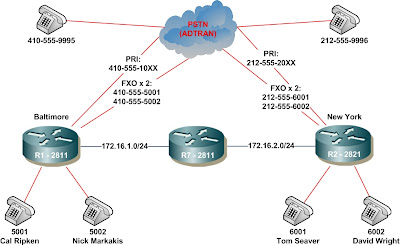
You’ve have been given two Cisco ISR 2801 routers to stage a pilot. Lab 1 involves preparing the Adtran for support the lab depicted below.


Task 1.1 – Initial Adtran Atlas 550 Setup


1. Using a terminal emulation program such as HyperTerminal or SecureCRT, configure the settings for 9600 data rate, no parity, 8 data bits, 1 stop bit, and no flow control.


2. Connect to the Adtran Atlas 550. The console port (Adtran calls it “Craft Port) requires a special pinout DN9. I did not know this when I initially purchased the box off of eBay. I spend a few nights playing with my SecureCRT setting and HyperTerminal. Finally, after some research, I discovered the requirement for this proprietary cable. Errr…..


3. I’ve opted to set up Telnet on the Adtran. That way, from the comfort of my home office (or via VPN for that matter), I can hit the box in my basement. To assign the Adtran Atlas an IP, use your arrow key to move down to Router, press Enter, and then Enter again on IP.


4. From IP, expand the Interface menu. Again, use your arrow keys to select Interface[1]. You can scroll over and modify each entry. In my case, I set the IP address as 10.1.1.252 and the Subnet Mask as 255.255.255.0


5. Using your arrow keys, go back, select Global, and modify the default gateway, which in my case is 10.1.1.1. Vola! Telnet is already enabled by default on the box.


Task 1.2 –Adtran Atlas 550 Dial-Plan Setup.

1. For this lab, the following numbers will be assigned:


  • Adtran FXS 3/1: R5-Baltimore FXO 0/0/0, 410-555-5001


  • Adtran FXS 3/2: R5-Baltimore FXO 0/0/1, 410-555-5002


  • Adtran FXS 3/3: R6-NewYork FXO 0/0/0, 212-555-6001


  • Adtran FXS 3/4: R6-NewYork FXO 0/0/1, 212-555-6002


  • Adtran FXS 3/5: PSTN Baltimore, 410-555-5555


  • Adtran FXS 3/6: PSTN New York, 212-555-6666
2. In order to support a 10-digit dial plan, the default Global Parameters need to be modified. From the main menu, scroll down to Dial Plan, and then over Global Param and press Enter.


3. From here, select Number Complete Templates.


4, Expanded the Number Complete Template, and modify the seven-digit dial to support ten-digit dial.


5. Next, select the Type Templates and modify the seven-digit Local number type to ten-digit dial.


6. You are now ready to modify the dial plan. Let’s start by heading back on the Adtran Atlas menu and selecting the User Term screen under the Dial Plan menu.


7. We’ll begin by modifying the In#Accept for FXS 3/1. Use the arrow key to highlight the In#Accept for FXS 3/1 and hit Enter. From the Incoming Number Accept List, once again use the arrow keys to highlight the Accept Number option and hit enter. You can now modify the ten-digit number for the port, in this case, 410-555-5001.

8. We will now modify the call-id setting by using are arrow keys to select Interface Configuration. From there, we modify the Caller ID Number to match the Accept Number previously configured. A little farther down, we will modify ANI to Caller ID setting to Enable.


9. At this point, the first FXS port on the Adtran has been properly configured. The process is repeated for the remaining dial numbers. Upon completion, you can test the configuration by attaching analog phone to each configured port and dialing the numbers accordingly.

After successful completion, it is time to begin working on some basic VoIP labs. I will save the PRI configuration, which is very similar, for a later time.

Monday, August 18, 2008

My Home Lab

I thought I would share my thoughts on my home lab. I’ll use this post to discuss my current and future software and hardware plans. I will avoid debating and discussing the pros and cons of building a home lab versus renting lab time. Building a home lab can be a significant financial investment; indeed over the past five+ years I have spent over $20K on equipment. However, for me, making the investment made good business sense; I’ve made what I’ve feel is a good return on my investment. Finally, since at least 50% of that investment was made for my R/S attempt, I already feel I am in a very good position to augment my equipment for a CCIE Voice.

Below is a logical diagram of my lab. For routing and switching, I own four (4) 2801 ISRs and three (3) 2811 ISRs. Please refer to the info below for cards, memory, and DSP resources; items italicized in red are devices that I plan to add to my lab in the relative near future. One of the 2811s functions as both an Access Server for reverse telnet to the console ports, as well as a frame relay switch. I also have a Catalyst 3750-24PS switch. For PSTN simulation, I have a first generation Adtran Atlas 550 with four PRI ports and 8-ports of FXS. Finally, I have a handful of analog phones, two (2) 7962Gs and two (2) 7942Gs.


I also own three servers: one DL320 G2 with two 250GB HDs and 4GB of memory; a DL320 G3 with two 750GB HDs and 4GB of memory; and a MCS7816 with two 160GB HDs. My plan for these is to install VMWare ESX on each, and then build out everything in virtual machines. This will make restoring configs very efficient and easy. Thus far I’ve gotten ESX to install and work on the DL320 G3. Next I will see how the install goes on the G2, and finally the MCS7816 (which is essentially a DL320 G5 with Celeron, if my research is correct).

LAB GEAR:

  • R1 (2811): 256D, 128F, PVDM2-32, VIC2-2FXO, VWIC2-1MFT-T1/E1, (2) WIC-2T, AIM-CUE, NME-16ES-1G-P
  • R2 (2811): 256D, 128F, PVDM2-32, VIC2-2FXO, VWIC2-1MFT-T1/E1, (2) WIC-2T
  • R3 (2801): 384D, 128F, PVDM2-32, VIC2-2FXO, VWIC2-1MFT-T1/E1, WIC-2T, WIC-2A/S
  • R4 (2801): 384D, 128F, PVDM2-32, VIC2-2FXO, VWIC2-1MFT-T1/E1, WIC-2T, WIC-2A/S
  • R5 (2801): 384D, 128F PVDM2-16, VIC2-2FXS, VIC2-2FXO, (2) WIC-2T
  • R6 (2801): 384D, 128F PVDM2-16, VIC2-2FXS, VIC2-2FXO, (2) WIC-2T
  • R7 (2811): 256D, 64F, (3) WIC-2T, NM-16A
  • DL320-G2: 4GB Memory, 2 x 250GB HD, VMware-ESX (planned) for AD & Exchange Server
  • DL320-G3: 4GB Memory, 2 x 750GB HD, VMware-ESX for UC Managers, UCCX
  • MC7816: 2GB Memory, 2 x 160GB HD, VMware-ESX (planned) for Unity, MPE

I can access my lab remotely via VPN over a PIX501 that is connected to my Comcast Cable Modem. It appears that Comcast rarely if ever changes their customers' IP; I've had the same one for over a year. Once I VPN in, I have to APC SNMP enabled power strips (AP9225 and AP9211). These are awesome for remote power management, although I probably scare the heck of out of my dog when I turn my lab on remotely.