Wednesday, November 25, 2009

CCIE Voice Lab 1.8 – SRST and AAR

This lab will challenge the candidate to configure Survivable Remote Site Telephony (SRST) and Automated Alternate Routing (AAR).

CCIE Voice Lab 1.8 Tasks

1. Configure the Los Angeles router for SIP SRST. Phone should display a “SRST Fallback Active” message.

2. While in SRTS mode, calls to 911 or 9-911 should be route immediately. You may only use on outgoing dial-peer to accomplish this task.

3. Preserve the dial-9 for PSTN access during an SRST scenario.

4. While in SRST node, users should be able to dial 4-digit to NY and 7+3… to London. Calls should be routed over the PSTN without the need for users to add prefixes to these locations. You may not use a Prefix in the dial-peer, and this task must be accomplished using a minimal amount of commands.

5. Ensure that users at New York and Los Angeles are able to call each other when bandwidth limits are met.


CCIE Voice Lab 1.8 Solutions

1. Tasks 1 – 4 involved setting up SRST for SIP phones. A very good reference document is the Cisco Unified SIP SRST System Administrator Guide . First, start by configuring the basis SRST commands on the Los Angeles VGWY.

losangeles#
!
voice register global
system message SRST Fallback Active
max-dn 10
max-pool 10
dialplan-pattern 1 2135432... extension-length 4
!
voice register pool 1
translation-profile incoming emergency
id mac 0021.D8B9.BC72
number 1 2001
codec g722-64
!
voice register pool 2
translation-profile incoming emergency
id mac 0021.D8BA.2373
number 1 2002
codec g722-64
!
!
application
global
service alternate default
!
!
ccm-manager fallback-mgcp
!
!
call-manager-fallback
max-conferences 4 gain -6
transfer-system full-consult
!


2. To configure 911 and 9-911 routing, configure 9-911 translation rule and translation profile. Then, apply the translation profile to the voice register pool configurations. Lastly, create a 911 pots dial-peer.

!
voice translation-rule 1
rule 1 /9911/ /911/
!
!
voice translation-profile emergency
translate called 1
!
!
voice register pool 1
translation-profile incoming emergency
!
voice register pool 2
translation-profile incoming emergency
!
!
dial-peer voice 911 pots
description SRST 911
destination-pattern 911
port 0/1/0:23
forward-digits all
!

3. Task 3 and 4 involve the creation of additional pots dial-peers. However, you need to create some additional translation rules and a translation profile to accommodate the 4-digit and 7+4-digit dialing requirements.

!
voice translation-rule 2
rule 1 /\(1...\)/ /212432\1/
rule 2 /^7\(3...\)/ /207654\1/
!
!
voice translation-profile SRST
translate called 2
!
!
dial-peer voice 2 pots
description SRST Long Distance
destination-pattern 91[2-9]..[2-9]......
incoming called-number .
direct-inward-dial
port 0/1/0:23
!
dial-peer voice 3 pots
description SRST Local 10-Digit
destination-pattern 9[2-9]..[2-9]......
port 0/1/0:23
!
dial-peer voice 4 pots
description SRST London
destination-pattern 901144T
port 0/1/0:23
!
dial-peer voice 5 pots
description SRST 4-digit to NY
translation-profile outgoing SRST
destination-pattern 1...
port 0/1/0:23
!
dial-peer voice 6 pots
description SRST 7+4-digit to London
translation-profile outgoing SRST
destination-pattern 73...
port 0/1/0:23
!


4. Test the SIP SRST fallback by shutting down the WAN link from Los Angeles to New York. First, the phones should failover to SRST and display the “SRST Fallback Active” message. The “show voice register all” will provide the SRST configuration. Lastly, place some test calls, using 4-digit, 7+4-digit, and PSTN dial patterns.

losangeles# sh voice register all
VOICE REGISTER GLOBAL
=====================
CONFIG [Version=7.1]
========================
Version 7.1
Mode is srst
Max-pool is 10
Max-dn is 10
Outbound-proxy is enabled and will use global configured value
System message is SRST Fallback Active
timeout interdigit 10
network-locale[0] US (This is the default network locale for this box)
network-locale[1] US
network-locale[2] US
network-locale[3] US
network-locale[4] US
user-locale[0] US (This is the default user locale for this box)
user-locale[1] US
user-locale[2] US
user-locale[3] US
user-locale[4] US

VOICE REGISTER DN
=================

VOICE REGISTER POOL
===================
Pool Tag 1
Config:
Mac address is 0021.D8B9.BC72
Number list 1 : Pattern is 2001
Proxy Ip address is 0.0.0.0
DTMF Relay is disabled
kpml signal is enabled
Translation-profile incoming emergency

Dialpeers created:

dial-peer voice 40003 voip
destination-pattern 2001
redirect ip2ip
session target ipv4:10.1.22.16:5060
session protocol sipv2
digit collect kpml
codec g722-64 bytes 160
after-hours-exempt FALSE

dial-peer voice 40004 voip
destination-pattern 2135432001
redirect ip2ip
session target ipv4:10.1.22.16:5060
session protocol sipv2
digit collect kpml
codec g722-64 bytes 160
after-hours-exempt FALSE

Statistics:
Active registrations : 1

Total SIP phones registered: 1
Total Registration Statistics
Registration requests : 1
Registration success : 1
Registration failed : 0
unRegister requests : 0
unRegister success : 0
unRegister failed : 0


Pool Tag 2
Config:
Mac address is 0021.D8BA.2373
Number list 1 : Pattern is 2002
Proxy Ip address is 0.0.0.0
DTMF Relay is disabled
kpml signal is enabled
Translation-profile incoming emergency

Dialpeers created:

dial-peer voice 40001 voip
destination-pattern 2002
redirect ip2ip
session target ipv4:10.1.22.17:5060
session protocol sipv2
digit collect kpml
codec g722-64 bytes 160
after-hours-exempt FALSE

dial-peer voice 40002 voip
destination-pattern 2135432002
redirect ip2ip
session target ipv4:10.1.22.17:5060
session protocol sipv2
digit collect kpml
codec g722-64 bytes 160
after-hours-exempt FALSE

Statistics:
Active registrations : 1

Total SIP phones registered: 1
Total Registration Statistics
Registration requests : 1
Registration success : 1
Registration failed : 0
unRegister requests : 0
unRegister success : 0
unRegister failed : 0


5. The final tasks require the configuration of setup and configuration of Automated Alternate Routing (AAR). AAR is disabled by default on CUCM, so the first step is to configure the AAR Service Parameters in CUCM by choosing System > Service Parameters > Cisco Call Manager.

Next, configure an AAR group. Since my Adtran PSTN simulator does not accept the “1” for long distance calls, I simply prefix a “9”. In the CCIE Voice Lab, and possibly your home lab, you may need to prefix “91”.


AAR Partitions and Calling Search Spaced are then created for AAR. Below is the NY AAR CSS, which included the NY AAR LD Partition.


Two new Route Lists are created, one for each location. These new route lists used for the AAR only point to the local PSTN gateways. Below is the NY AAR RL.


Create two new route patterns for ten-digit NY to LA and LA to NY calling (remember, my Adtran PSTN simulator does not accept “1+10-digit” dialing). Link these new route patterns to the appropriate AAR Route lists.


Finally, add the appropriate AAR Calling Search Space and AAR Group to each phone and AAR settings for line.


For testing, I temporary modify the bandwidth between locations to 24kbps (one call). Nail up two calls between each location. With the second call, the phone should display “Network Congestion, Rerouting” and the call should be placed via the PSTN.

Thursday, November 19, 2009

CCIE Voice Lab 1.7 – Voice CODECs and CAC

Now that the dial plan has been properly configured between New York, Los Angeles, and London, this lab will focus on configuring the proper CODECs between locations as well as Call Admission Control.

CCIE Voice Lab 1.7 Tasks
1. Calls within a location should use G.722 wideband.

2. Calls between locations should use G.729.

3. Allow five concurrent calls between New York and Los Angeles.

4. When calls from London to either New York or LA use the IP WAN, they should negotiate G.729. However, in the event that there are any transcoding issues, only one G.722 call should be allowed across the WAN.


CCIE Voice Lab 1.7 Solutions
The tasks in this lab are relatively simple. A good discussion on locations, regions, and CAC are covered Call Admission Control chapter of Cisco Unified Communications SRND Based on Cisco Unified Communications Manager 7.x. You can also click here and here for some old, but decent Gatekeeper configuration examples.

1. The first step is to create regions for New York, Los Angeles, and London and assign the codecs to be used between each location. You may have done some of these task earlier when configure phones.

2. Next, create Device Pools and assign the Regions accordingly.

3. Next, assign your newly create device pools to devices.

4. Create your locations and assign the appropriate bandwidth. Make sure you understand how CUCM allocates bandwidth for a particular codec. Then, assign these locations to the Phones.


5. On the gatekeeper, configure the proper bandwidth settings.

newyork#
!
gatekeeper
zone local newyork ballplayersllc.com 1.1.1.1
alias static 10.1.10.21 1720 gkid newyork gateway voip ras 10.1.10.21 33072 e164 2002 e164 2001 e164 1003 e164 1002 e164 1001
bandwidth total zone newyork 128
no shutdown


6. Finally, nail up some calls between locations to exceed the bandwidth limits. On CUCM phones, once bandwidth limits are hit, the phones should display “Not Enough Bandwidth”. On the gatekeeper, “debug ras” and “show gatekeeper zone status” are useful commands.

Tuesday, November 10, 2009

CCIE Voice Lab 1.6 – Call Routing

This lab focuses on developing the Call Routing and dial plan for Ballplayers, LLC. Please note, depending on your PSTN simulation, some task may require digit manipulation not explicitly defined in the tasks. For example, my Adtran does not accept the London international dial plan. Therefore, I will need to strip the 011+44 from the international dialing from New York and Los Angeles. Your solution may vary, depending on what you are using to simulate the PSTN, and what digits that device will accept.

CCIE Voice Lab 1.6 Tasks

1. Ari Gold (1001) and Arliss Michaels (2001) are allowed full dialing privileges, including international. David Wright (1002) and Kobe Bryant (2002) are not allowed international dialing. Finally, Eli Manning can only call on-net calls.

2. New York should be configured with the following call routing options and parameters:

Calls to London: 7+4 digits
Emergency: 911 and 9911
Local: 9+10 digits
Long Distance: 9+1+10 digits
International: 9+011+any number of digits

In addition:

2a. Local calls from New York should user the local VGWY, followed by the Los Angeles VGWY.

2b. Long Distance calls from New York should user the local VGWY, followed by the LA VGWY.

2c. Calls from NY to the LA area code (213) should route via the LA VGWY, followed by the NY VGWY.

2d. International calls to London from NY should use the 7+4 digit pattern via the gatekeeper, followed by the local NY VGWY. Users should not receive secondary dial-tone when calling London extensions.

2e. All other International calls should route via the NY VGWY, followed by the LA VGWY. Eli should be able to call London an on-net call.

3. Los Angeles should be configured with the following call routing options and parameters:

Calls to London: 7+4 digits
Emergency: 911 and 9911
Local: 9+10 digits
Long Distance: 9+1+10 digits
International: 9+011+any number of digits

In addition:

3a. Local calls from LA should user the local VGWY, followed by the NY VGWY.

3b. Long Distance calls from LA should user the local VGWY, followed by the NY VGWY.

3c. Calls from LA to the NY area code (212) should route via the NY VGWY, followed by the LA VGWY.

3d. International calls to London from LA should use the 7+4 digit pattern via the gatekeeper, followed by the local LA VGWY. Users should not receive secondary dial-tone when calling London extensions.

3e. All other International calls should route via the LA VGWY, followed by the NY VGWY. Eli should be able to call London an on-net call.

4. The London dial plan should be configured as follows:

Calls to New York and Los Angeles: 7+4 digits
Emergency: 999 and 9999
Local London: 9+8 digits
Long Distance UK: 9+0+8 digits
International to US: 9+001+any number of digits


5. You may not use any call blocking mechanisms or local routing to accomplish the task in this lab.

6. You may not use the 9.@ NANP wildcard.

7. All external callers should receive the proper E.164 Call ID from the Calling Party.


CCIE Voice Lab 1.6 Solutions
There are three ways to design a dial plan:

• The Traditional Partition/Calling Search Space approach
• The Line/Device CSS approach
• The New Local Route Groups approach

The wording of this lab, in particular task 5 disallowing the use of blocking mechanism and local routing is an attempt to force the user to configure the dial plan using the Traditional Partition/Calling Search Space approach. The dial plan configuration for both New York and Los Angeles is very similar, so the steps below apply to both.

1. First, begin by creating the appropriate partitions for each location.


2. Next, create the Calling Search Spaces (CSS) and assign the Partitions accordingly


3. Route groups are configured next. For each respective route group, only assign the local gateway. For example, for “RG_LA_MGCP_VGWY” only assign the LA VGWY; for RG_NY_H323_VGWY only assign the NY VGWY; and for RG_GKPR only assign gatekeeper trunk configured in the previous lab.

One note about this lab…. During my testing and staging, I ended up removing the Technology Prefix that was required in Lab 1.5. Therefore, you will need to remove this configuration from the trunk as well as the Gatekeeper.


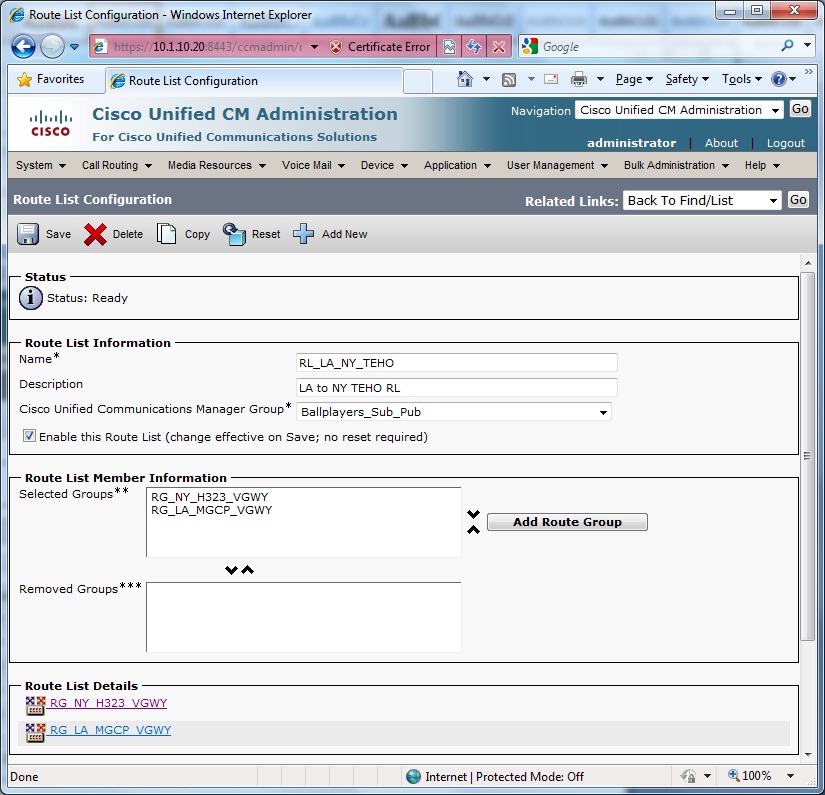
4. The Route Groups are then added to Route Lists. Pay attention to the ordering of the Route Lists in the Route Groups, so that the task requirements are met. For example, below is the ordering for the LA to NY Tail End Hop Off (TEHO) described in the tasks.


5. The Route Patterns are created next, and assigned to the appropriate Route Lists. Here, your configuration may vary slightly from mine, based on your particular PSTN simulator.


For example, in my Adtran only accepts 10-digit dialing (or, at least that is all I could figure it out to accept). Therefore, I apply a “XXXXXXXXXX” mask so that only the trailing ten digits of a call to London is sent. In this example, if a user in NY dials 9-011-44-20-7654-3001, only “20-7654-3001”, which my Adtran then routes to the London PRI. Don’t forget thing such as “Urgent Priority” for 911 and selecting Discard Digits options where appropriate.


6. Lastly, assign the phones and lines to their appropriate partitions in order to honor the Class of Service described in the task.

7. Networking between CUCM and CUCME can be tricky, especially given the tasks as described. For the 7+4-digit dialing, you need to create a translation rule. A rule is also required to add the appropriate prefix to route calls out the PSTN. Finally, for my testing purpose, I create a rule to translate “999” to “911” so that I could test 911 emergency call to my Adtran.

Another helpful hint during testing is to change the preferences of the dial-peer and observe the behavior of the phone class using the “sh voice call summary” command.

!
voice service voip
allow-connections h323 to h323
allow-connections h323 to sip
allow-connections sip to h323
allow-connections sip to sip
supplementary-service h450.12
h323
!
!
!
voice class codec 1
codec preference 1 g729r8
codec preference 2 g722-64
codec preference 3 g711ulaw
codec preference 4 g711alaw
!
!
translation-rule 1
Rule 1 71 1
Rule 2 72 2
!
!
translation-rule 2
Rule 0 ^999 911
!
!
translation-rule 3
Rule 1 71 2124321
Rule 2 72 2135432
!
!
dial-peer voice 1 pots
description inbound PRI dial-peer
incoming called-number .
direct-inward-dial
port 0/0/0:23
!
dial-peer voice 999 pots
destination-pattern 999
translate-outgoing called 2
port 0/0/0:23
forward-digits 3
!
dial-peer voice 2 pots
description International
destination-pattern 9001T
port 0/0/0:23
!
dial-peer voice 3 pots
description London Local
destination-pattern 9[2-9].......
port 0/0/0:23
!
dial-peer voice 4 pots
description UK Long Distance
destination-pattern 90[2-9].......
port 0/0/0:23
!
dial-peer voice 1000 voip
preference 2
destination-pattern 71...
translate-outgoing called 1
voice-class codec 1
session target ras
dtmf-relay h245-alphanumeric
!
dial-peer voice 2000 voip
preference 2
destination-pattern 72...
translate-outgoing called 1
voice-class codec 1
session target ras
dtmf-relay h245-alphanumeric
!
dial-peer voice 1001 pots
preference 1
destination-pattern 71...
translate-outgoing called 3
port 0/0/0:23
!
dial-peer voice 2001 pots
preference 1
destination-pattern 72...
translate-outgoing called 3
port 0/0/0:23
!

Friday, October 16, 2009

CCIE Voice Lab 1.5 – Voice Gateways

In CCIE Voice Lab 1.5, tasks will involved configuring the voice gateways in New York, Los Angeles, and London. To conserve DSP resources in my lab, I am only configuring 3 channels per voice gateway.

CCIE Voice Lab 1.5 Tasks

1. Configure the New York voice gateway as an H.323 gateway, and register with CUCM.

2. Configure Los Angeles as an MGCP gateway. However, you cannot use the “ccm-manager config server” command. If the primary CUCM goes down, make sure all endpoints on the MGCP gateway re-register to the backup CUCM.

3. Configure PSTN connectivity for London.

4. Configure the New York voice gateway as a gatekeeper. Register the CUCM servers and London CUCME router to the gatekeeper. The CUCM servers should register with the technology prefix of “1” and the London CUCME router should register with technology prefix “2”.

5. Verify inbound calling from the PSTN.


CCIE Voice Lab 1.5 Solutions

1. First step in adding the New York VGWY to CUCM is to configure the appropriate parameters in the router, including the VWIC module and dial-plan configurations.

newyork#
!
card type t1 0 0
!
network-clock-participate wic 0
!
isdn switch-type primary-ni
!
!
voice class codec 1
codec preference 1 g722-64
codec preference 2 g711ulaw
codec preference 3 g711alaw
codec preference 4 g729r8
!
!
voice class h323 1
h225 timeout tcp establish 3
!
!
controller T1 0/0/0
cablelength long 0db
pri-group timeslots 1-3,24
!
!
!
interface FastEthernet0/0.12
description New York Voice VLAN
encapsulation dot1Q 12
ip address 10.1.12.1 255.255.255.0
h323-gateway voip interface
h323-gateway voip bind srcaddr 10.1.12.1
!
!
dial-peer voice 1 pots
description inbound PRI dial-peer
incoming called-number .
direct-inward-dial
port 0/0/0:23
!
dial-peer voice 100 voip
description Voip DialPeer to UCMSUB01
preference 1
destination-pattern 2124321...
voice-class codec 1
voice-class h323 1
session target ipv4:10.1.10.21
incoming called-number .
dtmf-relay h245-alphanumeric
!
dial-peer voice 101 voip
description Voip DialPeer to UCMPUB01
preference 2
destination-pattern 2124321...
voice-class codec 1
voice-class h323 1
session target ipv4:10.1.10.20
incoming called-number .
dtmf-relay h245-alphanumeric
!
dial-peer voice 2 pots
destination-pattern 9T
port 0/0/0:23
!


Next, add the voice gateway to CUCM. Do not forget to modify the significant digits that CUCM receives for inbound calls.


2. The instructions for adding Los Angeles as an MGCP voice gateway explicitly tell us NOT to use the the “ccm-manager config server” command. Therefore, we need to manually configure the MGCP information on the router.

losangeles#
!
card type t1 0 1
!
network-clock-participate wic 1
!
isdn switch-type primary-ni
!
!
controller T1 0/1/0
cablelength long 0db
pri-group timeslots 1-3,24 service mgcp
!
!
interface Serial0/1/0:23
no ip address
encapsulation hdlc
isdn switch-type primary-ni
isdn incoming-voice voice
isdn bind-l3 ccm-manager
no cdp enable
!
!
ccm-manager switchback immediate
ccm-manager redundant-host 10.1.10.20
ccm-manager mgcp
ccm-manager fax protocol cisco
!
mgcp
mgcp call-agent 10.1.10.21 service-type mgcp version 0.1
mgcp fax t38 ecm
mgcp bind control source-interface Vlan22
mgcp bind media source-interface Vlan22
!
mgcp profile default
!
!
!
dial-peer voice 1 pots
service mgcp
incoming called-number .
direct-inward-dial
port 0/1/0:23
!
dial-peer voice 2 pots
service mgcp
destination-pattern 9T
port 0/1/0:23
!


Next, add the router as an MGCP gateway. Again, make sure to modify the significant digits that CUCM receives for inbound calls.


3. Configuring the PSTN and Dial Peers in London is fairly straight forward. Please note, I could not configure my Adtran Atlass 550 to accept the international dial-plan (44-20-7654-3XXX). As a result, I’ve modified the Adtran to accept 20-7654-3XXX. As for the 44 international code for London, I will work around this issue later (TBD).

london#
!
card type t1 0 0
!
network-clock-participate wic 0
!
isdn switch-type primary-ni
!
!
!
controller T1 0/0/0
cablelength short 110
pri-group timeslots 1-3,24
!
!
dial-peer voice 1 pots
description inbound PRI dial-peer
incoming called-number .
direct-inward-dial
port 0/0/0:23
!
dial-peer voice 2 pots
destination-pattern 9T
port 0/0/0:23
!


4. The final gatekeeper configuration requires a little care. First, pay attention to the wording regarding the technology prefix task. Habit may be to add the “#” sign; however the task instructions state only to add a “1” or “2”. Adding the “#” would result in points lost. Also, because the New York VGWY has been added to CUCM with the 10.1.12.1 IP address, you need to use a different IP for gatekeeper.

newyork#
!
gatekeeper
zone local newyork ballplayersllc.com 1.1.1.1
zone local london ballplayersll.com
gw-type-prefix 1* gw ipaddr 10.1.10.21 1720 gw ipaddr 10.1.10.20 1720
gw-type-prefix 2* gw ipaddr 3.3.3.3 1720
no shutdown
!

london#
!
interface Loopback0
ip address 3.3.3.3 255.255.255.0
ip ospf network point-to-point
h323-gateway voip interface
h323-gateway voip id newyork ipaddr 1.1.1.1 1719
h323-gateway voip h323-id london
h323-gateway voip tech-prefix 2
!
gateway
timer receive-rtp 1200
!
Next, add the Gatekeeper and Gatekeeper Controller Trunk to CUCM.


newyork#sh gatekeeper endpoints
GATEKEEPER ENDPOINT REGISTRATION
================================
CallSignalAddr Port RASSignalAddr Port Zone Name Type Flags
--------------- ----- --------------- ----- --------- ---- -----
3.3.3.3 1720 3.3.3.3 63826 newyork VOIP-GW
H323-ID: london
E164-ID: 3001
E164-ID: 3002
E164-ID: 3003
E164-ID: 3004
E164-ID: 3005
E164-ID: 3333
E164-ID: 2076543001
E164-ID: 2076543002
E164-ID: 2076543003
E164-ID: 2076543004
E164-ID: 2076543005
E164-ID: 2076543333
Voice Capacity Max.= Avail.= Current.= 0
10.1.10.20 41390 10.1.10.20 32833 newyork VOIP-GW
H323-ID: trunk_to_newyork_gkpr_1
Voice Capacity Max.= Avail.= Current.= 0
10.1.10.21 36152 10.1.10.21 32821 newyork VOIP-GW
H323-ID: trunk_to_newyork_gkpr_2
Voice Capacity Max.= Avail.= Current.= 0
Total number of active registrations = 3

newyork#sh gatekeeper gw-type-prefix
GATEWAY TYPE PREFIX TABLE
=========================
Prefix: 1*
Statically-configured gateways (not necessarily currently registered):
10.1.10.21:1720
10.1.10.20:1720
Zone newyork master gateway list:
10.1.10.20:41390 trunk_to_newyork_gkpr_1
10.1.10.21:36152 trunk_to_newyork_gkpr_2

Prefix: 2*
Statically-configured gateways (not necessarily currently registered):
3.3.3.3:1720
Zone newyork master gateway list:
3.3.3.3:1720 london

5. Each location should now be able to receive inbound calls from the PSTN. However, since a dial plan has yet to be configured on CUCM, only London can dial out.

Wednesday, October 7, 2009

CCIE Voice Lab 1.4 – CUCME London

Lab 1.4 focuses on setting up Cisco Unified Communications Manager Express for Ballplayers LLC’s London, UK office.

CCIE Voice Lab 1.4 Tasks

1. Configure the CUCME router in London using the four digit extensions in CCIE Voice Lab 1 Scenario Background. The phones should be provisioned as SCCP phones. Enable call waiting on all extensions.

2. Enable support for g.722 wideband codec.

3. Configure extensions 3003 and 3004. On Jerry Maquire’s phone, 3003 and 3004 should ring on the second line appearance. Since David Beckham only has a two-button phone, his primary extension plus 3003 and 3004 should ring his first line appearance. However, his name and primary extension should be displayed next to the line appearance.

4. Configure extension 3005 and assign this to Jerry Maquire. This line should not support call waiting.

5. Since Jerry Maquire is the lead agent and branch manager in London, assign him a 7962.

6. When a call comes into either 3003 or 3004, and a user is on the phone, the incoming call on the busy phone should disable a visible indicator with no ring. Any phone not busy should ring as normal.

7. The layout of the displays on Jerry Maquire’s and David Beckham’s IP Phones should be identical in appearance to the displays for the New York and Los Angeles IP Phones.

8. David Beckham as a nasty habit of accidentally dialing his wife, Posh Spice (Victoria). Therefore, allow dialing on David Beckham’s phone only by selecting the specific line appearance.

9. David Beckham’s published number to the general public is 44-20-7654-3333. When someone from the PSTN dials this number, Jerry Macquire’s phone should ring first, followed by David Beckham’s phone. If no one answers the call for 10 seconds, it is assumed the person is busy and should be switched to DND mode. If neither Jerry nor David answers, the call should be forwarded to DN 3000.

CCIE Voice Lab 1.4 Solutions

1. Since I have previously discussed in detail setting up CUCME in both the CUCME-CUE Labs and Connection-CUCME Labs, I will not revisit the setup in detail. Below is the initial telephony-service configuration.


london#
!
tftp-server flash:ringtones/Analog1.raw alias Analog1.raw
tftp-server flash:ringtones/Analog2.raw alias Analog2.raw
!etc
!
!
telephony-service
em logout 0:0 0:0 0:0
max-ephones 10
max-dn 20
ip source-address 10.1.32.1 port 2000
service phone g722CodecSupport 2
service phone handsetWidebandEnable 1
service phone headsetWidebandEnable 0
service phone handsetWidebandUIControl 0
system message Your current options
load 7942 SCCP42.8-4-2S
load 7962 SCCP42.8-4-2S
dialplan-pattern 1 442076543... extension-length 4
max-conferences 8 gain -6
transfer-system full-consult
secondary-dialtone 9
create cnf-files version-stamp 7960 Oct 06 2009 21:46:31

2. Configuring the ephone DNs is fairly simple. Keep in mind, extension 3001 – 3004 are dual line; extension 3005 is a single line, thereby disabling call waiting.

!
ephone-dn 1 dual-line
number 3001
label Jerry Maquire 3001
description 44-20-7654-3001
name Jerry Maquire
!
!
ephone-dn 2 dual-line
number 3002
label David Beckham 3002
description 44-20-7654-3002
name David Beckham
!
!
ephone-dn 3 dual-line
number 3003
!
!
ephone-dn 4 dual-line
number 3004
!
!
ephone-dn 5
number 3005
!


3. Things get a little more tricky when configuring the IP Phones.

For Jerry Maquire, ephone-dn 1 is assigned to button 1; ephone-dn 3 and ephone-dn 4 are assigned to button 2 as overlays, using the “c” option rather than the “o” option, which enables call-waiting. Extension 3005, ephone-dn 5, is assigned to button 3.

On David Beckham’s phone, ephone-dn’s 2, 3, and 4 are assigned to button 1 as overlays, also using the “c” option rather than the “o” option. In addition, the “auto-line incoming” command is add, forcing David to either pick up his handset or pressing the speaker-phone button, then pressing line appearance button 1, in order to place a call. This should help prevent him from accidentally dialing his wife, “Posh Spice”.

!
ephone 1
device-security-mode none
description Jerry Maquire
mac-address 0024.97AB.1FB5
username "jmaquire" password null
codec g722-64
type 7962
button 1:1 2c3,4 3:5
!
!
!
ephone 2
device-security-mode none
description David Beckham
mac-address 0021.D8BA.23A1
username "dbeckham" password null
codec g722-64
type 7942
auto-line incoming
button 1c2,3,4
!

4. Finally, a sequential hunt-group will route incoming calls to 3333 (or 44-20-7654-3333) to Jerry Maquire first, followed by David Beckham.

!
ephone-hunt 1 sequential
pilot 3333
list 3001, 3002
final 3000
timeout 10, 10
auto logout 1
!